
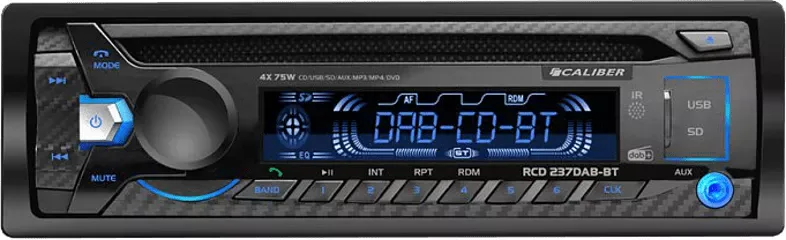
Caliber RCD237DAB-BT Manual
PDF manual · 20 Pages
English



Quick check
Incorrect answer, please try again.
Chat with your Caliber RCD237DAB-BT manual using AI
Get instant AI answers from your Caliber RCD237DAB-BT manual
Ask anything about the Caliber RCD237DAB-BT. Answers come from this manual, with the pages they are based on.
Ask a Question
Do you recommend RCD237DAB-BT?
Yes NoFrequently Asked Questions
Activate Bluetooth on your phone. Search for available devices and select 'RCD237DAB-BT'. Enter the password '0000' to connect successfully.
Is this answer helpful?
The unit accepts only standard round CD Audio discs. Ensure the label side faces up. Avoid irregular shaped discs to prevent damage.
Is this answer helpful?
Check if the disc is inserted correctly. Clean the edges with a pen to remove bumps. If problems persist, press the reset button on the back panel.
Is this answer helpful?
Yes, you can connect a USB stick. The unit supports MP3 files up to a maximum capacity of 32GB for playback.
Is this answer helpful?
TA stands for Traffic Announcement. The unit interrupts current playback to broadcast traffic information automatically when available.
Is this answer helpful?
The antenna input powers the active DAB+ antenna through the core of the wire. No separate power source is needed for connection.
Is this answer helpful?
Use a non-metallic pointed object to press and hold the reset button on the back of the unit for 5 seconds until it restores defaults.
Is this answer helpful?
Advantages and Disadvantages
Advantages

- Supports DAB+ digital radio for clear audio
- Bluetooth pairing with default password for phone access
- Multiple media inputs including CD, USB, and SD
Disadvantages

- CD player mechanism requires careful disc handling
- USB and SD storage limited to 32GB capacity
- Sensitive to dust and heavy vehicle vibrations
- No rear camera input provided in specifications
- Requires manual wire color identification for installation
Product Specification
Type
CD Receiver, 1-DIN
Display
LCD
Navigation
No
Traffic Message Channel
No
Tuner
FM, AM, DAB+
Media
CD (CD-R/RW), USB Drive, Memory Card
Audio Formats
MP3, WAV
Power
4 x 75W Peak
Connections
4 x Pre-out, 1 x AUX In (Front), 1 x USB (Front), SD Card Reader, Bluetooth
Anti-Theft
Removable Front Panel
Features
Hands-Free
Product Description
Experience Superior Sound with the Caliber RCD237DAB-BT Manual
Installing a new car stereo unit is a rewarding project that enhances your listening experience on the road. The Caliber RCD237DAB-BT stands out as a choice for drivers seeking modern connectivity and robust audio performance. Proper knowledge of the interface ensures safety and optimal functionality.
Key Features and Connectivity
This headunit supports multiple media formats including DAB+, FM radio, USB, and SD cards. Bluetooth connectivity allows seamless phone integration with a simple pairing process using the default password 0000. The audio menu offers extensive customization with bass, treble, balance, and fader controls. EQ presets like Rock and Pop ensure your music sounds crisp regardless of the source. The unit features a built-in CD player, though disc handling requires care to avoid mechanical issues. File navigation is available for MP3 tracks on the connected storage devices, making it easy to browse libraries. The display provides visual feedback for tracks and call status.
Control Interface and Operations
Operation is intuitive thanks to the clearly labeled buttons and rotary volume control. Dedicated keys allow you to adjust illumination settings or switch between sources like Tuner and CD quickly. Traffic announcements interrupt playback automatically when available, ensuring you stay informed without distraction. You can also use quick search functions to find frequencies manually or via automatic scanning. M1 through M6 buttons store your favorite presets for instant access.
Installation and Wiring
Proper wiring is essential for safe operation and longevity of the components. The ISO connector interface provides standardized power and speaker connections. Color-coded wires assist in identifying speaker channels, such as green for rear left speakers and purple for rear right channels. Specific ground connections are marked black while ignition switches use red wires. The antenna input is designed to power an active DAB+ antenna through the core wire, eliminating the need for an external power source during installation. Always ensure the installation location avoids direct sunlight and moisture to prevent damage to the internal electronics. Dust and vibration protection are also key factors to consider during mounting.
Important Notes and Maintenance
Regular maintenance prolongs the lifespan of your hardware and ensures continuous play. Cleaning the disc surface with a soft cloth prevents skipping during playback due to fingerprints or dust. Avoid irregular shaped discs to protect the mechanism inside the player from jams or damage. If issues arise, the reset button on the rear panel can restore factory settings quickly. Never write on or label the disc surface directly.
Conclusion
Upgrading with this unit brings clear benefits for daily commuters. You gain access to digital broadcasting and easy music storage options. Following setup guidelines ensures optimal performance without errors. Remember to secure loose cables and test all functions before finishing the job. The manual details specific troubleshooting steps for disc errors if loading issues occur during heavy vibrations while driving. Enjoy your upgraded audio system today with confidence in every note.
Search for 67,732 Manuals online


Type-in Brand or Model
Klaus Schmitt
6 months ago
Does this radio come with a DAB+ antenna? I am concerned about fine tuning features mentioned in reviews.
Manual.ly
6 months ago
Yes, the box includes a DAB+ antenna. However, regarding tuning, please note that manual fine adjustment features may be limited or absent on this model. The radio does support Bluetooth and features a built-in CD drive. If you face reception issues, ensure the antenna is positioned correctly near the receiver.