
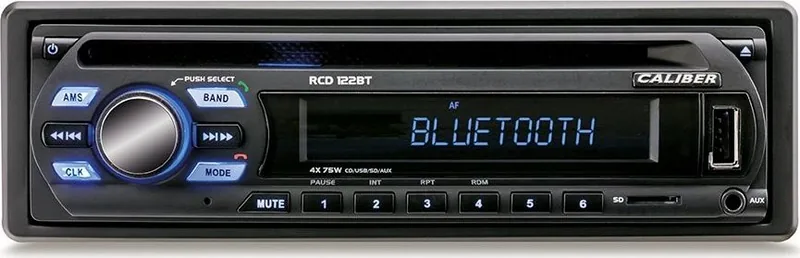
Caliber RCD122BT Manual
PDF manual · 28 Pages
English



Quick check
Incorrect answer, please try again.
Chat with your Caliber RCD122BT manual using AI
Get instant AI answers from your Caliber RCD122BT manual
Ask anything about the Caliber RCD122BT. Answers come from this manual, with the pages they are based on.
Ask a Question
Do you recommend RCD122BT?
Yes NoFrequently Asked Questions
Activate Bluetooth on your mobile search for RCD122BT CALIBER and enter password 0000. The display will show BT ON when connected successfully.
Is this answer helpful?
Check if the disc is inserted correctly with the label facing up. If it persists use a pointed object to press the reset switch on the back.
Is this answer helpful?
Yes the device supports formats including MP3 and WMA on SD cards up to 32GB capacity for high storage convenience.
Is this answer helpful?
Use the rotary volume knob for level control and the audio menu for balance fader and equalizer customization options.
Is this answer helpful?
Yes the unit normally auto-reconnects when powered back on after a brief disconnection from the power source.
Is this answer helpful?
Wipe dust with a dry soft cloth from center to edge. Avoid harsh chemicals or abrasive materials on either surface.
Is this answer helpful?
The 3.5mm jack is primarily designed for external audio system connections to expand your media playback capabilities.
Is this answer helpful?
Advantages and Disadvantages
Advantages

- Supports multiple formats including CD MP3 and WMA for versatile music playback options.
- Bluetooth connectivity allows wireless streaming from compatible mobile devices with automatic reconnection.
- Integrated equalizer settings provide custom bass and treble adjustments for better sound quality.
- Three storage options including USB and SD slots offer flexible media access up to 32GB.
- Six preset radio stations enable quick tuning to favorite channels without constant searching.
Disadvantages

- SD card slot requires front panel removal which may be inconvenient during short stops.
- Disc error sensitivity requires careful inspection of disc surfaces before every insertion.
- Non-round shaped discs are strictly prohibited and can cause permanent mechanism damage.
- Bluetooth pairing process requires entering a default password manually for initial connection.
- Auxiliary input jack can block the front panel when connected to certain older devices.
Product Specification
Type
CD Receiver, 1-DIN
Display
7-Segment
Navigation
No
TMC
No
Tuner
FM
Media
CD (CD-R/RW), USB Drive, Memory Card
Audio Formats
MP3, WMA
Power
4x 75W Peak
Connections
Preamp Output, 1x AUX In (Front), 1x USB (Front), Card Reader (microSD), Bluetooth
Theft Protection
Removable Faceplate
Features
Hands-free kit, 3-Band Equalizer
Product Description
Experience Superior Sound with the Caliber RCD122BT
Introducing the Caliber RCD122BT Manual provides a comprehensive guide for your new audio system. This unit brings versatile connectivity to your vehicle with CD MP3 and WMA support combined with wireless Bluetooth streaming. You can access presets and audio adjustments easily.
Navigating the interface is simple thanks to the clearly labeled buttons found in the Caliber RCD122BT Manual instructions. The audio menu allows you to tweak bass and treble settings for optimal sound quality. Additionally the unit supports USB and SD inputs for portable media storage.
Installation requires careful placement away from direct sun or heat sources to ensure longevity. Always store discs with labels facing up to prevent reading errors. Cleaning is straightforward using a soft cloth moving from center to edge. Regular maintenance prevents skipping issues.
Bluetooth pairing uses a standard security passcode for safety. The device reconnects automatically when in range. Rejecting calls is efficient via the mode button. This Caliber RCD122BT Manual ensures you maximize your entertainment experience while driving safely.
Proper disc handling is crucial for mechanism health. Avoid irregular shapes and ensure no dust accumulates. The reset function helps resolve common errors. Following these steps keeps your system running smoothly for years.
Notes regarding installation suggest avoiding excessive vibration and moisture. Keep the front panel clean when inserting media. The manual also details power functions requiring a long press for shutdown. Enjoy music with confidence by adhering to these guidelines for your vehicle setup.
Connectivity and Features
The Caliber RCD122BT offers extensive memory options with six preset stations labeled M1 through M6. These allow quick access to favorite radio frequencies during commutes. For visual feedback an integrated display screen shows track names and frequency details clearly even in low light conditions.
Scanning songs using the intro feature lets you preview ten seconds of each track to find your preference quickly. Shuffle modes ensure random playback for variety while repeat modes keep your favorite loops going. Transfer functions let audio call voice conversations privately on your mobile phone.
Connecting external devices is effortless via the 3.5mm auxiliary input jack. This compatibility extends beyond Bluetooth to older audio players needing wired connections. The USB port supports standard flash drives up to thirty-two gigabytes.
Maintenance and Safety
Safety warnings in the Caliber RCD122BT Manual emphasize avoiding extreme temperatures and humidity. Mechanical wear can occur if non-round discs are forced in. Cleaning solutions should be mild detergents to preserve the reflective surface of your media collection effectively.
Resetting the system with a pointed object solves persistent disc errors if loading fails repeatedly. Always check the inside rim of the disk for irregularities before insertion. Proper alignment prevents the player from ejecting the disc prematurely during operation.
Search for 67,732 Manuals online


Type-in Brand or Model