
Caliber RCD120BT Manual
PDF manual · 21 Pages
English



Quick check
Incorrect answer, please try again.
Chat with your Caliber RCD120BT manual using AI
Get instant AI answers from your Caliber RCD120BT manual
Ask anything about the Caliber RCD120BT. Answers come from this manual, with the pages they are based on.
Ask a Question
Do you recommend RCD120BT?
Yes NoFrequently Asked Questions
Press and hold the Menu button to open the Bluetooth menu. Activate Bluetooth on your phone, search for devices, and select 'Car Audio'. Enter the default password '8888' to complete the pairing process.
Is this answer helpful?
The unit plays standard round CDs, CD-R, and CD-RW discs containing audio files. It does not support irregularly shaped discs or DVDs.
Is this answer helpful?
Yes, by pressing and holding the Transfer (BND) button, you can route the audio output back to your mobile phone for a private conversation.
Is this answer helpful?
Use a non-metallic pointed object to press and hold the Reset button located on the rear panel for five seconds until the unit returns to factory defaults.
Is this answer helpful?
Yes, the front panel can be released using the Panel Release button, making it easy to remove and store safely when the vehicle is unattended.
Is this answer helpful?
The unit supports SD cards with a maximum capacity of 16GB for playing music and viewing JPEG images.
Is this answer helpful?
Advantages and Disadvantages
Advantages

- Supports multiple media formats including CD, MP3, WMA, USB, and SD card
- Built-in Bluetooth for wireless streaming and hands-free calling
- DAB+ and FM tuner with automatic station memory (AMS)
- Digital Signal Processor with preset EQ modes for sound customization
- Removable front panel enhances security against theft
Disadvantages

- SD card slot requires removing the front panel for access
- Does not support Apple CarPlay or Android Auto connectivity
- Maximum SD card capacity limited to 16GB
- No rear camera input mentioned in standard specifications
- Requires manual tuning for some radio frequencies without seek assist
Product Specification
Type
CD-Receiver, 1-DIN
Navigation
No
TMC
No
Media
CD (CD-R/RW), USB drive, memory card
Audio formats
MP3, WMA
Power
4x 75W Peak
Anti-theft protection
Removable control panel
Features
Hands-free device
Product Description
Experience Premium Sound with the Caliber RCD120BT Manual
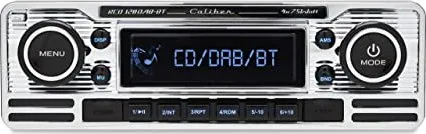
The Caliber RCD120BT is a versatile car audio headunit designed to bring high-quality entertainment and connectivity to your vehicle. This device serves as the central hub for your music, offering support for multiple media formats including CD, MP3, WMA, and USB drives. With its built-in Bluetooth capability, you can seamlessly stream audio from your smartphone or take hands-free calls directly through the unit's speakers.
One of the standout features of this receiver is its comprehensive radio tuning system. It supports both FM and DAB+ bands, ensuring you have access to local stations and digital broadcasts with superior clarity. The Auto Store Memory function automatically saves the six strongest stations, allowing for quick access to your favorites. Additionally, the Traffic Announcement feature ensures you stay informed about road conditions without missing your favorite tunes.
For those who value sound customization, the Caliber RCD120BT includes a Digital Signal Processor with preset equalizer settings like Flat, Classic, Pop, and Rock. You can also manually adjust Bass, Treble, Balance, and Fader to create the perfect listening environment for your specific vehicle interior. The front panel is removable, providing security when the car is parked, while the LCD display keeps all track information and settings visible at a glance.
Installation is straightforward with clearly labeled wiring connectors for power, ground, and speakers. The unit also features an auxiliary input jack for connecting external devices and a dedicated slot for SD cards, supporting up to 16GB of storage. Whether you are commuting or going on a long road trip, this manual-controlled unit offers reliability and ease of use.
Search for 67,732 Manuals online


Type-in Brand or Model