
British Telecom Whole Home Wi-Fi Manual
PDF manual · 2 Pages
English



Quick check
Incorrect answer, please try again.
Chat with your British Telecom Whole Home Wi-Fi manual using AI
Get instant AI answers from your British Telecom Whole Home Wi-Fi manual
Ask anything about the British Telecom Whole Home Wi-Fi. Answers come from this manual, with the pages they are based on.
Ask a Question
Do you recommend Whole Home Wi-Fi?
Yes NoFrequently Asked Questions
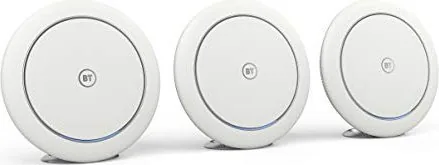
The LED lights on the disc indicate status. Blue means good connection, orange suggests moving the unit, and red means no connection. Purple indicates starting or updating.
Is this answer helpful?
The system is guaranteed for two years from the date of purchase, covering defective parts or inferior workmanship.
Is this answer helpful?
No, the radio equipment is restricted to indoor use only when operating in specific frequency ranges.
Is this answer helpful?
Do not put it in your normal rubbish bin. Contact your retailer or supplier for environmentally friendly disposal advice under the WEEE Directive.
Is this answer helpful?
It uses 7.09 Watts in operation, 4.27 Watts in standby, and 0.07 Watts in off mode.
Is this answer helpful?
You should try restarting your Whole Home Wi-Fi if it has no connection. Check the ethernet connection between the hub and router first.
Is this answer helpful?
Yes, the first disc must be connected to the hub or router with the included Ethernet cable during initial setup.
Is this answer helpful?
Advantages and Disadvantages
Advantages

- Two year guarantee for peace of mind
- Easy setup via mobile application
- Low power consumption for savings
- Mesh Wi-Fi covers whole home
- Automatic firmware updates
Disadvantages

- Indoor use only restriction
- Requires app for configuration
- Refurbished units may be provided after 28 days
- Recycling required for waste disposal
- Setup depends on internet connection availability
Product Specification
LAN
1 x 1000Base-T (Access Point, 3 Units)
Wireless
Wi-Fi 802.11a/b/g/n/ac (Wi-Fi 5), simultaneous
Transfer Rate
800Mbps (2.4GHz), 1733Mbps (5GHz)
Security
64/128-bit WEP, WPA, WPA2, WPS
Antennas
Internal
Connections
N/A
Power Consumption
7W (Consumption, Operation), Not specified (max. PSU power)
Features
MU-MIMO, IPv6, Roaming (Qualcomm Wi-Fi SON), Mesh (Shared Band)
Band Capability
Dual Band (Simultaneous), Mesh (Shared Band)
Kit Includes
3 x Access Points (1 x 1000Base-T LAN)
Mesh Base
1 x Access Point, Total Base Ports: 1 x 1000Base-T LAN
Mesh Clients
2 x Access Points, Total Client Ports: 2 x 1000Base-T LAN
Product Description
British Telecom Whole Home Wi-Fi Overview
Home internet connectivity often suffers from weak signals in distant rooms. The British Telecom Whole Home Wi-Fi, 3-pack solves this issue effectively. This system utilizes multiple disc units to blanket your entire property in strong wireless coverage. Each unit consumes minimal power for efficiency. Setting them up requires minimal technical knowledge. You simply download the Whole Home app from your device store. Follow the app instructions to connect the first disc to your router using the included Ethernet cable. Subsequent discs sync wirelessly once the initial setup is complete. The LED lights provide immediate feedback on network health. A solid blue light indicates a good connection, while orange suggests moving the unit closer to the hub. Red lights mean there is no connection, requiring a restart or repositioning. Purple indicates the device is starting up or updating. Firmware updates occur automatically without user intervention. Power saving modes engage after eighteen minutes of inactivity for energy conservation.
Security and reliability are paramount for modern networking needs. The system includes a two-year guarantee against manufacturing defects. If a fault occurs within this period, BT offers repair or replacement options. Items purchased over 28 days ago may receive refurbished replacements. Proper disposal is emphasized under the WEEE Directive to protect the environment. Contact retailers for recycling to ensure safe disposal. The British Telecom Whole Home Wi-Fi, 3-pack Manual ensures optimal setup is followed correctly for best results. The frequency usage is restricted to indoor use for specific ranges to comply with regulations. Connectivity extends beyond standard limits, ensuring your devices stay linked. You are advised to forget old networks to ensure automatic switching to the new network. This solution ensures your smart home devices remain active and responsive without constant drops. It represents a significant upgrade from single-point routers. Overall, this product delivers extensive coverage with user-friendly management tools and strong warranty backing. You can also find detailed technical information on the official website for updates.
Installation is straightforward with step by step guidance provided by the software. The app helps you find the best positions for discs accurately. Position a disc between the existing disc and the area needing coverage. Avoid switching on discs until instructed by the app for best results. This ensures proper mesh formation across the network without interference. If using an iPad, select the iPhone only option if the app does not show there. The system complies with the Waste Electrical Directive for environmental safety. Technical support is available via helpline for complex issues you might face. The 2401 to 2473MHz and 5170 to 5250MHz frequency ranges support standard connections. These frequencies ensure robust performance in busy environments without interference from neighbors. Your network stability improves significantly with this deployment strategy. Do not put it in normal rubbish bin but recycle properly. Enjoy seamless streaming and browsing throughout your house with this comprehensive mesh system.
Search for 67,706 Manuals online


Type-in Brand or Model