


Braun Series 9 9292cc Manual
PDF manual · 81 Pages
English



Quick check
Incorrect answer, please try again.
Chat with your Braun Series 9 9292cc manual using AI
Get instant AI answers from your Braun Series 9 9292cc manual
Ask anything about the Braun Series 9 9292cc. Answers come from this manual, with the pages they are based on.
Series 9 9292cc Maintenance Schedule
Apply a drop of light machine oil to the foil and cutter cassette and long hair trimmer once a week if cleaning with water.
Replace the cartridge when the level indicator blinks red, approximately every 3 weeks with daily use.
Change the foil and cutter cassette every 18 months to maintain maximum shaving performance.
Replace the cartridge after 8 weeks if not used daily to ensure optimal cleaning performance.
Free maintenance reminders
Timed to your purchase date. Always free, unsubscribe anytime.
Ask a Question
Do you recommend Series 9 9292cc?
Yes NoDo you recommend Series 9 9292cc?
Yes NoFrequently Asked Questions
Yes. It is designed for both dry shaving and wet shaving with water, foam, or gel. This makes it a flexible choice for users who prefer a quick dry routine or a more comfortable wet shave.
Is this answer helpful?
A full charge provides about 50 minutes of cordless shaving time. Actual runtime can vary depending on beard thickness, shaving habits, and environmental temperature.
Is this answer helpful?
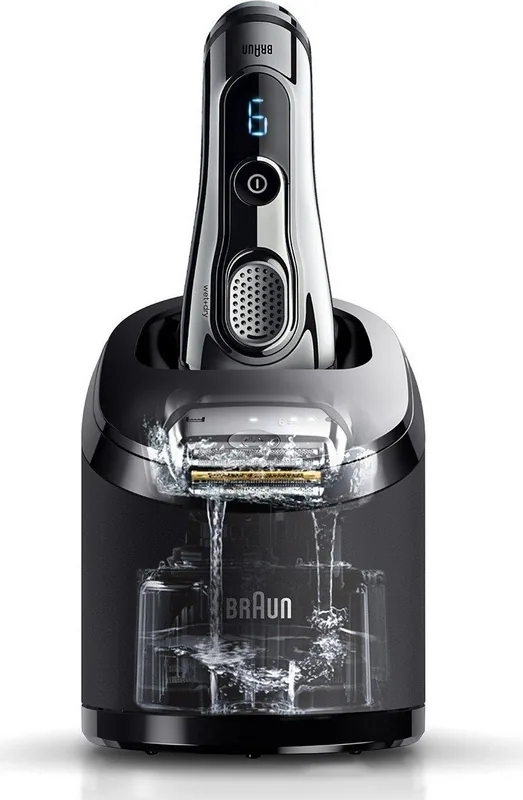
The Clean&Charge station cleans, charges, lubricates, and dries the shaver automatically. It also helps store the device neatly and keeps it ready for the next shave.
Is this answer helpful?
For best shaving results, cleaning after each shave is recommended. The shaver can also be rinsed under running water, and the Clean&Charge station can handle deeper cleaning cycles.
Is this answer helpful?
If used daily, the cartridge usually needs replacement about every 3 weeks. If it is not used every day, Braun recommends replacing it after about 8 weeks for reliable cleaning performance.
Is this answer helpful?
MultiHeadLock lets you lock the shaving head in multiple positions. This is useful for precise shaving around difficult areas such as under the nose or along facial contours.
Is this answer helpful?
Regular cleaning, occasional lubrication if you rinse with water, and timely replacement of the foil and cutter cassette are important. Using original Braun accessories also helps preserve performance.
Is this answer helpful?
Advantages and Disadvantages
Advantages

- Wet & dry shaving support gives flexibility with foam, gel, or a quick dry shave.
- Clean&Charge station automates cleaning, drying, charging, and lubrication.
- MultiHeadLock and trimmer improve control for detail work and hard-to-reach areas.
- Display alerts help track battery status, cleaning needs, and travel lock mode.
Disadvantages

- Replacement cartridges and shaving parts add ongoing ownership costs.
- Cordless-only operation means the shaver must be charged before use.
- Best results depend on regular cleaning and maintenance.
- Clean&Charge station requires space and original Braun cartridges to work properly.
Product Specification
Type
Men's
Shaving system
Foil shaver
Operating mode
Battery operated (Li-Ion)
Application
Wet/dry shaving
Shaving system
4-way, flexible shaving head, contour adaptation
Special features
washable, waterproof, integrated precision trimmer, quick charge, charging indicator light
Operating time
50 min
Charging time
1 h
Scope of delivery
Case, charging/cleaning station
Product Description
Braun Series 9 9292cc Wet & Dry: Premium Shaving Made Simple
The Braun Series 9 9292cc Wet & Dry is designed for men who want a close shave without giving up comfort or convenience. Built for cordless use, it supports both dry shaving and wet shaving with water, foam, or gel, making it easy to adapt to different routines and skin preferences. The model also pairs with Braun’s Clean&Charge station, which helps clean, dry, lubricate, and charge the shaver in one step.
One of the biggest strengths of this series is its focus on efficiency. The shaving head is made to handle tricky contours, while the MultiHeadLock feature helps lock the head into different positions for better control around the nose, jawline, and other hard-to-reach areas. A built-in long hair trimmer adds versatility for sideburns, mustaches, and beard shaping, so the shaver can do more than just daily cleanup.
The Braun Series 9 9292cc Wet & Dry Manual highlights how important proper care is for long-term performance. The shaver can be rinsed under running water, and regular cleaning helps maintain shaving quality. For deeper maintenance, the Clean&Charge station offers automatic cleaning cycles and drying time, which is especially useful for users who prefer a low-effort grooming routine. The display also provides helpful status updates such as battery level, cleaning reminders, and travel lock indication.
Battery life is another practical advantage. After charging, the shaver offers around 50 minutes of cordless use, which is enough for many shaves between charges. The travel lock adds peace of mind for packing, and the included travel case makes the device easier to carry on trips. Replacement parts such as the foil and cutter cassette, plus cleaning cartridges, help keep the shaver working at its best over time.
Why it stands out
Braun positions this shaver as a premium grooming tool with a balance of performance, hygiene, and usability. It is meant for users who want a smoother shave, less daily maintenance, and the flexibility of wet or dry use. The combination of smart cleaning, useful display alerts, and thoughtful design makes it feel more advanced than a basic electric shaver.
Notes
- Clean after each use for best results.
- Replace shaving parts regularly to maintain performance.
- Use only original Braun cartridges and accessories.
- Keep the shaver dry before placing it in the Clean&Charge station.
Search for 67,732 Manuals online


Type-in Brand or Model
Lukas Schmidt
11 months ago
The Series 9 looks great, but is it really worth the high price? How costly are the cleaning cartridges, and can I refill them to save money?
Manual.ly
10 months ago
Yes, many buyers find it worth it for the overall shave quality and the convenience of the Clean & Charge station. The main ongoing cost is the cleaning cartridges, and replacement prices can feel high. To reduce costs, you can also clean the shaver manually using the brush and running water (and do not necessarily need the station after every shave). Refilling cartridges is generally not recommended unless your specific model instructions explicitly say it is possible, because the cartridge is designed for proper dosing and hygiene. For the most accurate guidance, follow the manual for your exact Series 9 variant and approved replacement products.