
Braun Scouting Cam Black 200 Mini Manual
PDF manual · 91 Pages
English



Quick check
Incorrect answer, please try again.
Chat with your Braun Scouting Cam Black 200 Mini manual using AI
Get instant AI answers from your Braun Scouting Cam Black 200 Mini manual
Ask anything about the Braun Scouting Cam Black 200 Mini. Answers come from this manual, with the pages they are based on.
Ask a Question
Do you recommend Scouting Cam Black 200 Mini?
Yes NoFrequently Asked Questions
The device requires four standard 1.5V AA batteries. You can also use a 6V DC power adapter for continuous power.
Is this answer helpful?
Yes, the camera has a built-in microphone. You can activate audio recording in the settings menu during video capture.
Is this answer helpful?
The camera supports microSD cards up to 256 GB. It is recommended to use Class 10 or higher cards.
Is this answer helpful?
Yes, it uses infrared LEDs for night viewing. Images will be black and white in low light conditions.
Is this answer helpful?
You can download files by connecting via USB cable or by removing the microSD card and using a card reader.
Is this answer helpful?
If you forget the password, you must reset the camera. This action restores all settings to factory defaults.
Is this answer helpful?
Yes, you can set a start and end time for the target recording window. The camera stays in standby outside this window.
Is this answer helpful?
Advantages and Disadvantages
Advantages

- High resolution 24MP sensor for detailed images
- Supports SD cards up to 256GB for large storage
- Adjustable motion sensor sensitivity for different environments
- Long video recording time up to 10 minutes per clip
- Multiple language options for international users
Disadvantages

- Night mode only displays images in black and white
- Battery consumption increases significantly during video recording
- Password reset will remove all saved settings permanently
- Power adapter required for long term setup is not included
- LCD screen turns off automatically during standby operation
Product Specification
Effective Megapixels
2.0 Megapixels
Sensor
CMOS
Lens
Fixed focal length
Digital Zoom
No
Display
2" LCD
Viewfinder
No
Flash
Integrated, Infrared
Video Recording
AVI, 1920x1080 (16:9), 1280x720 (16:9)
Expandable Storage
microSD/microSDHC/microSDXC
Connections
USB Micro-B
Wireless
Wi-Fi (Wireless LAN)
Power Supply
AA Battery
Features
Trail Camera
Color
Brown, Pattern
Dimensions
2.95x4.13x1.69in (WxHxD)
Weight
4.80oz
Product Description
Advanced Outdoor Surveillance Solutions
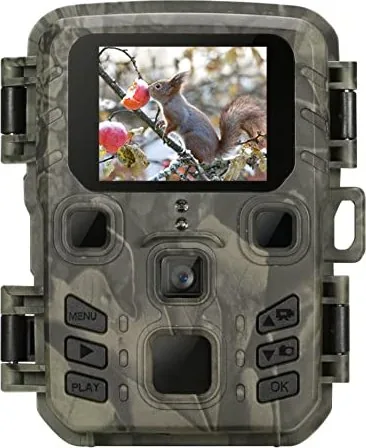
Tracking animals in their natural habitat demands precision and reliability. The Scouting Cam Black 200 Mini offers a compact solution for enthusiasts and researchers alike. This device captures high-quality imagery using advanced motion detection technology. It ensures you never miss a moment of wildlife activity. Whether you are monitoring backyard visitors or conducting field studies, this tool serves as a silent guardian. The rugged design withstands various environmental conditions during deployment.
Key Features Overview
The unit boasts a high resolution sensor capable of capturing detailed still images and videos. Users can choose between photo only modes or video recording depending on specific goals. The device supports standard AA batteries for extended field use. Alternatively, a power adapter option exists for long term deployments. You can configure recording sequences to take a still image immediately followed by a video clip. This ensures you capture the trigger event clearly. The built-in screen simplifies menu navigation without needing external monitors. Video resolution ranges from standard definition up to high definitions. Audio recording can be enabled to capture sounds alongside visual media.
Configuration and Setup
Navigating the settings is straightforward via the on-screen menu system. Important parameters include motion sensitivity and recording delay. You can adjust the lag time to prevent saving redundant footage from moving branches or grass. Braun Scouting Cam Black 200 Mini Manual guidance helps users through these specific calibration steps. Adjusting sensitivity based on environment improves accuracy significantly. Indoor settings differ from outdoor options. Temperature also influences sensor performance so choose low settings for cold weather. Target recording time allows you to set specific windows for operation. This saves battery life by keeping the device in standby during inactivity. Time lapse features allow for slow process monitoring like plant growth.
Storage and Playback
A microSD card slot accepts cards up to 256 GB capacity. Formatting is required before initial use to prevent errors. Data loss occurs if not formatted correctly on this device. Once filled, the camera can stop or loop recordings based on settings. Retrieved files are stored in a standard folder structure for easy computer access on Windows or Mac systems. A USB connection facilitates quick downloads without needing card readers. The playback menu allows you to delete or review files directly on the device. Slideshow options help visualize progress over time periods. File protection ensures accidental deletion does not occur on important files. This flexibility aids organization and retrieval.
Night Vision Capabilities
At night, images appear in black and white mode utilizing infrared LEDs. This helps with illumination while remaining invisible to most animals. Power stability is crucial during evening long shoots. Low voltage can affect performance and cause shutdowns. Ensure full batteries are used for night operations to maintain quality. The LCD display turns off to save power during operation. Password protection adds security for sensitive data storage. Resetting settings restores factory defaults if passwords are forgotten. Firmware updates may improve functionality over time.
Technical Support and Care
Proper usage ensures longevity and data integrity. Keep the unit dry and away from direct heat sources. Protect the lens cover during storage. Regular checks of the battery compartment ensure good contact. This setup provides a robust system for continuous monitoring and safety. Regular servicing and cleaning of the lens will maintain clarity. Proper placement of the camera angle will maximize detection zones. Consistent testing of the battery charge will prevent downtime.
Search for 67,706 Manuals online


Type-in Brand or Model