
Braun B-Box T7 Manual
PDF manual · 11 Pages
English



Quick check
Incorrect answer, please try again.
Chat with your Braun B-Box T7 manual using AI
Get instant AI answers from your Braun B-Box T7 manual
Ask anything about the Braun B-Box T7. Answers come from this manual, with the pages they are based on.
B-Box T7 Maintenance Schedule
Charge the battery once a month to preserve it if the device is not used for a long time.
Format the microSD card once a month for recording stability.
Free maintenance reminders
Timed to your purchase date. Always free, unsubscribe anytime.
Ask a Question
Do you recommend B-Box T7?
Yes No
Lena Schmidt
10 months ago
Is it easy to set up and use, especially if I'm not very technical?

Manual.ly
10 months ago
Yes. Customers report that the device is very easy to operate and that it is simple to set up and adjust. You should be able to start using it quickly without special technical knowledge. If you run into any trouble during setup, check the included instructions and wiring or configuration steps, and make sure all connections are secure before powering on. For best results, follow the recommended settings for your intended use.
Rebecca Cummings
4 months ago
Is the Dash Car easy to set up and operate?
Manual.ly
4 months ago
Yes, the Dash Car is designed for ease of use. It features a simple interface that makes setup quick and operation straightforward for all users.
Sofia Kowalski
4 months ago
Does this car come with a detailed instruction manual?

Irving Gusikowski
4 months ago
Is the Dash Car easy to operate and adjust?
Manual.ly
4 months ago
Yes. Customers report that it is straightforward to use and that the settings can be adjusted easily.
Roman Johns
6 months ago
Is the Dash Car easy to operate and adjust?
Manual.ly
6 months ago
Yes. The Dash Car is designed to be straightforward to use, with simple controls and easy adjustment options. Users report that setup and everyday operation are uncomplicated.
Frequently Asked Questions
With the front lens only, it supports up to 1920 x 1080 at 30 fps. In dual-lens operation, the front camera records at 1440 x 1080 at 30 fps and the rear camera records at 1280 x 720 at 30 fps.
Is this answer helpful?
Use a microSD card with up to 64 GB capacity. Class 10 or higher is recommended for reliable recording. Format the card in the camera before use, back up important clips regularly, and format it periodically to help maintain stable operation.
Is this answer helpful?
The G-sensor detects events such as sudden braking or a strong impact. When triggered, it saves and protects the current video clip from automatic overwriting. Low, medium, and high sensitivity settings are available.
Is this answer helpful?
Yes. When parking monitoring is enabled, vibration detected after the vehicle is parked can activate the camera for about 10 seconds of recording. If vibrations continue, recording can continue as well.
Is this answer helpful?
Yes. GPS can be enabled or disabled through the settings menu. When enabled and a satellite signal is available outdoors, it can synchronize the camera time and provide route information for compatible playback software.
Is this answer helpful?
Connect the camera to a computer using a Micro-USB cable and select Mass Storage on the camera screen. The computer can then access files stored on the inserted microSD card. PC Camera mode is also available for webcam use.
Is this answer helpful?
Advantages and Disadvantages
Advantages

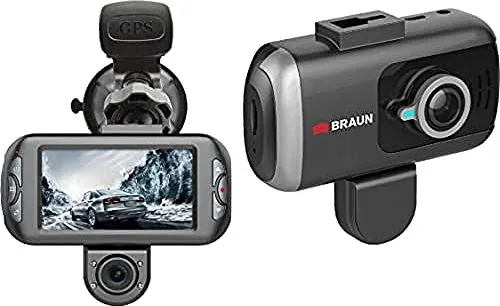
- Dual-lens coverage records the road ahead and rear area with 170-degree front and 120-degree rear viewing angles.
- Loop recording, manual emergency locking, and G-sensor protection help preserve important footage.
- Parking monitoring and motion detection add recording options when the vehicle is unattended.
- GPS support can synchronize time and provide route and coordinate data during compatible playback.
- Micro-USB connection supports both file transfer and PC camera use.
Disadvantages

- The camera is not waterproof and should not be used in wet environments.
- High cabin temperatures and direct sunlight may cause malfunction, image issues, discoloration, or housing deformation.
- GPS requires an external module and may not receive a signal indoors.
- microSD cards must be formatted, and incompatible cards can cause errors or unstable recording.
- Parking monitoring records after detected vibration but is not a guarantee that every event will be captured.
Product Specification
Effective megapixels
5.0 megapixels
Sensor
CMOS
Removable storage
microSD/microSDHC/microSDXC
Video function
H.264, MOV, 1920 x 1080 @ 30p (16:9)
Viewing angle
170 degrees
Display
3 in LCD
Ports
USB 2.0
Wireless
GPS
Special features
Motion sensor, loop function, second camera
Product Description
Braun B-Box T7 Manual: Dual-Lens Dash Cam Overview
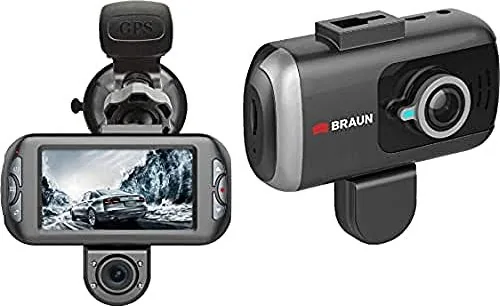
The Braun B-Box T7 is a dual-lens dash camera designed to capture activity in front of and behind a vehicle. Its front camera uses a wide 170-degree diagonal viewing angle, while the rear camera covers 120 degrees, helping drivers record a broader view of traffic, parking situations, and unexpected incidents. For anyone looking for practical setup and operating guidance, the Braun B-Box T7 Manual highlights the camera's recording modes, safety functions, and maintenance needs.
Video Recording and Everyday Use
When connected to a vehicle charger, the B-Box T7 can switch on and begin recording automatically. It supports loop recording, with selectable clip lengths of 3, 5, or 10 minutes. This feature helps manage storage by replacing older unprotected clips as the card fills. Drivers can also manually protect the current recording with the emergency function, preventing that clip from being overwritten.
The front lens records up to 1920 x 1080 at 30 frames per second when used alone. With both cameras active, the front recording is available at 1440 x 1080, while the rear camera records at 1280 x 720. HDR, exposure adjustment, audio recording, date stamps, and license plate number overlays provide useful options for tailoring footage to different driving conditions.
Safety, Parking, and GPS Features
A built-in G-sensor can detect hard braking or an impact and automatically lock the active video clip. Sensitivity can be set to low, medium, or high. Parking monitoring is also available: after the vehicle is parked and the camera is off, detected vibration can trigger a short recording. Continuous movement may keep recording active.
The optional GPS connection can log location data and synchronize the camera clock once a satellite signal is found outdoors. Compatible playback software can display driving routes and coordinates. GPS recording can also be disabled through the settings menu when privacy is preferred.
Storage, Photos, and Connectivity
The camera accepts microSD cards up to 64 GB. Class 10 or faster cards are recommended for dependable recording. Formatting the card in the camera before use and backing up recordings regularly can help maintain stable performance. The photo mode offers resolutions up to 12 megapixels, plus white balance, ISO, image quality, and self-timer controls.
Through Micro-USB, the B-Box T7 can transfer files to a computer in mass-storage mode or function as a PC camera. Its 7 cm LCD screen, speaker, microphone, and multilingual menu make direct operation straightforward.
Notes
- Mount the camera securely on a clean windshield for a clear recording angle.
- Keep the lens and windshield clean, and avoid direct sunlight or very hot enclosed vehicles.
- The unit is not waterproof and is intended for temperatures from -10 C to 50 C during operation.
Search for 67,706 Manuals online


Type-in Brand or Model
Lea Schneider
9 months ago
Is it easy to use and adjust, especially if I am a beginner?
Manual.ly
9 months ago
Yes. Customers report that the product is straightforward to operate and adjust. The setup and controls are designed to be user-friendly, so you can get started quickly without advanced technical knowledge. If you want, you can follow the included instructions step by step to fine-tune it to your preferences.