
Bosch Professional GLI 18V-2200 C Manual
PDF manual · 147 Pages
English



Quick check
Incorrect answer, please try again.
Chat with your Bosch Professional GLI 18V-2200 C manual using AI
Get instant AI answers from your Bosch Professional GLI 18V-2200 C manual
Ask anything about the Bosch Professional GLI 18V-2200 C. Answers come from this manual, with the pages they are based on.
GLI 18V-2200 C Maintenance Schedule
Replace the button cell when a warning appears in the app. Ensure the positive pole faces upwards.
Clean only with a dry, soft cloth. Do not use detergents or solvents to avoid damage.
Ask a Question
Do you recommend GLI 18V-2200 C?
Yes NoDo you recommend GLI 18V-2200 C?
Yes NoFrequently Asked Questions
It is designed for portable work lighting in indoor and outdoor job areas. It helps illuminate repair, installation, and construction spaces where strong temporary light is needed.
Is this answer helpful?
No. The solo version is the light unit only. A compatible Bosch 18V or 14.4V battery and a charger must be purchased separately if you do not already own them.
Is this answer helpful?
Yes. The light has two brightness levels. You can start it at maximum brightness or hold the switch to reduce the output to the desired level.
Is this answer helpful?
Yes. It is built with dust and splash protection when the battery cover is properly closed and locked. That makes it well suited for demanding work environments.
Is this answer helpful?
Yes, if you use the Bosch Toolbox app and a compatible Bluetooth® device. You can remote-control the light, set timers, manage groups, and check status information.
Is this answer helpful?
Yes. It includes a 5/8" tripod mount, so you can attach it to a tripod for higher or more stable lighting placement.
Is this answer helpful?
Advantages and Disadvantages
Advantages

- Bright 2200-lumen output supports clear visibility in dark or enclosed work areas.
- Bluetooth® app control enables remote operation, timers, grouping, and status checks.
- IP64-rated design helps protect against dust and splash water in demanding environments.
- Five-position lamp head, stand, and tripod mount improve placement flexibility.
Disadvantages

- Battery and charger are not included in the solo version.
- The light source is not replaceable, so a failed unit must be replaced.
- App features require a compatible Bluetooth® mobile device and Bosch Toolbox app.
- Not intended for road traffic or general room lighting use.
Product Specification
Operating Mode
Battery 14.4-18V Li-Ion
Light Source
LED, 2,200lm
Special Features
Carry handle, IP54, App control (Bluetooth)
Weight
4.19 lbs (without battery)
Scope of delivery
without charger and battery
Product Description
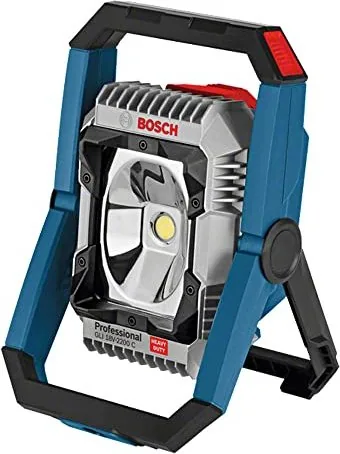
Bosch Professional GLI 18V-2200 C Cordless Work Light solo Manual
The Bosch Professional GLI 18V-2200 C Cordless Work Light solo Manual is built for users who need bright, portable, and reliable lighting on the job. With a powerful 2200-lumen output, it gives clear visibility in work areas where fixed lighting is weak, missing, or simply not practical. This makes it a strong fit for construction, installation, repair, and maintenance tasks.
Its design focuses on flexibility as much as brightness. The lamp head can be positioned in five ways, allowing you to direct the beam where it is needed most. A built-in stand provides stable floor placement, while the 5/8" tripod mount makes it easy to raise the light on a tripod for broader coverage. The carrying handle also helps with fast movement between rooms, floors, or job zones.
Durability is another key strength. Bosch designed the light with a special battery cover that helps protect it from dust and splash water when closed correctly, giving it an IP64 rating. That means it can handle tough work environments better than many basic cordless lights. The thermal protection system also helps reduce brightness first and then shut down if the unit becomes too hot, supporting safer operation during long sessions.
The smart side of the GLI 18V-2200 C adds even more value. Through Bluetooth® and the Bosch Toolbox app, you can control the light remotely, set timers, group several lights together, personalize settings, and check status information. This is especially useful for professionals managing multiple work lights across larger sites or wanting more precise lighting control without walking back and forth.
As a solo version, this model is focused on the light unit itself, so batteries and charger are purchased separately. It works with Bosch 14.4V and 18V batteries, making it convenient for users already in the Bosch Professional battery system. The result is a practical, jobsite-ready work light that combines strong illumination, smart controls, and rugged handling in one compact tool.
Notes
- Battery and charger are not included in the solo package.
- The light source cannot be replaced; the full unit must be replaced if it fails.
- For best dust and splash protection, always close and lock the battery cover properly.
- The light is intended for work illumination, not for road traffic or general room lighting.
Search for 67,732 Manuals online


Type-in Brand or Model
Sofia Berg
9 months ago
How reliable is delivery, and does the product match what I expect after ordering?
Manual.ly
9 months ago
Based on recent customer feedback, delivery and product handling were smooth and the overall process was reliable. Many reviewers said the product selection and delivery went well, and that the product itself met expectations. If you want extra assurance, please check the product description and key specs before ordering. You will also receive tracking information so you can follow the shipment status. If anything arrives damaged or does not match the description, contact our support team right away so we can help with a solution.