
Blue Microphones Snowball Manual
PDF manual · 4 Pages
English



Quick check
Incorrect answer, please try again.
Chat with your Blue Microphones Snowball manual using AI
Get instant AI answers from your Blue Microphones Snowball manual
Ask anything about the Blue Microphones Snowball. Answers come from this manual, with the pages they are based on.
Ask a Question
Do you recommend Snowball?
Yes NoFrequently Asked Questions
The Blue Snowball features three small switches on the rear casing. Toggle them to select Cardioid for front-focused recording, Cardioid with -10 dB Pad for loud sources, or Omnidirectional for capturing sound from all directions.
Is this answer helpful?
Yes, the Snowball works seamlessly with Windows 7, 8.1, and 10. It is fully compatible with streaming applications like OBS, XSplit, and Discord, allowing you to broadcast high-quality audio directly to your audience.
Is this answer helpful?
No, the Snowball is a class-compliant USB device. You simply plug it into your computer via the provided USB cable, and it will be recognized automatically by the operating system without needing additional software.
Is this answer helpful?
Cardioid mode captures sound primarily from the front, rejecting noise from the sides and rear. Omni mode captures sound equally from all 360 degrees, making it suitable for group discussions or ensemble recordings.
Is this answer helpful?
Yes, the Snowball includes a -10 dB pad switch. Engaging this reduces the microphone's sensitivity, preventing distortion when recording loud instruments like drums, electric guitars, or powerful vocalists.
Is this answer helpful?
The package includes a small desktop tripod stand. However, for professional setups, it is recommended to use a standard boom arm or shock mount to reduce handling noise and improve positioning flexibility.
Is this answer helpful?
Advantages and Disadvantages
Advantages

- Three switchable polar patterns offer versatility for different recording environments.
- Plug-and-play functionality requires no driver installation on Windows or Mac.
- Studio-quality condenser capsule captures detailed audio with a wide frequency response.
- Built-in -10 dB pad prevents clipping when recording loud sound sources.
- Compact and durable design fits easily on any desk setup.
Disadvantages

- Requires a direct USB connection and does not work reliably through USB hubs.
- No built-in headphone jack for zero-latency monitoring during recording.
- Cable length may be short for some desk configurations requiring extension.
- Physical switches on the back can be slightly difficult to reach while speaking.
- Omnidirectional mode picks up more room noise compared to cardioid settings.
Product Specification
Type
Instrument microphone, Vocal microphone, Streaming microphone, Table microphone
Design
Digital
Transducer principle
Condenser
Polar pattern
Omnidirectional, Cardioid
Connection
USB
Frequency range
40Hz-18kHz
Package contents
Table stand
Features
-10dB Pad
Dimensions
12.8x12.8x12.8 in
Weight
1.01 lbs
Product Description
Unlock Professional Audio with the Blue Microphones Snowball
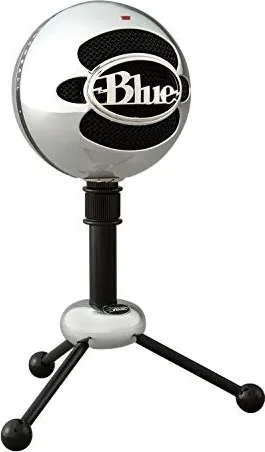
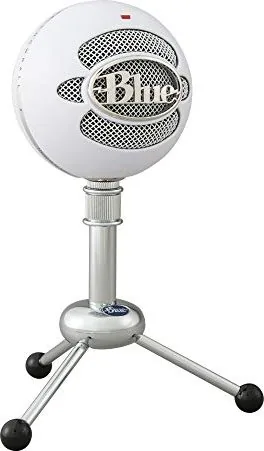
The Blue Microphones Snowball is a legendary USB condenser microphone designed to bring studio-quality sound directly to your desktop. Whether you are launching a podcast, streaming games on Twitch, recording vocals, or participating in high-definition video calls, this microphone delivers crystal-clear audio without the need for complex setups. Its intuitive design and plug-and-play functionality make it accessible for beginners while offering the performance professionals demand.
At the heart of the Snowball lies its proprietary large-diaphragm condenser capsule, which captures a wide frequency range from 40 Hz to 18 kHz with remarkable fidelity. The device features three distinct polar patterns that can be switched using physical switches on the back of the unit. The cardioid pattern focuses on sound from the front, ideal for solo vocalists and podcasters. Switching to cardioid with a -10 dB pad allows for recording louder instruments like drums or brass without distortion. Finally, the omnidirectional mode captures sound equally from all directions, perfect for conference calls or capturing ambient room acoustics.
Setup is effortless across both Windows and macOS platforms. Simply connect the included USB cable to your computer, and the operating system will automatically recognize the device. There are no drivers to install, ensuring you can start recording immediately. The LED indicator glows red when powered, providing visual confirmation of operation. For optimal results, users should mount the Snowball on a sturdy stand or tripod, avoiding USB hubs to ensure stable power delivery.
The Snowball has become a staple for content creators worldwide. It integrates seamlessly with popular software such as Audacity, GarageBand, Pro Tools, OBS, and Discord. By combining robust build quality with versatile audio capabilities, the Blue Microphones Snowball Manual serves as a guide to unlocking the full potential of this iconic piece of gear. Registering your product not only secures your two-year warranty but also grants access to exclusive support and discounts.
Key Features Overview
- Three selectable polar patterns for diverse recording scenarios.
- High-resolution 44.1 kHz/16-bit digital output.
- No external power supply required via USB bus power.
- Compatible with major streaming and DAW software.
Important Notes
Always use a direct USB port rather than a hub to prevent latency issues. Ensure the microphone is positioned correctly relative to your voice source to maximize clarity and minimize background noise.
Search for 67,706 Manuals online


Type-in Brand or Model