
Blue Microphones Snowball iCE Manual
PDF manual · 4 Pages
English



Quick check
Incorrect answer, please try again.
Chat with your Blue Microphones Snowball iCE manual using AI
Get instant AI answers from your Blue Microphones Snowball iCE manual
Ask anything about the Blue Microphones Snowball iCE. Answers come from this manual, with the pages they are based on.
Ask a Question
Do you recommend Snowball iCE?
Yes NoFrequently Asked Questions
Yes. Snowball iCE is plug-and-play for macOS (10.10 or higher) and Windows (7, 8.1, 10). Connect via the supplied USB cable, select Blue Snowball iCE in system sound settings, and adjust input volume as needed.
Is this answer helpful?
No drivers are required. The Snowball iCE works natively with common recording and streaming applications like Audacity, GarageBand, OBS, Discord, XSplit and Skype. Install only if you want additional third-party apps or drivers for special setups.
Is this answer helpful?
Position the mic 6–12 inches from your mouth, slightly off-axis to reduce plosives. Use a pop filter for plosive control and start with low input gain, increasing gradually to avoid clipping. Adjust distance and angle for tone and room acoustics.
Is this answer helpful?
Yes. The cardioid condenser capsule captures vocals and many acoustic instruments well, especially in controlled rooms. For complex multi-mic setups or high-fidelity studio recording, higher-end interfaces and mics may be preferred.
Is this answer helpful?
Reduce the input volume in your system sound settings or recording software, move slightly farther from the mic, and ensure you’re not using a USB hub. Check for software gain staging and enable any limiter plugins if needed.
Is this answer helpful?
Yes. It is compatible with most live streaming tools including OBS, XSplit and Discord. Select the Snowball iCE as your audio input device in the streaming software settings and test levels before going live.
Is this answer helpful?
Blue Microphones provides a two-year limited warranty against defects in materials and workmanship when purchased from an authorized dealer. The warranty excludes misuse, unauthorized repairs, and certain transportation costs.
Is this answer helpful?
Advantages and Disadvantages
Advantages

- Plug-and-play USB connection with no drivers required for Mac and PC.
- Cardioid condenser capsule offers clear, focused voice capture and reduced background noise.
- Compact, portable design with included desktop tripod and standard mount compatibility.
- Broad software compatibility (Audacity, GarageBand, OBS, Discord, XSplit, Skype).
- Two-year limited warranty through authorized Blue dealers.
Disadvantages

- Single cardioid pattern limits versatility for multi-person or stereo recording.
- Sensitive capsule can clip if input gain is set too high; requires careful level control.
- Better performance requires some room treatment to avoid reflections and ambient noise.
- Should be plugged into a direct USB port; performance may degrade on USB hubs.
- Limited sample rate/bit depth (44.1 kHz/16-bit) compared with higher-end interfaces.
Product Specification
Type
Instrument microphone, Vocal microphone, Streaming microphone, Desktop microphone
Design
digital
Transducer principle
Condenser
Polar pattern
Cardioid
Connection
USB
Frequency range
40Hz-18kHz
Included in delivery
Desktop stand
Special features
-10dB Pad
Dimensions
12.80x12.80x12.80in
Weight
1.01lb
Product Description
Blue Microphones Snowball iCE Overview
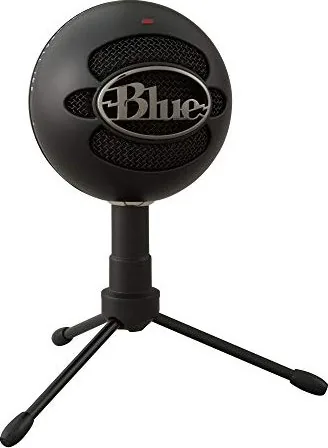
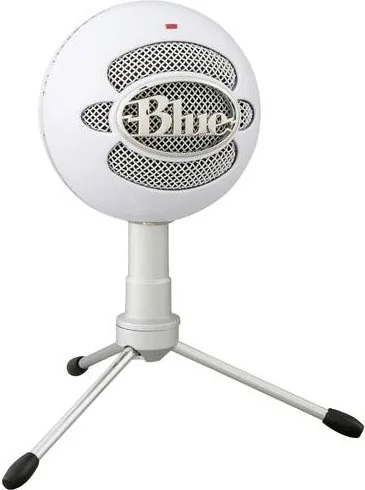
The Blue Microphones Snowball iCE is a compact USB condenser microphone designed for creators who want clear, professional audio with minimal setup. Utilizing a custom cardioid capsule, the Snowball iCE focuses on the voice or primary sound source while reducing background noise, making it a reliable choice for podcasting, streaming, voiceover work, Skype/VoIP calls, and basic music recording. Its plug-and-play USB connection works with both Mac and Windows systems without the need for drivers, so you can connect and start recording right away.
Features and Use Cases
Snowball iCE delivers a frequency response that suits speech and many instruments, capturing studio-quality vocals, acoustic guitars, and other sources when used in a treated environment. The mic ships with a desktop tripod but can be mounted on standard mic stands or boom arms. It’s compatible with popular software like Audacity, GarageBand, OBS, Discord, XSplit and more, making it a versatile tool for gamers, podcasters, musicians and remote workers.
Setup is straightforward: plug the supplied USB cable into your computer, select the Blue Snowball iCE in system sound settings, and adjust input levels. Windows users can set levels via Control Panel > Sound > Recording > Properties. Mac users select the mic under System Preferences > Sound > Input. Because the capsule is sensitive, keep input volume moderated to avoid clipping.
Build and Specs
Constructed with a condenser pressure-gradient capsule in a cardioid polar pattern, the Snowball iCE offers a frequency response roughly from 40 Hz to 18 kHz and records at 44.1 kHz/16-bit. It’s lightweight and portable, designed in the USA and manufactured in China. Blue provides a two-year limited warranty through authorized dealers and suggests plugging directly into a computer USB port rather than a hub for optimal performance.
Practical Tips
Place the mic a consistent distance from the speaker—typically 6–12 inches—for full-bodied voice capture and reduced room noise. Use a pop filter or windscreen for plosive control, and consider basic room treatment or positioning to minimize reflections. For live streaming, pair the mic with OBS, Discord or XSplit to integrate crisp audio into your broadcast.
Notes
- Best used plugged directly into a computer USB port (avoid USB hubs).
- Compatible with macOS 10.10+ and Windows 7/8.1/10.
- Sensitive capsule: start with low input gain and adjust gradually.
- Optional accessories like shock mounts improve isolation.
Search for 67,706 Manuals online


Type-in Brand or Model