
BH Fitness RC09 TFT Manual
PDF manual · 36 Pages
English



Quick check
Incorrect answer, please try again.
Chat with your BH Fitness RC09 TFT manual using AI
Get instant AI answers from your BH Fitness RC09 TFT manual
Ask anything about the BH Fitness RC09 TFT. Answers come from this manual, with the pages they are based on.
RC09 TFT Maintenance Schedule
Apply lubricant to the sliding belt if walking is jerky, the motor fails to start, or the circuit breaker trips due to overload.
Inspect the sliding belt and drive belt tension. Adjust them if the walking motion is jerky or the machine stalls.
Ask a Question
Do you recommend RC09 TFT?
Yes NoFrequently Asked Questions
Navigate to the main screen and click the sphere icon in the upper right corner. Select the desired language from the drop-down list to switch immediately.
Is this answer helpful?
Yes, access Settings on the main screen, choose the MIL SWITCH option, and select your preferred unit system of measurement.
Is this answer helpful?
This mode adjusts the treadmill speed to keep your pulse rate constant. You must use hand grips or a chest belt for accurate monitoring. The machine slows if you go above and speeds up if you fall below your target.
Is this answer helpful?
Check that the current limiter is pressed in. Switch the machine off, press the overload button, and lubricate the belt if necessary.
Is this answer helpful?
Ensure the belt is lubricated. Check the tension of the sliding belt and the drive belt. Adjust tension as needed using the appropriate tools.
Is this answer helpful?
The safety key goes into compartment E on the electronic unit. It must be inserted before the machine turns on. Always clip the cord to your clothing.
Is this answer helpful?
It is recommended to keep the environment ventilated during heavy exercise for optimal results. Ensure the machine is not exposed to water.
Is this answer helpful?
Advantages and Disadvantages
Advantages

- TFT touchscreen with multiple language support
- 36 preset programs for varied fitness goals
- Heart rate control adjusts speed automatically
- Emergency stop with safety key included
- USB port for music and multimedia enjoyment
Disadvantages

- Not a medical device for pulse monitoring
- Requires earthed socket for electrical safety
- Belt needs regular lubrication for smoothness
- Safety key can detach if not clipped
- Maximum speed may be high for beginners
Product Specification
Motor Power
2.27 HP continuous power, 3.95 HP peak power
Speed
0.62-13.67 MPH
Incline
0-12% electronically adjustable
Running Surface
61.02x21.65 inches
Max User Weight
330.69 lbs
Dimensions
82.68x37.01x57.87 inches
Weight
251.33 lbs
Features
Transport wheels, hand pulse measurement, chest strap compatible, ventilation, foldable
Product Description
Comprehensive Overview of the BH Fitness RC09 Treadmill Manual
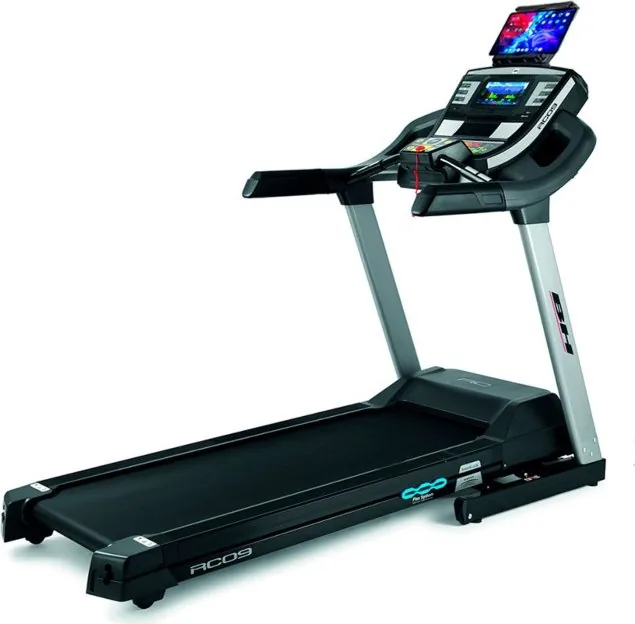
Start your journey to better health with the BH Fitness RC09 TFT Treadmill Manual by understanding this exceptional equipment. The guide highlights essential features for every workout session. Whether you are a beginner or an athlete, this treadmill provides support you need to succeed in your fitness goals.
Key Features
The monitor is equipped with a large TFT display that supports touch functions for intuitive interaction. Users can quickly access different workout modes without interruption. The interface supports multiple languages to suit your preference. You can change units easily through the settings menu. Navigation is simple with provided quick access buttons. You should check the power cord for signs of damage before plugging in.
Diverse Workout Options
The BH Fitness RC09 TFT Treadmill Manual explains thirty-six preset programs are available. These profiles target fitness areas like cardio for various needs. Program selection is done from the colorful touchscreen. Additionally, there is a user profile program for custom training plans with speeds. You can choose objective programs where you set a target time. Navigation mode allows video playback for entertainment. Music playback is supported via USB connection for entertainment and motivation to keep you engaged.
Safety and Convenience
Safety is a top priority with the design of this unit to protect the user. It includes a magnetic safety key that stops the machine instantly if you fall off. Always clip the key to clothing to ensure this happens effectively. The ECO function reduces energy consumption for short periods. The heart rate control mode adjusts speed to keep pulse steady. Emergency stop buttons are located on handlebars for immediate access. This helps maintain safety over time. Consult the warranty booklet for specific coverage details regarding parts.
Usage Tips
Make sure the incline is at the lowest setting before folding for storage. Lubricate the running belt regularly to prevent jerky movements. Check that the machine is on a level surface. Use an earthed power socket to prevent electrical shocks. Contact support if error codes appear for resolution. Always store the manual near the machine for quick reference.
Conclusion
By following the BH Fitness RC09 TFT Treadmill Manual, you ensure a long-lasting safe experience. This equipment offers robust performance for home fitness enthusiasts. Adjusting speed is possible at any time. Keep the environment ventilated for optimal results. Proper usage ensures you get the best value from your investment. Enjoy your training sessions with confidence and safety at home.
Search for 67,706 Manuals online


Type-in Brand or Model