
Beurer OT 30 Manual
PDF manual · 260 Pages
English



Quick check
Incorrect answer, please try again.
Chat with your Beurer OT 30 manual using AI
Get instant AI answers from your Beurer OT 30 manual
Ask anything about the Beurer OT 30. Answers come from this manual, with the pages they are based on.
OT 30 Maintenance Schedule
Clean with a soft, clean cloth. For stubborn stains, use a cloth dampened with water or neutral cleaner, then dry.
Use 75% ethanol or diluted isopropyl alcohol. Do not dip the sensor in alcohol or hot water above 50C.
Replace when the battery status indicator appears on the display. Use type 3V CR 2032.
Perform regular metrological controls using appropriate means if used in professional healthcare.
Ask a Question
Do you recommend OT 30?
Yes NoFrequently Asked Questions
Measure immediately after waking and before you get out of bed. The device is intended for the same time each morning, ideally after at least 4 hours of sleep. Avoid eating and intense physical activity before measuring.
Is this answer helpful?
The thermometer supports different measurement modes, but you should keep the chosen measurement site consistent throughout the cycle. If you switch the device or the measurement location, you should mark it as a disruption, because reliable cycle evaluation may no longer be guaranteed for that cycle.
Is this answer helpful?
A measurement takes 3 minutes. The thermometer ends the measurement when a stable temperature is reached and then provides an acoustic signal and displays the measured value. Wait for the final signal before removing it.
Is this answer helpful?
You can store up to 30 readings in the device memory and review them on the thermometer. However, the Ovy app is used to synchronize time and to set temperature unit and tone. Cycle predictions and the cycle overview are produced in the app.
Is this answer helpful?
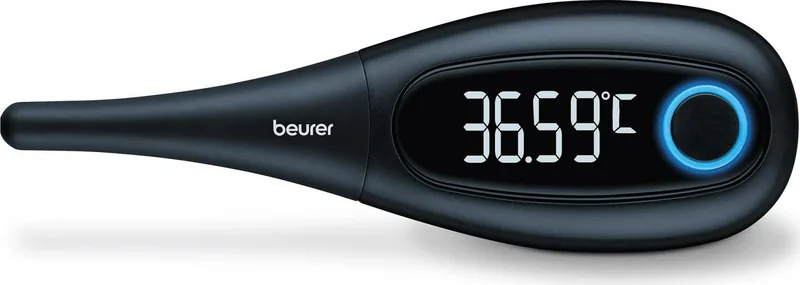
After measurement, if Bluetooth on your smartphone is enabled and it is within range, the OT 30 transfers results automatically to the Ovy app. During transfer, the LED ring lights blue, and when transfer completes it flashes twice. You can sync later using the device memory.
Is this answer helpful?
It uses a 3 V button cell battery type CR 2032. The instructions specify not to use rechargeable batteries. Replace the battery when the battery status indicator appears.
Is this answer helpful?
Clean with a soft, clean cloth before and after each use. For stubborn stains, use a cloth dampened with water or a neutral cleaning agent, then dry. You may disinfect using 75% ethanol or diluted isopropyl alcohol, but do not dip the measuring sensor tip in alcohol or hot water.
Is this answer helpful?
Advantages and Disadvantages
Advantages

- Works with the Ovy app to document your cycle and support prediction of fertile and non-fertile days.
- Bluetooth Low Energy transfer with LED ring feedback and 6-digit pairing code during setup.
- 30-value memory helps when you sync later instead of immediately.
- Specialized basal temperature routine for wake-up measurements at consistent timing.
- Strong precision specification: +/- 0.05 C in the key temperature range under defined conditions.
Disadvantages

- Requires consistent wake-up timing and at least 4 hours of sleep for best results.
- Changing the measurement location during a cycle is treated as a disruption and reduces reliability.
- Temperature unit and sound settings are managed only through the Ovy app.
- Measurement takes 3 minutes, so daily routine can be demanding.
Product Specification
Type
Cycle thermometer
Product Description
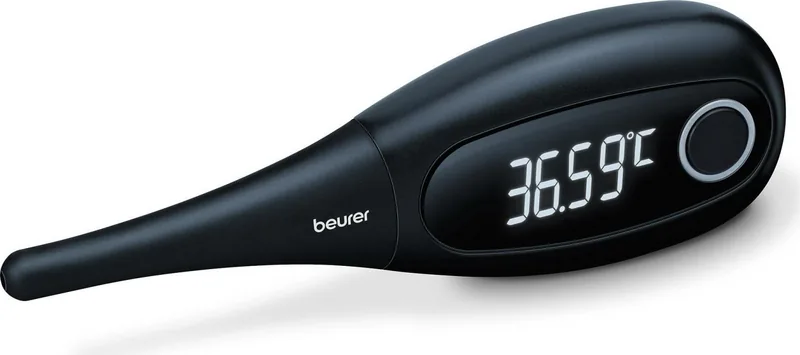
Beurer OT 30 Basal Cycle Thermometer
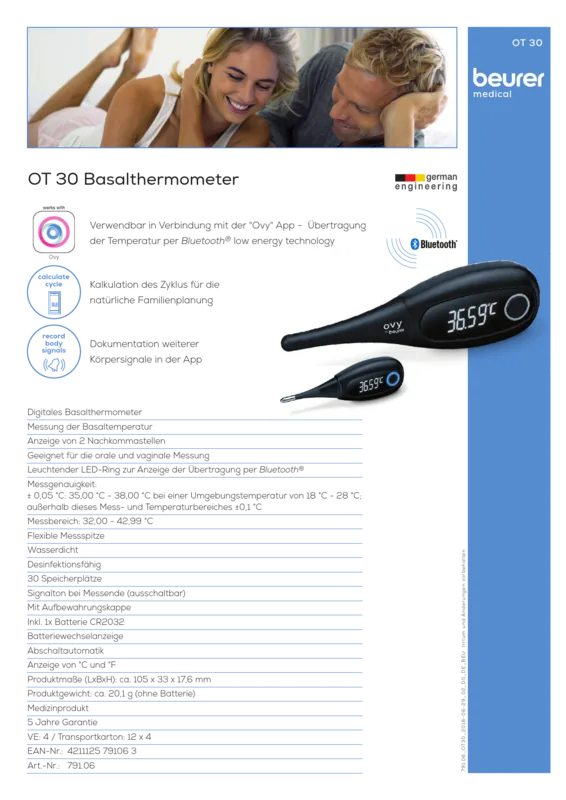
If you want to better understand your cycle, the Beurer OT 30 Basal Cycle Thermometer is designed for consistent basal temperature tracking at the same time each morning. With its specialized digital measurement method and a user-friendly connection to the Ovy app, it helps turn daily readings into cycle insights, including fertile and non-fertile phases as well as period timing.
The key idea behind basal temperature is routine. The OT 30 asks you to measure immediately after waking, before you get out of bed, and ideally after at least 4 hours of sleep. It also supports multiple measurement positions (oral, rectal, or vaginal), but you should keep the chosen measurement site the same throughout the cycle for the most reliable evaluation. For anyone reading the Beurer OT 30 Basal Cycle Thermometer Manual, the emphasis is clear: consistency matters as much as the reading itself.
Once your measurement is complete, the device runs for 3 minutes and signals when a stable temperature is reached. The screen uses an OLED display, while a LED ring provides visual feedback during use and data transfer. Results can be transferred via Bluetooth using Bluetooth Low Energy technology, and the thermometer holds the last 30 values in its memory if you prefer syncing later.
What makes the OT 30 especially practical is how smoothly it fits into a smartphone routine. The free Ovy app automatically calculates your cycle using a self-learning algorithm. After you connect the thermometer, the app can integrate additional context such as disrupted sleep, fever, alcohol consumption, or other external influences to improve forecasting accuracy over time.
Key results
- Basal temperature tracking with a 3-minute measurement time and an acoustic signal when ready.
- Bluetooth Low Energy sync to the Ovy app, enabling cycle documentation and forecast of fertile windows.
- 30-measurement memory for storing recent data between transfers.
- High measurement precision: +/- 0.05 C between 35.00 C and 38.00 C (within specified ambient conditions).
- Practical design for repeat routines, using an IP64 rating and a flexible measuring tip.
Notes
- Avoid bending the measuring tip more than 90 degrees.
- Wait for the end of the measurement before removing the thermometer.
- If you experience unusual results, consult your doctor.
- Clean with a soft cloth; do not soak the measuring sensor in alcohol or hot water.
Search for 67,706 Manuals online


Type-in Brand or Model
Lena Schneider
7 months ago
Does the basal thermometer pairing work with the Ovy app? Mine will not connect and I am disappointed.
Manual.ly
7 months ago
Sorry about that. If the basal thermometer will not pair with the Ovy app, please try: (1) Ensure Bluetooth is enabled on your phone and the Ovy app has location/Bluetooth permissions. (2) Restart Bluetooth and close/reopen the Ovy app. (3) Remove the thermometer from the app (if listed) and try pairing again in a fresh session. (4) Check the thermometer battery and charge it fully. (5) Verify you are using the latest version of the Ovy app. If it still does not connect, contact support with your phone model, OS version, and any pairing error so we can verify compatibility and next steps.