
Belkin F5D7051 Manual
PDF manual · 42 Pages
English



Quick check
Incorrect answer, please try again.
Chat with your Belkin F5D7051 manual using AI
Get instant AI answers from your Belkin F5D7051 manual
Ask anything about the Belkin F5D7051. Answers come from this manual, with the pages they are based on.
Ask a Question
Do you recommend F5D7051?
Yes NoFrequently Asked Questions
The adapter is designed for Windows 2000 and Windows XP. Drivers and the Belkin WLAN utility are provided on the installation CD; some WPA features on Windows XP may require Microsoft updates.
Is this answer helpful?
Yes. To achieve the adapter's maximum 54 Mbps throughput you must plug it into a USB 2.0 port. If connected to a USB 1.1 port, the maximum transfer rate is limited to 11 Mbps.
Is this answer helpful?
Use the Belkin utility or Windows wireless settings to enable WEP (64/128-bit) or WPA (WPA-PSK with TKIP/AES). Create and save a profile with the correct SSID, encryption type and network key to ensure matching settings with your router.
Is this answer helpful?
Try moving the computer 1.5–3 meters from the router to check for range issues, refresh the AP list, verify the router’s SSID broadcast is enabled, and check for interference sources like cordless phones and microwaves.
Is this answer helpful?
Yes. The Belkin utility provides extra features like site survey, detailed diagnostics and profile management. You can enable or disable Windows Zero Configuration (WZC) via the Belkin tray menu to choose which utility manages the adapter.
Is this answer helpful?
Typical indoor range is about 30–60 meters. Range and throughput are affected by distance, walls, metal objects, antenna orientation, and nearby 2.4 GHz devices that cause interference.
Is this answer helpful?
Check router LEDs and WAN connectivity, ensure encryption keys and SSID exactly match between adapter and router, reboot modem/router if needed, and contact Belkin support if problems persist.
Is this answer helpful?
Advantages and Disadvantages
Advantages

- Easy plug-and-play USB 2.0 installation with Belkin Easy Installation Wizard.
- Supports 802.11g and backward-compatible with 802.11b for broad device compatibility.
- Belkin WLAN utility with AP scanning, profile manager, and detailed connection info.
- Supports WEP and WPA security options, including WPA-PSK with TKIP/AES for XP.
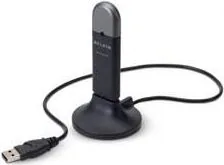
- Compact design with protective cap and desktop stand for flexible placement.
Disadvantages

- Operates on crowded 2.4 GHz band, prone to interference from phones and microwaves.
- Maximum 54 Mbps requires USB 2.0 host; USB 1.1 limits throughput to 11 Mbps.
- WPA features may require Windows XP updates or extra configuration steps.
- Indoor range (30–60 m) varies widely with obstacles and signal-blocking materials.
- Limited advanced features compared with modern dual-band 802.11n/ac adapters.
Product Specification
Type
WLAN Adapter
Design
1x USB stick, 1x externally wired (adapter)
Interface
1x USB-A 2.0 (plug), 1x USB-A 2.0 (plug via cable)
Connectivity
1x WLAN 802.11b/g (1x 2.4GHz), 1x signal booster, Antenna
Transmission
1x 2.4GHz WLAN (125Mb/s)
Power supply
Power supply only via interface
Chipset
Broadcom BCM4320 (WLAN Adapter)
Compatibility
universal
USB notation
Link
Product Description
Belkin Wireless Adapter 2.4GHz WLAN USB-A 2.0 Stecker Manual
The Belkin Wireless Adapter 2.4GHz WLAN USB-A 2.0 Stecker is a compact plug-and-play USB 2.0 adapter designed to add Wi‑Fi connectivity to desktops and notebooks. Compliant with IEEE 802.11g and backward compatible with 802.11b, it operates in the crowded 2.4 GHz ISM band to provide mobility and an easy way to join home or small-office wireless networks. With a simple installation wizard, USB 2.0 interface, and a desktop stand, the adapter aims to deliver fast wireless access (up to 54 Mbps on USB 2.0 hosts) while keeping setup accessible for nontechnical users.
Key features and usage
The adapter supports infrastructure and ad-hoc modes, letting you connect to access points or directly to another computer. It includes a Belkin WLAN monitoring utility for scanning networks, creating and storing profiles for different locations (home, work), and viewing signal quality, channel and encryption details. LED indicators show activity and connection state. The package typically contains the adapter with protective cap, desktop stand, installation CD, and quick guide.
Security options include 64- and 128-bit WEP and WPA (WPA-PSK/TKIP or AES) support (WPA available on Windows XP with appropriate utilities), and the manual explains generating keys, profile creation, and matching router settings. The adapter is intended for SOHO use, temporary LANs, and spaces where cabling is impractical. Average indoor range is listed up to about 30–60 meters depending on obstacles and interference.
Installation and setup
Belkin recommends installing the provided software before plugging in the adapter. The installation wizard simplifies driver and utility setup; once connected, Windows recognizes the device and the Belkin tray icon provides quick access to AP lists, profile management, and connection status. For Windows XP users, the guide outlines choices between the Belkin utility and Windows Zero Configuration (WZC) and how to enable WPA through the Windows wireless utility.
Performance and placement tips
Placement is critical: position the router/access point centrally and avoid proximity to 2.4 GHz cordless phones, microwaves, metal cabinets, and large aquariums. Antenna orientation and channel selection (use site survey to pick the quietest channel) can noticeably improve throughput and stability. If facing slow speeds or intermittent drops, testing at 1.5–3 meters from the AP helps isolate interference or range issues.
Notes
- Maximum throughput requires a USB 2.0 host; on USB 1.1 the adapter is limited to 11 Mbps.
- Keep at least 20 cm distance from any external antenna for RF exposure compliance.
- Firmware, drivers and regulatory info (FCC/CE/IC) and a limited lifetime warranty are detailed in the product literature.
Search for 67,732 Manuals online


Type-in Brand or Model