
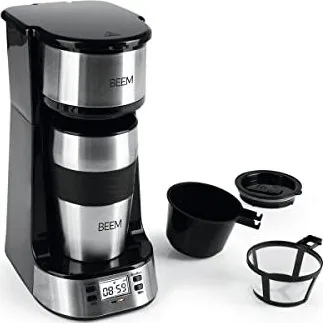
Beem Thermo 2 Go Manual
PDF manual · 72 Pages
English



Quick check
Incorrect answer, please try again.
Chat with your Beem Thermo 2 Go manual using AI
Get instant AI answers from your Beem Thermo 2 Go manual
Ask anything about the Beem Thermo 2 Go. Answers come from this manual, with the pages they are based on.
Thermo 2 Go Maintenance Schedule
Use a descaling agent (e.g., BEEM Premium) depending on water quality and usage frequency. Rinse twice with clear water afterwards.
Wash with mild detergent and warm water or in the dishwasher after every use. Allow parts to cool before removing.
Inspect the power cord regularly for any signs of damage. Do not use the device if damaged.
Free maintenance reminders
Timed to your purchase date. Always free, unsubscribe anytime.
Ask a Question
Do you recommend Thermo 2 Go?
Yes NoFrequently Asked Questions
You should descale the device approximately every two to six weeks. The frequency depends on your local water hardness and usage levels. Signs indicating a need include slow brewing or excessive steam production. Use a recommended descaling agent following the specific instructions in the manual for best results and machine longevity.
Is this answer helpful?
No, you must only use water in the tank. Never pour milk or other liquids into the water reservoir. This can damage the internal components and the machine. Milk can cause buildup and hygiene issues that affect the taste of future coffee batches.
Is this answer helpful?
The maximum water capacity is approximately 420 ml, which can be found on the tank markings. The minimum fill level is around 240 ml. Overfilling the tank may cause overflow during the brewing process. Ensure you respect the indicated levels on the glass or plastic tank.
Is this answer helpful?
No, the included cup is not designed to be leak-proof. It has a slide closure but cannot prevent spills completely. Do not transport the filled cup inside a bag or pocket. Keep it on a stable surface if carrying the cup is necessary to avoid messes.
Is this answer helpful?
Weak coffee may result from too much water or insufficient coffee powder. Check the ratio recommended in the preparation guide. You should also ensure the filter is clean and the machine is not scaled up. Adjusting the grind size can also improve the flavor profile significantly.
Is this answer helpful?
Children aged eight years and older may use the device under supervision. Younger children must be kept away from the appliance to avoid burns or injury. Always store the device out of reach when not in use. Adults must ensure proper safety handling.
Is this answer helpful?
Check if the power plug is inserted correctly into the socket. Verify that the electricity socket is functioning and not tripped a fuse. If problems persist, the display unit might be defective and require contacting customer service for further assistance and repair options.
Is this answer helpful?
Advantages and Disadvantages
Advantages

- Built-in timer allows setting brewing time for morning convenience.
- Includes reusable permanent filter reducing waste and cost over time.
- Compact design fits easily on counters without taking much space.
- To-go cup included makes it easy to carry fresh coffee to work.
- Simple operation with clear buttons for power and timer settings.
Disadvantages

- To-go cup lid is not leak-proof so do not transport in bags.
- Only supports ground coffee powder and does not accept capsules.
- Water tank minimum capacity is relatively high at 240 ml per brew.
- Requires regular descaling every few weeks to prevent calcium buildup.
- No steam function for milk frothing or cappuccino style drinks.
Product Specification
Power
750W
Color
stainless steel, black
Capacity
1 cup
Filter
Permanent filter
Features
Timer
Package Contents
without carafe
Product Description
Discovering Joy in Every Cup with the Beem Thermo 2 Go
Brewing a perfect cup of coffee is about more than just the appliance; it is about understanding how to operate it safely and effectively. The Beem Thermo 2 Go Single-Cup Coffee Machine Manual provides essential guidance for owners of this compact and efficient device. If you have recently purchased this machine, familiarizing yourself with the detailed documentation ensures longevity and optimal performance for daily use.
Key Features and Functionality
This coffee machine is designed for maximum convenience in a small kitchen space. It allows you to prepare single servings using standard coffee powder rather than expensive pods. One standout feature is the automated timer function. Using the programmable settings explained in the manual, you can wake up to freshly brewed coffee every morning. The instructions explain how to set the hours and minutes using the specific control keys on the device front panel. The to-go cup included offers a portable solution for your commute, though users should note it is not fully leak-proof when inside a bag.
Safety and Maintenance
Reading the Beem Thermo 2 Go Single-Cup Coffee Machine Manual is critical for home safety. The device involves high temperatures and electrical components. Safety notes strictly warn against inserting the appliance into water or using it near flammable materials. Regular cleaning is required to maintain coffee quality. The permanent filter needs thorough washing, and the water tank must be filled only with water, never with milk or other beverages. Descaling is another vital maintenance step recommended every two to six weeks depending on local water hardness. Failure to follow these steps can lead to significant damage or void your warranty coverage entirely.
Troubleshooting and Technical Specs
Common issues include weak coffee taste or clogged outlets. The guide offers simple solutions like adjusting water amounts or cleaning the outlet carefully. If the digital display does not light up, check the power cord connection first. The machine operates on 220 to 240 volts with a power rating between 650 and 750 watts. Proper storage involves unplugging the unit during long periods of inactivity. Keep the original packaging if you need to return the item for warranty claims or transport.
Final Thoughts
Your long-term experience with the machine depends heavily on proper usage and adherence to guidelines provided by the manufacturer. By following the Beem Thermo 2 Go Single-Cup Coffee Machine Manual, you protect your investment and ensure consistent flavor profiles. This simple appliance brings daily joy when treated with consistent care. Always prioritize safety instructions regarding hot surfaces and keeping children away during operation. Enjoy your coffee with confidence and peace of mind.
Search for 67,706 Manuals online


Type-in Brand or Model