
Batavia Maxxpack BT-COS001 Manual
PDF manual · 22 Pages
English



Quick check
Incorrect answer, please try again.
Chat with your Batavia Maxxpack BT-COS001 manual using AI
Get instant AI answers from your Batavia Maxxpack BT-COS001 manual
Ask anything about the Batavia Maxxpack BT-COS001. Answers come from this manual, with the pages they are based on.
Maxxpack BT-COS001 Maintenance Schedule
Check the sanding paper for wear before every use. Do not use worn or damaged sanding paper.
Empty the dust bag by tapping it out or using compressed air. Clean the bag and housing exhaust connection to ensure easy removal.
Wipe the tool with a clean cloth or blow off dust with low-pressure compressed air immediately after use.
Clean regularly with a damp cloth and mild soap. Do not use solvents or allow water to enter the tool interior.
Ask a Question
Do you recommend Maxxpack BT-COS001?
Yes NoFrequently Asked Questions
No, this product is sold as a solo unit. You must purchase the battery and charger separately. Compatible 2Ah and 4Ah batteries are available under article numbers 7062517 and 7062518.
Is this answer helpful?
This sander is intended for dry sanding of wood, plastic, stone, composites, paint, and filler. It is also suitable for stripping rust and paint. However, do not use it on metal containing asbestos or magnesium workpieces.
Is this answer helpful?
Align the holes on the sanding paper with the openings on the sanding plate to allow dust extraction. Press the paper firmly onto the plate until it adheres securely. Ensure the paper is the correct 125 mm diameter.
Is this answer helpful?
No, this tool is designed strictly for dry sanding. Using it with water or other liquids could damage the motor and electrical components, creating a safety hazard.
Is this answer helpful?
The hand/arm vibration emission level is measured at 9.6 m/s² with an uncertainty of 1.5 m/s². To minimize exposure, maintain the tool properly and keep your hands warm during operation.
Is this answer helpful?
Yes, the product comes with a two-year warranty from the date of purchase. This covers defects in workmanship and materials but does not cover damage resulting from misuse, neglect, or unauthorized repairs.
Is this answer helpful?
Advantages and Disadvantages
Advantages

- High-speed motor reaches 12000 rpm for efficient sanding
- Integrated dust collection bag keeps work area clean
- Lightweight design at 1.75 kg reduces user fatigue
- Compatible with standard 125 mm sanding discs
- Insulated grip handles improve safety and comfort
Disadvantages

- Battery and charger are not included in the package
- Cannot be used on magnesium or asbestos-containing materials
- Requires separate purchase of compatible batteries
- Dust bag must be emptied frequently during heavy use
- Overheating risk if excessive pressure is applied
Product Specification
Type
Random orbit sander
Battery
18V, Li-Ion
No-load speed
12000 rpm
Disc diameter
4.92 inches
Oscillation amplitude
0.08 inches
Tool attachment
Hook and loop
Features
Softgrip, Dust extraction
Weight
3.09 lbs
Package contents
Without charger and battery, includes dust bag
Product Description
Batavia Maxxpack Cordless Orbital Sander Solo Review
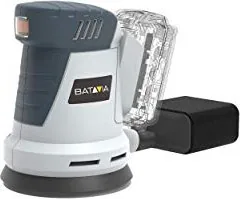
The Batavia Maxxpack Cordless Orbital Sander Solo (Model BT-COS001) is a versatile power tool designed for professional and DIY enthusiasts who need flexibility without the constraint of a power cord. This unit is sold as a bare tool, meaning it does not include a battery or charger, allowing users to integrate it seamlessly into their existing Batavia MAXXPACK ecosystem or choose the specific capacity that suits their workflow.
Designed primarily for dry sanding, this random orbital sander excels at smoothing wood, plastic, stone, composites, paint, filler, and similar materials. It is particularly effective for stripping rust, removing old paint layers, and preparing surfaces for finishing. The device features a robust motor capable of reaching a no-load speed of 12000 rpm with an eccentricity of 2 mm, ensuring efficient material removal while minimizing swirl marks on the workpiece.
Ergonomics play a significant role in the design of this sander. It includes an insulated gripping surface to enhance user comfort during extended periods of use. The dust collection system is a standout feature, comprising a dedicated bag and flange that connects directly to the sanding plate. This setup ensures that up to 95% of dust is captured, keeping the workspace clean and protecting the operator's health from harmful particulates generated when sanding wood or painted surfaces.
The sander accepts standard 125 mm sanding discs, which are easy to attach and remove. Proper selection of abrasive paper grain size is crucial for optimal results. Users can start with coarser grits like 80 for rough shaping and progress to finer grits such as 220 for a smooth finish. For ultra-smooth results on wood, lightly moistening the surface before the final pass can help swell fibers for a superior texture. Safety is paramount; the tool comes with clear warnings regarding asbestos, magnesium, and the necessity of wearing protective gear like goggles and dust masks.
Important Notes
- Battery and charger are sold separately under article numbers 7062517/2Ah and 7062518/4Ah.
- Always ensure the workpiece is securely fixed before starting.
- Do not dispose of the tool or batteries in domestic refuse; follow local recycling regulations.
- The tool carries a two-year warranty covering manufacturing defects but excludes damage from misuse.
Search for 67,706 Manuals online


Type-in Brand or Model