
Basetech FM-10 Manual
PDF manual · 8 Pages
English



Quick check
Incorrect answer, please try again.
Chat with your Basetech FM-10 manual using AI
Get instant AI answers from your Basetech FM-10 manual
Ask anything about the Basetech FM-10. Answers come from this manual, with the pages they are based on.
FM-10 Maintenance Schedule
Replace the 9V battery when display contrast decreases or the battery symbol flashes. Remove if not used for long periods to prevent leakage.
Disconnect the product from power before cleaning to ensure safety.
Wipe the product with a dry, fiber-free cloth. Do not use aggressive cleaners or alcohol.
Ask a Question
Do you recommend FM-10?
Yes NoFrequently Asked Questions
It is intended for measuring moisture in concrete and stone, wood, and other construction materials such as gypsum boards. The meter offers settings for wood and for concrete/masonry so you can select the most appropriate mode before measuring.
Is this answer helpful?
When you switch the meter on, it performs required calibration and should show 0% afterward. Hold the device in open air so the sensor does not touch any objects, keep at least 10 cm distance from surrounding items, and avoid touching the sensor with your hand during calibration. If you need to calibrate again, switch the unit off and then on.
Is this answer helpful?
The sensor must be kept perpendicular (at a right angle) to the surface being measured. If the device is slanted, the sensor interaction changes and the value can deviate significantly. For consistent results, keep the meter stable and use only light contact.
Is this answer helpful?
No. The device is not suitable for metals or electricity-conductive materials. If metal is within the sensor range (for example nails, screws, cables, or pipes), measurement values can increase considerably.
Is this answer helpful?
During measurement, briefly pressing the button freezes the current value on the display. This remains visible even if you remove the sensor head from the surface, making it easier to read and record. Press the button again briefly to continue normal measurement.
Is this answer helpful?
When the audio signal function is enabled, the meter emits signals as you move the sensor over the surface. More signals correspond to higher moisture. This makes it easier to scan wider spots and quickly identify areas with relatively elevated moisture.
Is this answer helpful?
Replace the battery when the display contrast drops strongly or when the battery symbol indicates it is weak or spent. The display shows battery status, and a spent battery can lead to issues such as damage from leakage. For best runtime, high-quality alkaline 9 V batteries are recommended.
Is this answer helpful?
Advantages and Disadvantages
Advantages

- Non-destructive moisture measurement for concrete/stone, wood, and other construction materials
- Two material modes (wood and concrete/masonry) to match typical substrate behavior
- Freeze display helps capture readings and audio signals speed up scanning larger areas
- Wide relative humidity measurement range from 0.1% to 99.9%
- Automatic power saving turns the meter off after about 3 minutes without changes
Disadvantages

- Not suitable for metals or electricity-conductive materials
- Sensitive to measurement angle, corners, and uneven contact, which can cause deviations
- Readings are an average affected by surface moisture and internal moisture
- Calibration is required at every switch-on and must be performed carefully
- Uses a 9 V block battery; rechargeable operation is possible but runtime is shorter
Product Description
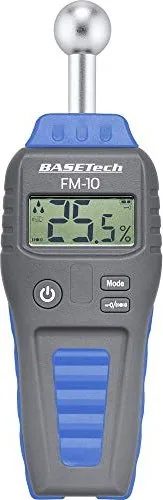
Basetech FM-10 Moisture meter
If you need a practical way to check moisture in construction materials, the Basetech FM-10 Moisture meter is designed for on-site guidance. It measures relative humidity in common building substrates such as concrete, stone, wood, and similar materials (for example, gypsum boards). With its non-destructive sensor approach, you can assess moisture conditions without sampling or damaging the surface.
Made for real checks in the field
The FM-10 works with a 9 V block battery and offers two measurement modes so you can select the material type before measuring. This matters because material behavior influences the moisture reading. The instrument displays humidity directly as a percentage and includes a measurement depth of less than 102 mm, allowing you to get a useful indication of moisture conditions beneath the surface.
Reliable results depend on technique
For best consistency, start by placing the sensor correctly and keeping orientation stable. During startup, the meter performs calibration and should be held in open air so the sensor does not touch objects. During measurement, hold the device perpendicular to the surface and use only a light touch. If you measure in corners or on rough areas, readings can shift because the sensor sees moisture-related effects from multiple surfaces.
Readings you can act on
The display can be “frozen” so you can capture a value more easily, even after removing the sensor head from the surface. There is also an optional audio signal for faster interpretation over larger areas: more signals indicate higher moisture. For practical troubleshooting, the meter is especially useful for comparison measurements, where you set a reference reading in a dry area and then compare later results.
Key results
- Measures relative humidity from 0.1% to 99.9% with 0.1% resolution, supporting quick spotting of low-to-high moisture conditions.
- Sensor signal penetrates up to less than 102 mm, giving a useful view of moisture beyond the immediate surface.
- Supports wood and concrete/masonry modes, helping tailor readings to typical material behavior.
- Includes freeze display and an audio signal option for better readability and coverage on larger spots.
Notes
- The Basetech FM-10 Moisture meter is not suitable for metals or electricity-conductive materials.
- Calibration happens at every switch-on; consult the Basetech FM-10 Moisture meter Manual keyword guidance for the recommended calibration handling.
- Battery status is shown on the display; the unit can power down automatically after about 3 minutes of inactivity.
Quick pros vs cons
- Pros: non-destructive moisture assessment, material modes, freeze and audio help, and auto power saving.
- Cons: needs correct sensor placement, accuracy depends on surface/material conditions, and it cannot measure metals.
Search for 67,732 Manuals online


Type-in Brand or Model
nostrum92
7 months ago
Does this moisture meter give reliable readings on concrete, brick, and wood, or is it uncalibrated and inaccurate? Also, what happens near metal pipes or reinforcement?
Manual.ly
7 months ago
Many users report that the meter is best for relative comparisons, not absolute water-content percentages. If it shows extreme values on concrete or brick, try using a known-dry spot on the same material as your baseline and compare wet vs. dry areas. The device may also be affected by sensor behavior and material type, so mixed results on different days can happen. Metal inside walls (pipes, reinforcement) can strongly distort readings and lead to false results, so avoid measuring directly over metal or interpret those spots with caution. For wood, you generally get more consistent contrast between damp and dry areas. Ensure proper skin/point contact, fresh batteries, and measure the same location pattern for trend checking.