

Basetech EM-3000 Manual
PDF manual · 12 Pages
English



Quick check
Incorrect answer, please try again.
Chat with your Basetech EM-3000 manual using AI
Get instant AI answers from your Basetech EM-3000 manual
Ask anything about the Basetech EM-3000. Answers come from this manual, with the pages they are based on.
EM-3000 Maintenance Schedule
Replace both LR44 batteries if the display cannot be activated by pressing a button or if contrast decreases sharply while unplugged.
Unplug the energy cost meter from the wall socket and disconnect any attached consumer before wiping the exterior with a dry soft cloth.
Ask a Question
Do you recommend EM-3000?
Yes NoFrequently Asked Questions
Enter your electricity rate in cents or dollars per kilowatt-hour using the COST button. Press and hold for 3 seconds to access the tariff setting. Use SET and UP buttons to adjust the value. This allows the device to calculate real-time costs based on consumption data.
Is this answer helpful?
No, the device is strictly for dry indoor environments only. Exposure to moisture, humidity, rain, or water can damage the internal sensor circuitry and cause electrical hazards. Do not place it near showers or pools.
Is this answer helpful?
The device requires two LR44 button cell batteries to retain data when disconnected from the main power supply. These batteries are located on the back of the unit. Remove them before long-term storage to prevent leakage.
Is this answer helpful?
Press the dedicated RESET key located on the unit using a pen tip. This will clear all stored data and reset settings like electricity price and overload limits to default values. It also clears confusing display characters.
Is this answer helpful?
The device has a maximum handling capacity of 3680 watts. It operates on 230 volts AC. Ensure the connected appliance does not exceed this limit to prevent overheating or safety warnings on the display.
Is this answer helpful?
No, the meter is not officially calibrated for billing purposes. It is intended for personal monitoring of energy consumption and cost estimation. For legal billing, certified equipment is required.
Is this answer helpful?
Use only a dry, soft, and clean cloth to wipe the exterior. Do not use chemical cleaners or solvents. Dust can be removed with a soft brush. Never pour liquids directly onto the device to avoid electrical shock.
Is this answer helpful?
Advantages and Disadvantages
Advantages

- Real-time monitoring of power consumption and costs with clear LCD display
- Child safety lock prevents unauthorized plug insertion for home safety
- Battery backup retains data even when disconnected from main power
- Overload warning alert protects connected appliances from power surges
- Calculates CO2 emissions automatically for environmental awareness
Disadvantages

- Indoor use only, does not work in wet or outdoor environments
- Cannot be officially calibrated for legal billing purposes
- Requires manual setup of electricity tariffs for accurate cost tracking
- No internal repair options, requires professional service for faults
- Display goes blank when unplugged and must be reactivated manually
Product Specification
Type
Energy cost meter
Product Description
Optimizing Household Energy Consumption With The Basetech EM-3000
Why Monitoring Power Matters For Your Home
Tracking electricity usage is essential for modern budgeting and environmental responsibility. The Basetech EM-3000 Energy cost measurement device brings transparency to your home power grid. This smart socket connects directly between the wall outlet and any electrical appliance in your living space. It provides accurate readings without needing specialized tools or professional technicians for installation. Homeowners appreciate the simplicity of the plug-and-play design which fits into standard outlets easily. Users gain immediate visibility into energy consumption habits that often go unnoticed. By monitoring usage continuously, families can reduce waste and lower bills significantly over time.
Key Features And Functions For Users
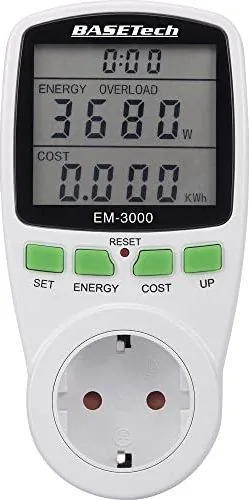
The device displays multiple metrics instantly on its bright LCD screen. You can cycle through voltage, current, and frequency readings with a simple button press action. The device also monitors the power factor and total energy consumed in real-time accurately. A crucial feature allows users to program the local cost per kilowatt-hour rate. This enables accurate financial calculations of specific connected devices. The system automatically estimates CO2 emissions based on usage patterns using a fixed base value of 0.998 kgCO2 per kWh. Data retention occurs even when power is removed from the wall socket safely. Two LR44 batteries ensure history is safe during storage periods. Setting the overload limit is simple using the provided input buttons for customization needs. The display flashes an alert immediately if limits are exceeded to protect equipment from damage. The upper display line indicates the operating time of the load. It switches between minutes and hours automatically based on duration.
Safety And Usage Guidelines To Follow
Safety mechanisms protect users and young children from accidental hazards. An internal child lock prevents unauthorized insertion of plugs into the socket safely. The unit is designed for dry indoor environments only and should not go outside. Moisture or outdoor conditions can damage the sensor circuitry and void guarantees immediately. Avoid placing it near bathrooms, showers, or pools where water is present daily. Do not cover the device during operation since heat buildup can cause fire risk. Cleaning should only be done with a dry soft cloth to avoid damage. No chemical cleaners are safe for the casing materials inside the unit. Batteries must be handled carefully to prevent leaks and skin irritation always. Do not open the main housing yourself.
Technical Specifications And Maintenance Requirements
Maximum power handling capacity is 3680 watts for most household appliances. The unit operates on standard 230 volts AC frequencies. Users can reset all settings to factory defaults if configuration becomes incorrect. This is useful if settings become wrong or buttons stop working properly. Maintenance is minimal as the unit is sealed for durability and safety. Do not attempt to repair it internally as it voids warranty terms. Only change batteries for data retention during long storage periods. Dispose of used batteries and units according to local environmental regulations strictly. This tool remains a valuable investment for energy awareness and savings.
Search for 67,732 Manuals online


Type-in Brand or Model
Julia Schmidt
8 months ago
I am worried about the reviews mentioning the display is hard to see when plugged in and plugs falling out. Is this a known issue?
Manual.ly
8 months ago
Hello, thank you for reaching out. Some users experienced display contrast issues when the device is powered. Adjusting the viewing angle may help. For loose connections, ensure the socket is compatible. If the unit fails within the warranty period, please email our support for a replacement.