Manual.ly Logo

Basetech 350C12 Manual

4.7 · 13 Ratings

PDF manual · 12 Pages

English

M: OA-GPT-54-NAN
page

/ 12

Loading...
77bbc5da1a65be2fa4f70f79a3660a29384c page 4
b) Persons and product
• The product is suitable only for use in dry environments. If you want to use the
product outdoors, make sure that the weather conditions permit use of the product.
If necessary, use suitable protective devices, in order to keep the product dry.
• Moisture, dust, fume and/or vapours can affect the optics of the thermometer and
lead to incorrect measurements.
• Do not use in the immediate proximity of strong magnetic or electromagnetic elds
or transmission aerials. These may distort the measurements.
• Do not subject the thermometer to high temperatures in the vicinity of heat sources
or use it to measure explosive gases, vapours or dusts.
• Always comply with the accident prevention regulations for electrical equipment
when using the product in industrial facilities.
• Trained personnel must supervise the use of electrical appliances in schools,
training facilities and DIY workshops.
• Never switch the device on immediately after taking it from the cold into a warm
environment. The condensation generated may destroy the product. Condensation
on the lens can lead to inaccurate measurements. Leave the device switched off
and allow it to reach room temperature.
c) (Rechargeable) battery
• Always check that the battery is inserted in the correct polarity.
• To prevent battery leakage, the battery should be removed from the device if it
is not used for a long period of time. Leaking or damaged batteries may cause
acid burns if they come into contact with your skin. Always use suitable protective
gloves when handling damaged batteries.
• The battery must be kept out of the reach of children. Do not leave batteries lying
around, as there is a risk that children or pets may swallow them.
• Batteries must not be dismantled, short-circuited or thrown into re. Never
recharge non-rechargeable batteries. There is a risk of explosion!
d) Laser safety
• When operating the laser equipment, always make sure that the laser beam is
directed so that no one is in the projection area and that unintentionally reected
beams (e.g. from reective objects) cannot be directed into areas where people
are present.
• Laser radiation can be dangerous if the laser beam or its reection enters
unprotected eyes. Before using the thermometer, familiarise yourself with the
statutory regulations and instructions for operating such a laser device.
• Never look into the laser beam or point it at people or animals. Laser radiation can
cause serious eye damage.
• If laser radiation enters your eyes, close your eyes immediately and move your
head away from the beam.
• If your eyes have been irritated by laser radiation, do not continue to perform
hazardous tasks, such as working with machines, working at heights or working
near to high voltages. Do not drive any vehicles until the irritation has completely
subsided.
• Do not point the laser beam at mirrors or other reective surfaces. The uncontrolled,
reected beam may strike people or animals.
• Never open the device. Conguration or maintenance tasks must only be
completed by a trained specialist who is familiar with the potential hazards.
Improper maintenance work may result in dangerous laser radiation.
• The product is equipped with a class 2 laser. Laser signs in different languages
are included with the product. If the sign on the laser is not in your local language,
attach the appropriate sign to the laser.
• Caution: Using equipment or procedures other than those described in these
instructions could lead to exposure to dangerous radiation.
Operating instructions
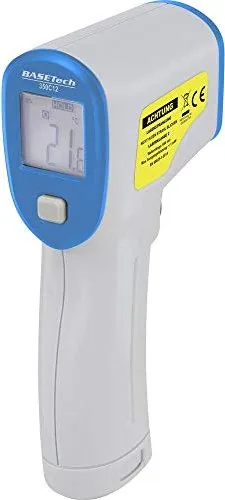
Basetech IR thermometer 350 °C 12:1
Item no. 1586224
Intended use
The infrared thermometer is a measuring device for contactless temperature measurement.
It determines the temperature by infrared energy that is emitted by an object and by its
emissivity. It is especially useful for measuring the temperature of hot, difcult to access or
moving objects. The thermometer measures the surface temperature of an object. It cannot
measure through transparent surfaces such as glass or plastics. The temperature measuring
range is -50 ºC to +350 ºC. A 9 V block battery is required for the voltage supply.
Diagnostic application for medical purposes is not permissible.
For safety and approval purposes, you must not rebuild and/or modify this product. Using the
product for purposes other than those described above may damage the product. In addition,
improper use can cause hazards such as a short circuit or re. Read the operating instructions
carefully and store them in a safe place. Only make this product available to third parties
together with its operating instructions.
This product complies with statutory, national and European regulations. All company and
product names are trademarks of their respective owners. All rights reserved.
Delivery contents
• IR thermometer
• 9 V block battery
• Operating instructions
Up-to-date operating instructions
Download the latest operating instructions at www.conrad.com/downloads or scan the QR code
shown. Follow the instructions on the website.
Explanation of symbols
The symbol with an exclamation mark in a triangle is used to highlight important
information in these operating instructions. Always read this information carefully.
The arrow symbol indicates special information and advice on how to use the
product.
Safety instructions
Read the operating instructions and safety information carefully. If you do
not follow the safety instructions and information on proper handling in
these operating instructions, we will assume no liability for any resulting
personal injury or damage to property. Such cases will invalidate the warranty/
guarantee.
a) General information
• This product is not a toy. Keep it out of the reach of children and pets.
• Do not leave packaging material lying around carelessly. This may become
dangerous playing material for children.
• Protect the product from extreme temperatures, direct sunlight, strong jolts, high
humidity, moisture, ammable gases, vapours and solvents.
• Do not place the product under any mechanical stress.
• If it is no longer possible to operate the product safely, stop using it and prevent
unauthorized use. Safe operation can no longer be guaranteed if the product:
- is visibly damaged,
- is no longer working properly,
- has been stored for extended periods in adverse ambient conditions or
- has been subjected to any serious transport-related stress.
• Always handle the product carefully. Jolts, impacts or a fall even from a low height
may damage the product.
• Consult a technician if you are not sure how to use or connect the product.
• Maintenance, modications and repairs must be done by a technician or a
specialist repair centre.
• If you have questions which remain unanswered by these operating instructions,
contact our technical support service or other technical personnel.

Chat with your Basetech 350C12 manual using AI

Get instant AI answers from your Basetech 350C12 manual

Ask anything about the Basetech 350C12. Answers come from this manual, with the pages they are based on.

Ask a Question

0/1000

Do you recommend 350C12?

Yes No
0
User Pic

Lukas Schmidt

10 months ago

How accurate is the infrared temperature measurement, and can I adjust the emissivity for different materials?

0
User Pic

Manual.ly

10 months ago

The device provides fast, stable readings (often within seconds) and is generally accurate enough for everyday tasks like checking wall, floor, or heating radiator temperatures and spotting cold bridges. Emissivity is fixed (typically set to 0.95), so you cannot adjust it per material in the menu. For most common surfaces this setting works well, but very reflective or unusual materials can reduce accuracy. If you need highly precise results for specific emissivity values, a professional infrared meter with configurable emissivity may be more suitable.

M: OA-GPT-54-NAN
M: OA-GPT-54-NAN

Frequently Asked Questions

A

It measures the surface temperature of an object using infrared energy. It is not designed to measure through transparent materials such as glass or plastic. Expect the displayed value to represent an average over the IR measuring spot.

Is this answer helpful?

A

Ensure the target object is larger than the IR measuring spot. As a rule from the device guidance, the measured object should be at least about twice the spot size. Also aim perpendicular to the surface and keep the lens clean.

Is this answer helpful?

A

"Hi" appears when the measured temperature exceeds +350 C. "Lo" appears when it is below -50 C. Move to a suitable target temperature range or adjust your expectations for what the device can measure.

Is this answer helpful?

A

No. The device uses a fixed emissivity of 0.95 and does not offer emissivity adjustment. For better results on tricky surfaces, avoid direct measurement on very reflective areas or use the recommended tape method for transparent targets.

Is this answer helpful?

A

Use the Mode button setup steps to switch between settings. The target laser can be enabled or disabled, and the LCD backlight can also be toggled. During measurement, the laser operates only when set to on and the trigger is held.

Is this answer helpful?

A

Do not switch the thermometer on immediately. Let it reach room temperature first to avoid condensation on the lens, which can cause incorrect readings or damage over time.

Is this answer helpful?

M: OA-GPT-54-NAN

Advantages and Disadvantages

Advantages

  • Contactless surface temperature measurement from -50 C to +350 C
  • IR spot ratio about 12:1 (D:S) supports accurate aiming with the right distance
  • HOLD function freezes the reading for easier review
  • Backlight and units switch (C/F) improve usability across settings
  • Target laser can be enabled or disabled; auto power-off after inactivity
VS

Disadvantages

  • Emissivity is fixed at 0.95, reducing flexibility for different materials
  • Shiny or reflective surfaces can produce less accurate results
  • Cannot measure through transparent materials like glass or plastic
  • Not suitable for medical diagnostic use
M: OA-GPT-54-NAN

Product Specification

Measuring Range

-58F to +662F

Display

yes

Special Features

Automatic shut-off after 10s

Power Supply

Battery operated (1x 9V block battery)

Weight

0.25 lb

M: GO-GEM-FL-25

Product Description

Basetech 350C12 Infrared Thermometer

If you need fast, contactless temperature checks up to 350 C, the Basetech 350C12 Infrared Thermometer is built for practical everyday use. Using infrared energy and a fixed emissivity setting, it lets you measure hot, moving, or hard-to-reach objects without touching the surface. For best results, follow the Basetech 350C12 Infrared Thermometer Manual guidance on aiming, lens care, and distance-to-spot behavior.

Designed for quick surface readings

The device measures surface temperature (not through transparent materials like glass or plastic). Its measuring range is -50 C to +350 C, with clear on-screen indicators for out-of-range temperatures: "Hi" and "Lo". A scan-style indicator appears while measuring, and the value can be frozen for easy reading using the HOLD function.

Accuracy depends on how you aim

To get dependable numbers, point the infrared sensor and laser outlet as close to perpendicular as possible. The thermometer works best when the target area is large enough for its IR measuring spot. With an IR ratio of about 12:1 (D:S), smaller targets require you to stand closer. Also, keep the sensor lens clean: dust, smoke, or residue can distort the reading.

Handy features for real work

Switch between C and F, and enable or disable the white LCD backlight for visibility in dim areas. The target laser can also be turned on or off, helping you place the measurement on the right spot while the trigger is held. An automatic power-off shuts the device down after about 10 seconds of inactivity to help save battery life.

Safety and limitations to keep in mind

Use the thermometer only in dry environments and avoid strong magnetic or electromagnetic fields. Do not switch it on immediately after moving from cold to warm locations, since condensation on the lens can lead to incorrect measurements. The product is not intended for medical diagnostic use, and emissivity is fixed at 0.95, so shiny or reflective surfaces may be less reliable.

Key highlights (quick results)

  • Measures surface temperature contactlessly from -50 C to +350 C, ideal for hot and hard-to-reach objects.
  • IR measuring spot ratio of about 12:1 (D:S) helps you plan distance for accurate averaging.
  • Fixed emissivity 0.95 means you cannot fine-tune material settings, so reflectivity matters.
  • Laser class 2 target guidance can be enabled or disabled for better aiming control.
  • HOLD and SCAN indicators make it easier to read stable measurements.

Notes

  • For shiny surfaces, consider placing opaque tape on the area and measuring the taped region.
  • Longer high-temperature measurements at close distance can warm the device and reduce accuracy.
  • Remove the 9 V block battery if storing the unit for a long time.
M: OA-GPT-54-NAN

© Copyright 2026 Manual.ly