
Barco ClickShare Conference CX Manual
PDF manual · 98 Pages
English



Quick check
Incorrect answer, please try again.
Chat with your Barco ClickShare Conference CX manual using AI
Get instant AI answers from your Barco ClickShare Conference CX manual
Ask anything about the Barco ClickShare Conference CX. Answers come from this manual, with the pages they are based on.
Ask a Question
Do you recommend ClickShare Conference CX?
Yes NoFrequently Asked Questions
Plug the button into one of the USB ports on the base unit. The base unit LED blinks and the button LED fills a circle during pairing. When the button LED turns green and the base LED turns static white, pairing is complete.
Is this answer helpful?
The device comes with a standard one-year guarantee relating to perfect manufacturing. You can claim five years of coverage via SmartCare by registering the device in XMS Cloud.
Is this answer helpful?
Yes, the device functions without registration. However, registering grants access to five years of warranty and improved cloud features. You must register within six months to activate the package.
Is this answer helpful?
The base unit supports 4K UHD resolution at 30Hz via HDMI Output. It can accept video inputs up to 1920x1080 at 30Hz for HDMI connections.
Is this answer helpful?
Yes, touch screen support and interactivity are available via USB connection to the base unit. A list of supported screens can be found on the manufacturer website.
Is this answer helpful?
The default password is admin for both username and password. You can change this in the security settings or use factory defaults to reset the device to original settings.
Is this answer helpful?
No, cloud integration is not required for basic operation. However, managing configuration via XMS Cloud is preferred for remote administration and monitoring capabilities.
Is this answer helpful?
Advantages and Disadvantages
Advantages

- Instant wireless sharing with dedicated conference buttons for one touch access.
- Supports 4K UHD video resolution for high quality presentations.
- Cloud management through XMS Cloud for remote administration.
- Compatible with multiple operating systems and conferencing platforms.
- Secure encryption protocols including WPA2 for wireless transmissions.
Disadvantages

- Five year warranty requires online registration to XMS cloud.
- Regional power cord variations exist for different countries.
- Mounting screws and plugs not included in the standard box.
- Some updates need manual configuration if network is unavailable.
- Modifications to device hardware void warranty protection claims.
Product Specification
Type
WLAN Adapter/Module
Product Description
Experience Seamless Collaboration
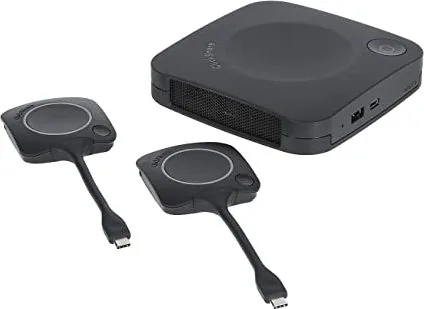
Transform your meeting rooms into hubs of productivity. The Barco ClickShare Conference CX offers a wireless presentation solution that streamlines how teams connect. With its Base Unit and Conference Buttons, users can share content instantly. This setup supports 4K UHD resolution for crisp visuals. It integrates with various operating systems including Windows, macOS, and iOS. The system allows seamless switching between devices without complex wiring.
Installation is straightforward, supporting table or wall mounting options. The Base Unit features a status LED ring indicating connectivity. Network integration via the LAN port ensures stable performance without lag. Users can manage devices through the XMS Cloud for remote administration. Audio support includes echo canceling speakerphones for clear communication. Configuration guidance follows the Barco ClickShare Conference CX Manual standards.
Technical specifications are robust. The Base Unit handles video inputs efficiently. It supports HDMI connections for high-definition displays. Audio transmission is handled via USB or SPDIF sockets. The device consumes minimal power in standby modes to save energy. Environmental conditions must be monitored to ensure longevity and reliability. Dust-free environments are preferred for optimal thermal performance. Security features protect corporate data during sensitive sharing sessions.
Software compatibility is broad across devices. The ClickShare App allows presence detection for automatic room connection. Windows certified drivers load automatically upon button insertion for ease of use. Encryption protocols like WPA2 secure wireless transmissions against threats. The system supports multiple users sharing content sequentially. Touch screen interactivity is enabled for direct control of shared content.
Configuration is managed through a local web interface or cloud platform. Administrators can set SSIDs and manage security levels remotely. The configurator allows personalization of user interfaces to match branding. Wall mounting saves table space for a cleaner organized look. Installation requires specific tools for fixed mounting securely. Always verify power requirements before installation begins to avoid issues.
Warranty conditions require online registration to XMS Cloud services. Users get a standard one-year guarantee plus five years via SmartCare. Modifications to the device void the guarantee claims automatically. Firmware updates improve functionality over time. Regional power cords differ based on the country of purchase.
Radio compliance meets FCC Class B digital device limits. Interference mitigation strategies are outlined for local operation. Ensure compliance with regional wireless transmission regulations to remain in legal bounds. Minimum separation distances are recommended for safety from radio frequency exposure.
The base unit connects to displays using HDMI cables provided separately. No cables are included in the box. You must source appropriate lengths for your setup. Ensure your network supports 1Gbit speeds for best performance.
Registration to XMS Cloud grants access to the device token. This process activates five years of service coverage. You can use the device without registration but lose extended support.
Notes Check compatibility with existing AV peripherals before purchase. Maintain distance between radiators and the device always. Keep serial numbers safe for warranty proof. Use proper cables to prevent interference signals.
Search for 67,732 Manuals online


Type-in Brand or Model