

Bang & Olufsen Beoplay EQ Manual
PDF manual · 24 Pages
English



Quick check
Incorrect answer, please try again.
Chat with your Bang & Olufsen Beoplay EQ manual using AI
Get instant AI answers from your Bang & Olufsen Beoplay EQ manual
Ask anything about the Bang & Olufsen Beoplay EQ. Answers come from this manual, with the pages they are based on.
Ask a Question
Do you recommend Beoplay EQ?
Yes NoFrequently Asked Questions
Turn on the earphones and place them in the charging case for automatic Bluetooth pairing. For manual pairing, press and hold for about six to eight seconds, then select BeoPlay EQ from the Bluetooth list on your device.
Is this answer helpful?
The earphones offer Active Noise Cancellation, Transparency, and Neutral modes. Use a double press to cycle between them. Active Noise Cancellation reduces background distractions, while Transparency allows more outside sound to be heard.
Is this answer helpful?
Yes. The left or right earbud can be used independently for key music and call actions. This can be convenient when you want to keep one ear open to your surroundings.
Is this answer helpful?
Use the touch controls on the earbuds. Double presses can play or pause music and accept or end calls. Press-and-hold gestures are used for volume control, while double presses can also change listening modes.
Is this answer helpful?
BeoPlay EQ includes silicone ear tips in extra small, small, medium, large, and extra large sizes. Comply foam tips are also included, offering another option for users seeking a different fit and feel.
Is this answer helpful?
The Bang & Olufsen app supports product setup and gives access to relevant earphone settings. It is part of the recommended setup process after the earphones are paired with your Bluetooth device.
Is this answer helpful?
Advantages and Disadvantages
Advantages

- Automatic Bluetooth pairing helps simplify initial connection.
- Touch controls support music playback, calls, volume, and listening modes.
- Active Noise Cancellation, Transparency, and Neutral modes add listening flexibility.
- Single-earbud operation supports essential controls with either earbud.
- Multiple silicone sizes and Comply foam tips support a personalized fit.
Disadvantages

- Touch gestures may take time to learn and use consistently.
- Manual pairing requires a long press of approximately six to eight seconds.
- Advanced setup depends on installing the Bang & Olufsen app.
- Listeners may need to test several ear tip sizes to find a secure fit.
Product Specification
Type
In-ear headphones
Form factor
True Wireless, without ear hooks
Design
Closed-back
Microphone
Integrated
Wireless
Bluetooth 5.2, AAC, aptX, aptX Adaptive, Google Fast Pair
Controls
Touch control
Battery life
6.5 h (with ANC), 7.5 h (without ANC), 20 h (with charging case)
Battery
USB-C charging port, charging case (340 mAh), wireless charging (Qi), 2 h charging time, fast charging (20 min for 2 h of playback)
Frequency range
20 Hz-22 kHz
Impedance
17 ohms
Sensitivity
107 dB
Drivers
0.27 in
Device features
Adaptive active noise cancellation (ANC), ambient mode, water-resistant (IP54)
Software features
Equalizer presets, custom equalizer, app control
Weight
0.28 oz (per earbud), 1.76 oz (charging case)
Product Description
Bang & Olufsen BeoPlay EQ - Read, Download & Print Free
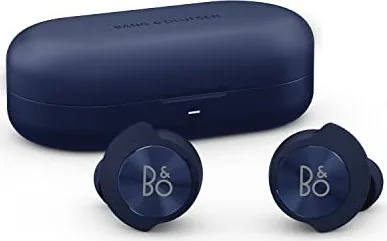
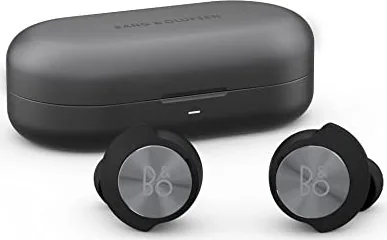
The Bang & Olufsen BeoPlay EQ is a pair of true wireless earphones designed for everyday listening, calls, and flexible sound control. With a compact charging case and touch-based controls on each earbud, it offers a streamlined way to move between music, conversations, and your surroundings.
Quick setup and connection
Getting started is simple. Turn on the earphones, place them in the case, and use automatic Bluetooth pairing to connect them with a compatible device. The Bang & Olufsen app adds another layer of setup, allowing listeners to configure the earphones and access product-related settings.
For manual pairing, press and hold the earphones for approximately six to eight seconds. Once the BeoPlay EQ appears in the Bluetooth list, select it to establish a connection. This is useful when switching to a new phone, tablet, or other Bluetooth-enabled device.
Controls for music and calls
The BeoPlay EQ uses touch gestures to keep core controls close at hand. Double-press controls can play or pause music, accept or end a call, and adjust volume through press-and-hold actions. The earphones also support single-earbud use, so either the left or right earbud can handle essential playback and call actions independently.
A double press can cycle through Active Noise Cancellation, Transparency, and Neutral modes. Active Noise Cancellation is intended to reduce distracting background sound, while Transparency helps bring external sound into the listening experience. Neutral mode provides an option for listeners who prefer a more conventional listening setting.
Fit, charging, and daily use
The included ear tips support a more personalized fit. Silicone tips are available in extra small, small, medium, large, and extra large sizes, while Comply foam tips provide an additional comfort-focused option. Choosing the right tip size can help improve stability and help the earphones feel more secure during daily use.
The charging case stores and recharges the earphones between listening sessions. Keeping the earbuds in the case when they are not in use helps ensure they are ready for the next call, commute, or music session.
Notes
- Use the Bang & Olufsen app for setup and product options.
- Register the product to receive information about software updates and offers.
- Support is available through Bang & Olufsen, including a global English hotline.
- For the best experience, test the supplied ear tips and choose the most comfortable fit.
Search for 67,732 Manuals online


Type-in Brand or Model