
BakkerElkhuizen UltraBoard 960 Manual
PDF manual · 6 Pages
English



Quick check
Incorrect answer, please try again.
Chat with your BakkerElkhuizen UltraBoard 960 manual using AI
Get instant AI answers from your BakkerElkhuizen UltraBoard 960 manual
Ask anything about the BakkerElkhuizen UltraBoard 960. Answers come from this manual, with the pages they are based on.
Ask a Question
Do you recommend UltraBoard 960?
Yes NoFrequently Asked Questions
This keyboard is designed specifically for Windows-based PCs. It may not function correctly on Mac systems due to driver and key mapping differences.
Is this answer helpful?
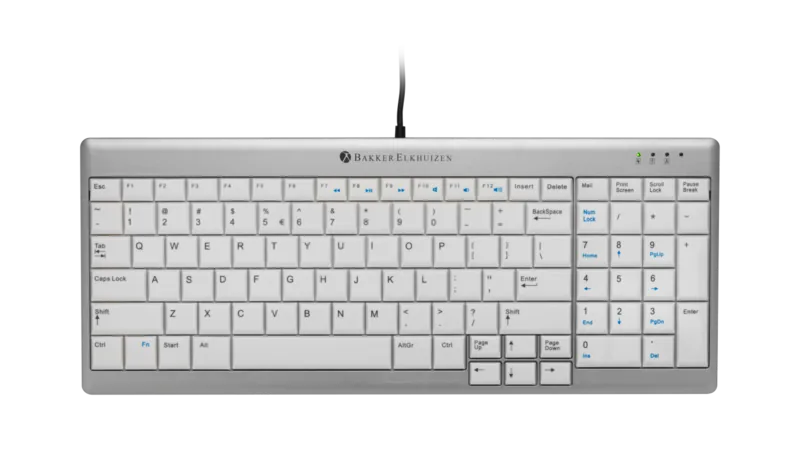
Hold down the Fn key and press the corresponding F7 through F12 keys to access functions like play, pause, mute, and volume control.
Is this answer helpful?
Yes, the UltraBoard 960 features an integrated USB hub with two ports, allowing you to connect other devices directly to the keyboard.
Is this answer helpful?
Yes, the keyboard comes with height-adjustable feet that allow you to change the tilt angle for a more comfortable typing position.
Is this answer helpful?
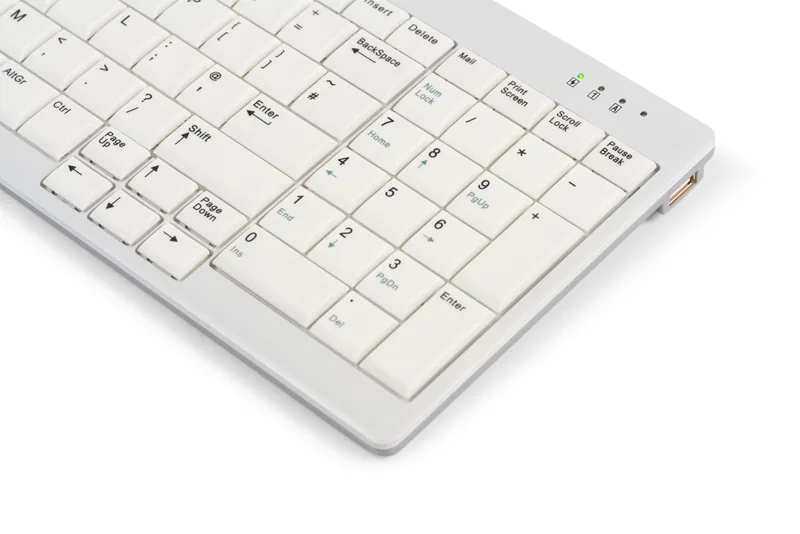
The green LEDs indicate Power status, NumLock activation, and CapsLock activation, providing clear visual feedback on the keyboard's state.
Is this answer helpful?
Advantages and Disadvantages
Advantages

- Ergonomic scissor action keys reduce finger fatigue
- Built-in 2-port USB hub for convenient connectivity
- Height adjustable feet enhance typing posture
- Integrated multimedia keys simplify media control
- Plug-and-play installation requires no manual driver setup
Disadvantages

- Limited to Windows-based PC compatibility
- Wired connection restricts mobility range
- No backlighting mentioned for low-light environments
- Compact layout may require adjustment for some users
- Basic LED indicators only show status not battery level
Product Specification
Layout
DE
Type
Rubber Dome
Lighting
N/A
Keycap Level
regular, with frame, chiclet
Keycap Format
flat
Keycap Dome
concave
Numpad
Standard
Cursor Block
offset
Control Keys
proprietary
F-Keys
Standard (top row, no gap below, ungrouped)
Delete Key
Standard
Status Indicator
Caps Lock, Num, Scroll
Wrist Rest
N/A
Chassis
Plastic
Chassis Color
solid, gray
Keycap Finish
solid, white
Key Label
solid, black
Connection
wired (5.09 ft), USB-A 2.0
Power Supply
USB
Dimensions (WxDxH)
14.3 x 0.75 x 5.8 inches
Weight
1.38 lbs
Features
USB Hub (2x USB-A 2.0), FN Key
Product Description
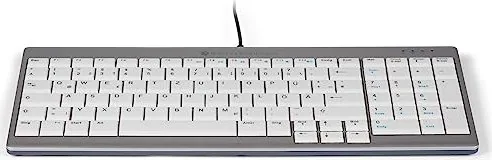
Discover the BakkerElkhuizen UltraBoard 960 Compact Standard USB DE
The BakkerElkhuizen UltraBoard 960 Compact Standard USB DE represents a perfect blend of ergonomic design and functional efficiency for modern workspaces. Designed specifically for Windows-based PCs, this keyboard addresses the common need for space-saving peripherals without compromising on performance or comfort. Its ultra-thin profile makes it an ideal choice for users who value a clean desk setup while maintaining high productivity levels.
One of the standout features of the UltraBoard 960 is its scissor action keys. These keys provide a finger-friendly surface that significantly reduces typing fatigue during extended sessions. The height-adjustable feet allow users to customize the tilt angle, ensuring a natural wrist position that promotes better posture. This attention to ergonomic detail makes the keyboard suitable for both professional environments and home offices where long hours of typing are common.
Connectivity is streamlined through an integrated USB hub with two ports, enabling users to connect additional peripheral devices directly to the keyboard. This feature simplifies cable management and keeps the workspace organized. The keyboard also includes five dedicated shortcut keys such as Mail, Print Screen, and NumLock, alongside integrated multimedia controls. By holding the Fn key and pressing function keys F7 through F12, users can easily manage audio playback, volume levels, and track navigation without interrupting their workflow.
Installation is effortless thanks to the plug-and-play capability. Upon connecting the device via the integrated USB plug, the operating system automatically detects and installs the necessary drivers within seconds. Status LEDs for power, NumLock, and CapsLock provide clear visual feedback, ensuring users are always aware of their keyboard's current state. Whether you are managing spreadsheets or enjoying multimedia content, the BakkerElkhuizen UltraBoard 960 delivers a reliable and comfortable typing experience.
Search for 67,706 Manuals online


Type-in Brand or Model