
BakkerElkhuizen UltraBoard 950 Wireless Manual
PDF manual · 9 Pages
English



Quick check
Incorrect answer, please try again.
Chat with your BakkerElkhuizen UltraBoard 950 Wireless manual using AI
Get instant AI answers from your BakkerElkhuizen UltraBoard 950 Wireless manual
Ask anything about the BakkerElkhuizen UltraBoard 950 Wireless. Answers come from this manual, with the pages they are based on.
Ask a Question
Do you recommend UltraBoard 950 Wireless?
Yes NoFrequently Asked Questions
It is a compact wireless keyboard with a slim profile, adjustable height, and scissor-action keys. It is designed to save space while improving typing comfort and supporting multiple operating systems.
Is this answer helpful?
It is made for Windows and macOS systems, and it also supports iOS and Android layouts through shortcut combinations. Bluetooth support is required on the device you want to connect.
Is this answer helpful?
Turn the keyboard on, select the correct OS mode, choose a host number, and start Bluetooth search on your device. Then press the pairing button and complete the code entry if prompted.
Is this answer helpful?
Yes. The keyboard supports multiple host slots, so you can store several paired devices and switch between them using the Fn key and a host number.
Is this answer helpful?
Low battery power is a common cause. Recharge the keyboard fully, then reconnect it if needed. Also make sure Bluetooth is stable and the correct OS mode is selected.
Is this answer helpful?
If symbol positions appear reversed, use the Fn key with the relevant symbol key to swap them. This helps match regional keyboard layouts more accurately.
Is this answer helpful?
Advantages and Disadvantages
Advantages

- Compact wireless design saves desk space without sacrificing core typing features.
- Scissor-action keys and adjustable height improve comfort for longer work sessions.
- Supports multiple operating systems, including Windows, macOS, iOS, and Android.
- Integrated multimedia keys and host switching add convenience for daily use.
Disadvantages

- Some Bluetooth dongles may not fully support the keyboard, which can complicate pairing.
- Older macOS versions are not officially supported, so compatibility may be limited.
- Initial setup requires several steps, including OS selection and host programming.
- Users may need to recharge the battery regularly to avoid connection issues.
Product Specification
Layout
DE
Type
Rubber Dome
Lighting
N/A
Keycap Level
regular, framed, Chiclet
Keycap Format
flat
Keycap Profile
straight
Numeric Keypad
N/A
Cursor Block
offset
Control Keys
proprietary
F-Keys
Standard (below multimedia keys, no spacing below, ungrouped)
Delete Key
Standard
Status Indicator
Caps Lock, Num Lock, Scroll Lock
Palm Rest
N/A
Housing
Plastic
Connection
wireless (Bluetooth)
Power Supply
Battery
Dimensions (WxHxD)
11.22x0.75x5.79 in
Weight
0.95 lb
Special Features
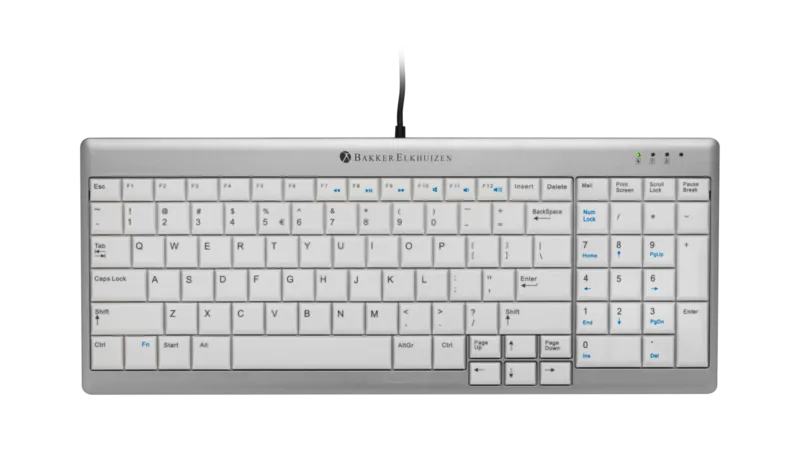
4 multimedia keys, Bluetooth connections switchable by button, FN key
Product Description
BakkerElkhuizen UltraBoard 950 Wireless: Compact Comfort for Everyday Typing
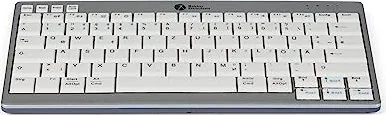
The BakkerElkhuizen UltraBoard 950 Wireless, Bluetooth, German Manual highlights a keyboard built for users who want a cleaner desk and a more comfortable typing experience. This compact wireless model is designed for Windows and macOS environments, while also supporting iOS and Android layouts through simple key combinations. Its space-saving format makes it a practical choice for anyone who needs full functionality without the bulk of a traditional keyboard.
What makes the UltraBoard 950 Wireless appealing is its focus on comfort. The scissor-action keys are designed with a finger-friendly surface, helping reduce fatigue during longer typing sessions. The keyboard is also ultra-thin and height adjustable, which can improve wrist position and overall ergonomics. For people who switch between devices, the integrated host memory and easy Bluetooth pairing make it especially flexible in a multi-device setup.
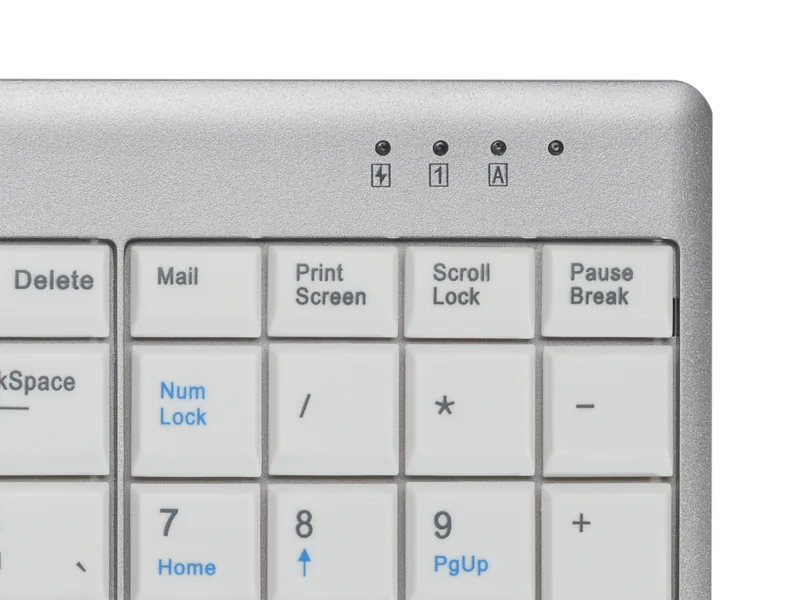
Beyond typing comfort, this keyboard includes useful everyday shortcuts. Multimedia keys offer quick access to volume, playback, and navigation controls, while the numpad function is cleverly integrated to save space. The status LEDs provide clear feedback for power, charging, caps lock, and num lock, so it is easy to keep track of what the keyboard is doing at a glance. The rechargeable battery also adds convenience and reduces the need for disposable batteries.
Setup is straightforward, but it does reward a little attention. A full charge before first use is recommended, and pairing involves selecting the correct operating system mode, choosing a host slot, and confirming the Bluetooth connection. Once paired, the keyboard can be switched between stored devices using the Fn key and host numbers, which is handy for people who work across a laptop, tablet, or desktop.
Overall, the UltraBoard 950 Wireless is a smart blend of compact design, wireless freedom, and practical shortcuts. It suits office users, home workers, and anyone looking for a neat, efficient keyboard that supports different operating systems without giving up comfort.
Notes
- Best for users who value portability and desk space.
- Check Bluetooth compatibility before pairing, especially with older adapters.
- The German layout includes special symbol support through Fn-based adjustments.
- macOS support is good, though older versions may need extra care.
Search for 67,706 Manuals online


Type-in Brand or Model