
BakkerElkhuizen S-board 840 Manual
PDF manual · 4 Pages
English


Quick check
Incorrect answer, please try again.
Chat with your BakkerElkhuizen S-board 840 manual using AI
Get instant AI answers from your BakkerElkhuizen S-board 840 manual
Ask anything about the BakkerElkhuizen S-board 840. Answers come from this manual, with the pages they are based on.
Ask a Question
Do you recommend S-board 840?
Yes NoFrequently Asked Questions
It is designed to support comfortable desk work by reducing the distance to the mouse and encouraging a more natural arm and shoulder posture.
Is this answer helpful?
Yes. It includes two USB ports that can be used for a mouse or another USB device, with a total limit of 500 mA.
Is this answer helpful?
It includes multimedia and productivity shortcuts such as open, save, print, copy, paste, play or pause, mute, and browser-related commands.
Is this answer helpful?
Yes, especially for users who value a compact layout and want less reaching between typing and mouse use. Comfort can vary by person, but the design is aimed at reducing strain.
Is this answer helpful?
The manual content is presented in English, Dutch, and German, which suggests broad usability across different office environments.
Is this answer helpful?
Yes. It references keys and combinations for NumLock, ScrollLock, Print Screen, Page Up, Page Down, Home, End, and related functions.
Is this answer helpful?
Advantages and Disadvantages
Advantages

- Compact layout reduces mouse reach and can support a more natural shoulder position.
- Two built-in USB ports add convenient connectivity for a mouse or light accessory.
- Multimedia and shortcut keys speed up common actions like copy, paste, print, and mute.
- Navigation and function key combinations help with everyday productivity tasks.
Disadvantages

- Compact design may feel smaller than users expect from a traditional full-size keyboard.
- USB ports have a combined 500 mA limit, so they are not meant for power-hungry devices.
- Shortcut-heavy layout may take some time to memorize.
- Right-side mouse positioning may not suit every left-handed workflow equally well.
Product Specification
Layout
US
Type
Rubber Dome
Lighting
N/A
Keycap level
regular, with frame
Keycap format
flat
Keycap profile
straight
Numpad
N/A
Cursor block
offset
Control keys
proprietary
F-keys
Standard (below multimedia keys, spaced downwards, ungrouped)
Delete key
Standard
Status indicator
Capslock, Num, Scroll
Palm rest
N/A
Case
Plastic
Case color
multicolored, silver (Position: top), black (Position: side)
Keycap finish
multicolored, black/silver
Key legends
monochrome, black
Connection
wired (59.06 in), USB-A 2.0
Power supply
USB
Dimensions (WxHxD)
12.01x0.79x6.50in
Weight
1.06 lb
Special features
12 multimedia keys, USB-Hub (2x USB-A 2.0), FN-key
Product Description
BakkerElkhuizen S-board 840, USB, US Manual
Compact comfort for everyday typing
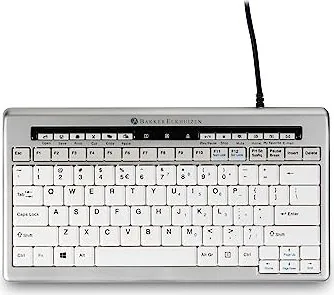
The BakkerElkhuizen S-board 840 is a compact USB keyboard designed for people who want a cleaner desk layout and a more natural working position. Its reduced width brings the mouse closer to the body, which can help limit unnecessary reaching during long typing sessions. For office users, students, and home workers alike, that small change can make daily computer work feel more relaxed and efficient.
A smarter way to place the mouse
What makes the S-board 840 stand out is its ergonomic focus. Because the keyboard takes up less horizontal space, the mouse can sit directly in front of the right shoulder instead of being pushed far to the side. That positioning supports a better posture for the arm and shoulder and may reduce strain over time. It is a simple idea, but one that fits well into modern workspaces where comfort and productivity need to work together.
Practical features that support productivity
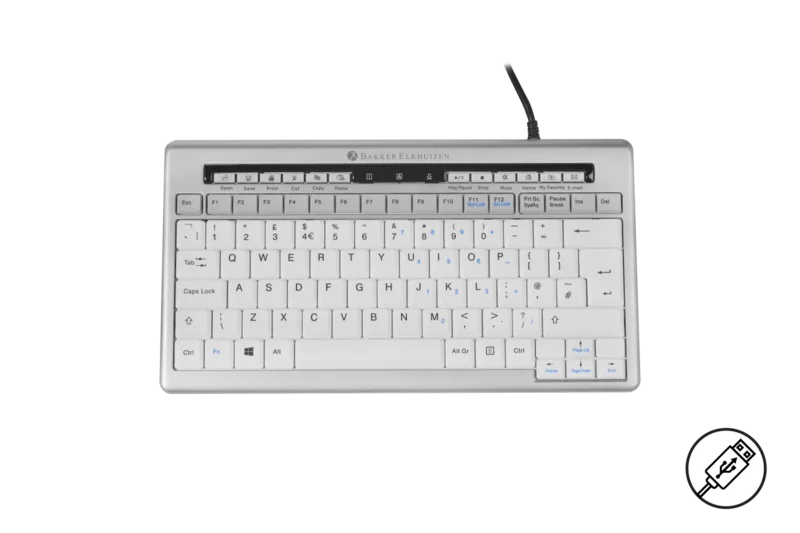
Beyond comfort, the keyboard adds useful everyday convenience. Two USB ports are built into the design, making it easy to connect a mouse or another USB accessory without reaching for a separate hub. The total power limit of 500 mA keeps those ports suited to light peripherals, which is ideal for common desk setups. The S-board 840 also includes multimedia and shortcut keys for actions such as open, save, print, copy, paste, play or pause, mute, and browser-related commands. These shortcuts can help speed up routine tasks and reduce repetitive mouse clicks.
Designed for fast learning and broad use
The BakkerElkhuizen S-board 840, USB, US Manual also highlights navigation and function combinations such as NumLock, ScrollLock, Print Screen, Page Up, Page Down, Home, and End. That makes the keyboard useful not only for general typing, but also for users who move through documents, spreadsheets, and systems menus often. The multilingual guidance reflected in the manual content shows that the product is intended for a wide range of workplace environments.
Final thoughts
If you are looking for a compact keyboard that balances ergonomic thinking with practical shortcuts, the S-board 840 is a strong option. It does not try to be flashy; instead, it focuses on improving day-to-day comfort, keeping the workspace tidy, and making common actions easier to access.
Notes
- Compact size helps reduce mouse reach.
- Two USB ports add useful desk-side convenience.
- Shortcut keys support faster daily workflows.
Search for 67,706 Manuals online


Type-in Brand or Model