
BakkerElkhuizen S-board 840 Numpad Manual
PDF manual · 4 Pages
English



Quick check
Incorrect answer, please try again.
Chat with your BakkerElkhuizen S-board 840 Numpad manual using AI
Get instant AI answers from your BakkerElkhuizen S-board 840 Numpad manual
Ask anything about the BakkerElkhuizen S-board 840 Numpad. Answers come from this manual, with the pages they are based on.
Ask a Question
Do you recommend S-board 840 Numpad?
Yes NoFrequently Asked Questions
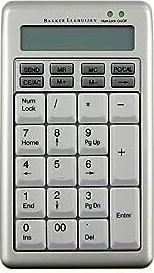
First, connect the keypad to a USB port on your computer. Once the system recognizes the hardware, press the CE/ACK button to activate the device and enter either keypad or calculator mode.
Is this answer helpful?
If there is no activity for 10 minutes, the keypad will automatically enter a sleep mode to save energy. You can restart it instantly by pressing the CE/ACK button.
Is this answer helpful?
Yes, the keypad has a calculator mode where it can perform basic arithmetic independently. However, advanced features like sending results to a host require a USB connection.
Is this answer helpful?
Absolutely. It includes memory registers that allow you to store numbers, add results to memory (M+), subtract from memory (M-), and clear the memory entirely.
Is this answer helpful?
Yes, it uses a standard USB connection which is universally supported by Windows, macOS, and Linux operating systems without needing additional drivers.
Is this answer helpful?
Advantages and Disadvantages
Advantages

- Dual-mode operation allows switching between numeric keypad and standalone calculator functions
- Automatic sleep mode after 10 minutes of inactivity saves energy effectively
- Compact and lightweight design makes it highly portable for travel
- Direct data transfer capability sends calculation results straight to the host computer
Disadvantages

- No built-in rechargeable battery; requires constant USB connection for power
- Limited key set compared to a full-sized external numeric pad
- No dedicated volume or media control keys unlike some multimedia keyboards
Product Specification
Type
Numpad
Compatibility
PC, Mac OS
Key Type
Rubber Dome
Keys
26
Lighting
N/A
Key Height
Straight
Key Shape
Flat
Wrist Rest
N/A
Case
Plastic
Connection
Wired (3.6 ft), USB
Power Supply
USB
Dimensions (WxHxD)
3.74x0.87x6.06 in
Weight
4.23 oz
Features
Calculator, Display, 00 key
Product Description
The BakkerElkhuizen S-board 840 Numpad: Precision and Portability
The BakkerElkhuizen S-board 840 Numpad is a versatile accessory designed to enhance productivity for professionals who require accurate data entry. This USB numeric keypad bridges the gap between standard laptop keyboards and full-sized desktop setups, offering a compact yet powerful solution for accountants, engineers, and students. Whether you are balancing ledgers or performing complex calculations, this device ensures your workflow remains uninterrupted.
Designed with the user in mind, the keypad features a dual-mode functionality that allows it to switch seamlessly between a standard numeric input mode and a dedicated calculator mode. In calculator mode, the device acts as an independent tool, handling memory operations like adding results to memory (M+) or subtracting from it (M-). When connected to a computer, it functions as an efficient extension of your keyboard, sending calculation results directly to the host system via the SEND function. This flexibility makes it an ideal companion for tasks requiring both quick arithmetic and precise data transmission.
One of the standout features of the S-board 840 is its intelligent power management. To conserve energy during periods of inactivity, the keypad automatically enters a sleep mode after ten minutes of non-use. Reactivating the device is effortless; simply press the CE/ACK button to wake it up and resume your work immediately. This feature not only extends the lifespan of the hardware but also aligns with eco-friendly computing practices.
The physical design prioritizes ergonomics and portability. With a slim profile and lightweight construction, it fits easily into any bag without adding significant bulk. The layout is optimized for speed, featuring clearly marked keys for essential functions such as backspace, clear memory, and transfer operations. The build quality reflects BakkerElkhuizen's reputation for durable office equipment, ensuring reliable performance even under heavy daily use.
Important Notes
- The device supports multiple language layouts including US, UK, DE, BE, and FR.
- It connects via a standard USB port, making it compatible with most modern computers.
- The sleep mode can be bypassed by pressing the CE/ACK button at any time.
- Ideal for users who need frequent access to numerical data without a full-size keyboard.
Search for 67,706 Manuals online


Type-in Brand or Model