
BakkerElkhuizen M-board 870 Manual
PDF manual · 4 Pages
English



Quick check
Incorrect answer, please try again.
Chat with your BakkerElkhuizen M-board 870 manual using AI
Get instant AI answers from your BakkerElkhuizen M-board 870 manual
Ask anything about the BakkerElkhuizen M-board 870. Answers come from this manual, with the pages they are based on.
Ask a Question
Do you recommend M-board 870?
Yes NoFrequently Asked Questions
You can pair and switch between up to eight different Bluetooth devices simultaneously using the host select key and number keys.
Is this answer helpful?
Yes, it works with Windows-based PCs. Ensure your computer has Bluetooth enabled or use an external Bluetooth receiver for pairing.
Is this answer helpful?
Simply go to your device's Bluetooth settings menu and select the option to forget or delete the listing for the Bluetooth mini keyboard.
Is this answer helpful?
The mini-display indicates the active device number corresponding to the channel selected via the host select key and number keys.
Is this answer helpful?
Absolutely. The keyboard supports Apple iPads and iPhones, allowing you to pair them easily through the standard Bluetooth settings menu.
Is this answer helpful?
Advantages and Disadvantages
Advantages

- Ergonomic design reduces arm and shoulder strain by allowing closer mouse positioning.
- Multi-host support enables switching between up to 8 different Bluetooth devices effortlessly.
- Mini-display window provides clear visual confirmation of the active connection channel.
- Compatible with all major platforms including iOS, Android, macOS, and Windows.
- Compact layout saves desk space while maintaining full functionality.
Disadvantages

- Requires a separate Bluetooth receiver if the computer does not have built-in Bluetooth.
- No dedicated media control keys for quick volume or playback adjustments.
- Battery life may vary depending on usage frequency and backlight settings.
- Pairing process requires manual entry of codes which can be slightly time-consuming.
- Limited key customization options compared to high-end mechanical keyboards.
Product Specification
Layout
DE
Type
Rubber Dome
Lighting
N/A
Keycap Level
regular, with frame, chiclet
Keycap Format
flat
Keycap Crown
straight
Numpad
N/A
Cursor Block
offset
Control Keys
N/A
Delete Key
Standard
Wrist Rest
N/A
Housing
Plastic
Connection
Wireless (Bluetooth)
Power Supply
2x AA
Dimensions (WxDxH)
11.26x0.79x5.2 inches
Weight
13 oz
Features
Switchable Bluetooth connections via button, FN key, CMD key (Mac layout)
Product Description
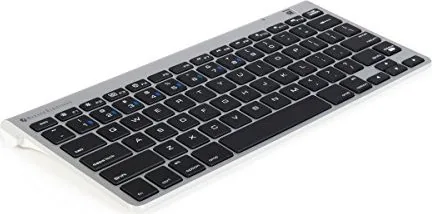
Elevate Your Workspace with the BakkerElkhuizen M-board 870 Bluetooth DE
The BakkerElkhuizen M-board 870 Bluetooth DE represents a significant leap forward in ergonomic computing accessories. Designed specifically for users who value both comfort and efficiency, this compact keyboard redefines how we interact with our devices. By reducing the physical distance required to reach a mouse, it encourages a more natural body posture, alleviating strain on the right arm and shoulder during extended work sessions.
One of the standout features of this device is its multi-host capability. Users can seamlessly switch between up to eight different Bluetooth devices using the dedicated host select button and number keys. The integrated mini-display window provides instant visual feedback, clearly indicating which device is currently active. This functionality makes it an ideal tool for professionals managing multiple operating systems, including iOS, Android, macOS, and Windows.
Setting up the M-board 870 is a straightforward process regardless of your platform. Whether you are pairing with an iPhone, an Android tablet, a Mac computer, or a Windows PC, the steps remain consistent yet intuitive. Simply turn on the device, hold the host select key while choosing a channel, and follow the on-screen prompts to establish a secure connection. The keyboard even guides you through a pairing code verification step to ensure a stable link before confirming the connection.
Beyond its connectivity prowess, the M-board 870 prioritizes user health. Its compact form factor allows the mouse to be positioned closer to the user's centerline, promoting better alignment of the upper body. This thoughtful design helps prevent repetitive strain injuries and supports long-term wellness in the office environment. It is a versatile solution that adapts to various workflows while maintaining a sleek and professional aesthetic.
Key Notes
- Supports up to 8 simultaneous Bluetooth connections.
- Features a mini-display for easy device status monitoring.
- Compatible with major operating systems including iOS, Android, Mac, and Windows.
Search for 67,706 Manuals online


Type-in Brand or Model