


BakkerElkhuizen Goldtouch Go!2 Travel Manual
PDF manual · 3 Pages
English



Quick check
Incorrect answer, please try again.
Chat with your BakkerElkhuizen Goldtouch Go!2 Travel manual using AI
Get instant AI answers from your BakkerElkhuizen Goldtouch Go!2 Travel manual
Ask anything about the BakkerElkhuizen Goldtouch Go!2 Travel. Answers come from this manual, with the pages they are based on.
Ask a Question
Do you recommend Goldtouch Go!2 Travel?
Yes NoFrequently Asked Questions
No, the Goldtouch Go!2 Travel Keyboard uses Plug and Play technology. You do not need to install any additional drivers. The operating system automatically installs the proper drivers once the device is connected via USB.
Is this answer helpful?
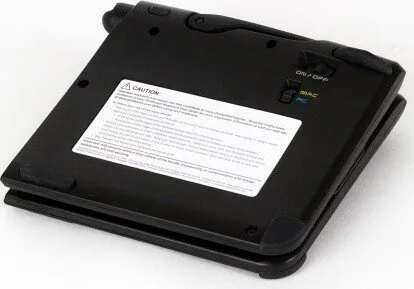
You can select your operating system by adjusting the switch located on the back of the keyboard. The device defaults to PC mode. Simply toggle the switch to match your computer before connecting via USB.
Is this answer helpful?
No. You should never place any lubrication or cleaning fluid in the ball joint. Attempting to do so will void your warranty protection immediately. Keep the mechanism clean and dry for proper function.
Is this answer helpful?
Your keyboard will operate best in temperatures between minus 5 degrees Celsius and 50 degrees Celsius, which is 23 degrees Fahrenheit to 122 degrees Fahrenheit. Do not subject the keyboard to extremes outside this range.
Is this answer helpful?
Keep the surface clean by wiping with a soft cloth that is dampened with a mild cleaning solution, preferably water and mild soap. Avoid getting it wet or using undue force to operate the keys.
Is this answer helpful?
Release the locking mechanism by pulling the handle away from the keyboard first. This allows for full adjustment on both horizontal and vertical planes. Once set, close the handle to lock the segments in place securely.
Is this answer helpful?
Advantages and Disadvantages
Advantages

- Plug and Play technology supports quick setup without additional drivers.
- Adjustable segments allow personalized ergonomic positioning for maximum comfort.
- PC and Mac mode switch enables broad compatibility with different systems.
- Durable handle mechanism locks segments securely during transport and use.
- Cleaning is simple with a damp cloth and mild soap solution.
Disadvantages

- Lubricating ball joints invalidates the warranty protection immediately.
- Operating range is restrictive to temperatures between minus 5 and 50 Celsius.
- Users must remember to release the latch before adjusting segments.
- Dropping or exposure to water can damage internal electronic components.
- Requires all four feet to contact surface for proper function.
Product Specification
Layout
US
Type
Rubber Dome
Lighting
N/A
Keycap Level
Regular, with frame
Keycap Shape
Flat
Keycap Dome
Straight
Numpad
N/A
Cursor Block
Separate
Control Keys
Proprietary
Enter Key
Shortened
Delete Key
Standard
Status Indicators
Caps Lock, Num Lock, Scroll Lock
Wrist Rest
N/A
Housing
Plastic
Connection
Wireless (Bluetooth)
Power Source
Battery
Dimensions (WxHxD)
13.50 x 0.91 x 5.98 inches
Weight
1.10 lbs
Features
FN Key, ergonomic, foldable
Product Description
Ergonomic Travel Solutions
Travel professionals and remote workers require equipment that adapts to their environment without compromising comfort. The BakkerElkhuizen Goldtouch Travel Go2, Bluetooth, US Manual reflects commitment to ergonomic health during road usage. This keyboard stands out for unique design philosophy, prioritizing flexibility where standard models fail. It integrates seamlessly into your existing workflow, ensuring productivity remains high regardless of your changing location or workspace setup.
Setup Made Simple
Getting started does not involve complex or lengthy procedures typical of legacy hardware. This device utilizes advanced Plug and Play technology, eliminating the need for cumbersome third-party driver installations on most modern systems. Users simply adjust the physical switch on the back casing to select PC or Mac mode specifically. Once connected via USB, your current operating system typically recognizes the hardware immediately as a standard input device. This straightforward approach saves significant time during initial configuration phases and reduces technical hurdles.
Customized Comfort Settings
Adjustability is the core feature that defines this innovative input device for the modern user. Users can release the locking mechanism by pulling the handle away from the chassis deliberately. This allows for a full adjustment range within both horizontal and vertical planes for each specific segment individually. Finding the perfect ergonomic position ensures reduced strain on wrists during long typing sessions throughout the day. Lock segments firmly by closing the handle to maintain total stability during use.
Maintenance Requirements
Proper care and attention extend the useful life of your electronic investment significantly over time. Avoid exposing the unit to any moisture or extreme temperatures strictly between minus 5 and 50 degrees Celsius. Cleaning should involve a soft cloth dampened with mild soap and water only occasionally. Never attempt to lubricate the internal ball joints yourself as a user. Doing so can void your warranty protection immediately without exception. Always check that no foreign objects are trapped between the latch handle during operation.
Important Warning
Do not force the keys or operate the latch handle with undue force. Ensure fingers are clear when closing. For video demonstrations visit the official website. This ensures safe operation and prevents mechanical issues.
Conclusion
Investing in quality hardware enhances your daily remote work experience significantly. This model offers versatility for both Windows and Apple ecosystems. By following the maintenance guidelines found in the BakkerElkhuizen Goldtouch Travel Go2, Bluetooth, US Manual, users ensure longevity. Comfort and reliability define this premium peripheral choice for modern remote work environments.
Search for 67,706 Manuals online


Type-in Brand or Model