
BakkerElkhuizen Evoluent 4 Small Wireless Manual
PDF manual · 8 Pages
English



Quick check
Incorrect answer, please try again.
Chat with your BakkerElkhuizen Evoluent 4 Small Wireless manual using AI
Get instant AI answers from your BakkerElkhuizen Evoluent 4 Small Wireless manual
Ask anything about the BakkerElkhuizen Evoluent 4 Small Wireless. Answers come from this manual, with the pages they are based on.
Ask a Question
Do you recommend Evoluent 4 Small Wireless?
Yes NoFrequently Asked Questions
This mouse uses a vertical design that keeps your hand in a neutral handshake position. Standard mice force the wrist into a pronated twist which causes strain over time. By using this model you reduce pressure on the forearm tendons. The ergonomic posture allows for longer work sessions without discomfort or pain.
Is this answer helpful?
You should download the Evoluent Mouse Manager from the BakkerElkhuizen website. It supports both Windows and Mac operating systems. Remove any previous mouse software before installing to avoid conflicts. This driver unlocks custom button mapping and speed settings.
Is this answer helpful?
Yes the button functions are programmable with the optional driver software. You can assign commands like copy paste or launch applications to specific keys. The thumb buttons and scroll wheel can be reconfigured for different apps. This flexibility allows you to tailor the device to your workflow needs.
Is this answer helpful?
Use the plus and minus buttons located on the side of the mouse. These physical controls change the pointer speed instantly without software. You can switch between two or three speeds using keyboard combinations as defined in the driver settings.
Is this answer helpful?
Yes the device supports Mac and Windows operating systems. You must download the specific version from the official website for installation. The driver ensures compatibility with the macOS environment for full feature access.
Is this answer helpful?
Disable the primary and secondary button swap option in the system settings. Also enable the enhance pointer precision feature for accurate tracking. These changes are mandatory for the mouse to operate correctly and feel natural to the user.
Is this answer helpful?
Advantages and Disadvantages
Advantages

- Ergonomic vertical design reduces wrist strain by promoting a neutral handshake posture.
- Wireless connectivity eliminates cable clutter for a cleaner workspace environment.
- Programmable buttons allow customization of commands via the Mouse Manager software.
- Physical speed adjustment keys offer instant control over cursor sensitivity levels.
- Compact small size fits well on smaller desks or laptop setups efficiently.
Disadvantages

- Large hands may find the small form factor too restrictive for comfortable use.
- Full functionality requires installing separate drivers and software packages first.
- Vertical orientation requires an adjustment period to learn new movement patterns.
- Windows settings must be changed manually to enable pointer precision correctly.
- Wireless connection may need batteries or charging which adds maintenance overhead.
Product Specification
Handedness
Right Hand
Buttons
7 (total), 3 (main), 2 (top), 2 (left)
Scroll Wheel
1x 2-Way
Sensor
Red LED/IR
Resolution
2600 dpi, adjustable to 1800/1300/800 dpi
Connection
wireless (2.40GHz), USB-A (USB-A Receiver)
Dimensions (WxHxD)
3.11 x 2.91 x 3.98 inches
Approximate Volume
9.46 cubic inches (approximate shape)
Weight
6.14 oz
Features
Thumb rest
Product Description
Discovering Ergonomics with the BakkerElkhuizen Evoluent 4 Vertical Mouse
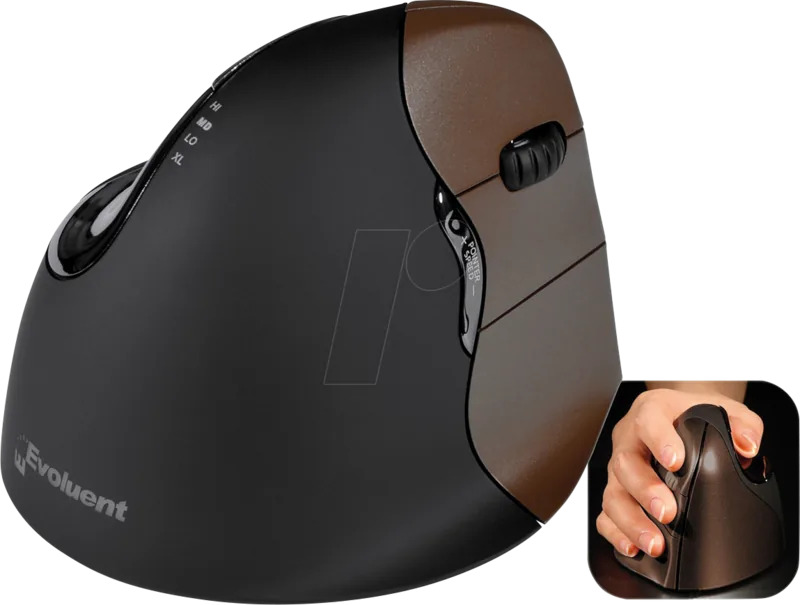
The Evoluent 4 Vertical Mouse Small Wireless from BakkerElkhuizen represents a significant leap in ergonomic computing accessories designed for modern professionals. Using a standard mouse often forces your hand into an unnatural twisted position where the palm faces down. This causes long term strain on the wrist joint and forearm muscles. This device changes that dynamic by utilizing a specialized vertical design. It keeps your hand in a neutral handshake posture similar to a standing greeting. This neutral stance significantly minimizes repetitive strain syndromes and keeps work sessions comfortable for hours. The wireless design offers great freedom from cables cluttering your desk space and allows for cleaner setups.
Setup involves careful Windows settings changes before connecting the hardware. You must disable the primary secondary swap option in the control panel settings. Enable the pointer precision option to ensure smooth tracking accuracy. This step is mandatory for optimal performance and feel during use. Drivers allow deep customization of button functions via the optional manager software. The software enables mapping of keys to specific commands like copy or paste. Speed adjustment is handled via physical side keys on the device surface. You can switch speed intervals instantly while working without touching the screen. The wizard appears when you plug in the usb connector immediately. Select show me all drivers for the best installation path. Click the Ergonomic option to finalize the connection process.
The small form factor is ideal for limited desk space or laptop users. It suits users who prefer a compact grip without sacrificing advanced functionality. Installation requires downloading the manager tool for full features from the provided link. The tool supports both Windows and Mac operating systems for broad compatibility. Download the file and uninstall conflicting mouse software first to prevent errors. Clean removal ensures the new driver takes precedence without system conflicts. This mouse suits productivity focused users who value health and efficiency above all. Combine it with a compact keyboard for a full ergonomic setup to reduce arm load. The BakkerElkhuizen website provides further support and driver downloads for troubleshooting. Upgrade your workstation today for a more comfortable experience and better health outcomes. Avoid physical pain with this smart technological solution for office environments.
Note on Usage
Use this mouse with a compact keyboard to minimize strain on your entire arm. Further details regarding ergonomics are available on the official BakkerElkhuizen web portal. Check for driver updates regularly to ensure compatibility with your system.
Search for 67,706 Manuals online


Type-in Brand or Model