

Azio MGK-L80 RGB Manual
PDF manual · 20 Pages
English



Quick check
Incorrect answer, please try again.
Chat with your Azio MGK-L80 RGB manual using AI
Get instant AI answers from your Azio MGK-L80 RGB manual
Ask anything about the Azio MGK-L80 RGB. Answers come from this manual, with the pages they are based on.
Ask a Question
Do you recommend MGK-L80 RGB?
Yes NoFrequently Asked Questions
No. It is designed for plug-and-play use through USB, so the keyboard installs the needed drivers automatically. Lighting, hotkeys, and basic functions can be handled directly from the keyboard.
Is this answer helpful?
It uses Kailh Brown mechanical switches. These provide tactile feedback without the loud click of a fully clicky switch, making them a balanced option for both gaming and typing.
Is this answer helpful?
The keyboard includes six lighting modes. They cover effects like spectrum cycling, wave, splash, reactive lighting, marquee movement, and a custom mode for key-by-key color control.
Is this answer helpful?
Yes. The MGK L80 supports four programmable macro keys. Recording is done on the keyboard itself, and macro use is enabled in Gaming Mode without needing extra software.
Is this answer helpful?
Gaming Mode disables the Windows key to reduce accidental presses during play. It also enables the macro key functions, letting you record and trigger the F1 to F4 macro keys.
Is this answer helpful?
Yes. The keyboard comes with a magnetic detachable palm rest. It can improve wrist comfort during long sessions and can be removed when you want a more compact setup.
Is this answer helpful?
Advantages and Disadvantages
Advantages

- Plug-and-play USB setup makes it easy to start using without installing software.
- Kailh Brown switches offer tactile feedback with less noise than clicky switches.
- RGB backlighting includes six modes plus direct brightness and speed adjustments.
- Four macro keys can be recorded on the fly in Gaming Mode for faster control.
- Magnetic detachable palm rest and aluminum faceplate add comfort and a premium feel.
Disadvantages

- Macros are tied to Gaming Mode, so they are not always available in normal use.
- USB wired design limits placement flexibility compared with wireless keyboards.
- Official support is focused on older and current Windows versions, not broader platforms.
- Customization is convenient, but it is hardware-based rather than deep software-based editing.
Product Specification
Layout
US
Type
mechanical
Switch designation
Kailh BROWN
Lighting
RGB
Keycap level
raised, frameless
Keycap format
regular
Keycap profile
concave
Numeric keypad
Standard
Cursor block
Standard
Control keys
Standard
Enter key
shortened
Delete key
Standard
Status indicator
Capslock, Num, Scroll
Palm rest
modular
Case
Metal
Connection
wired (5.91ft), USB-A 2.0
Power supply
USB
Dimensions (WxHxD)
17.52x1.38x5.39in
Weight
2.34lb
Features
1x volume rotary control (rotary knob, top right), Anti-Ghosting (N-Key-Rollover), FN key
Switch manufacturer
Kailh
Switch model
BROWN
Switch characteristic
tactile
Contact feedback
without
Damping
without
Actuation force
0.11lbf (+/-0.02lbf tolerance) ~ 0.11lbf (+/-0.02lbf tolerance)
Key travel
0.16in (+/-0.06in tolerance)
Tactile force
0.13lbf (+/-0.02lbf tolerance) ~ 0.13lbf (+/-0.02lbf tolerance)
Pre-travel
0.07in (+/-0.06in tolerance)
Lifespan
50 million
Product Description
Azio MGK L80 RGB Gaming Keyboard Review
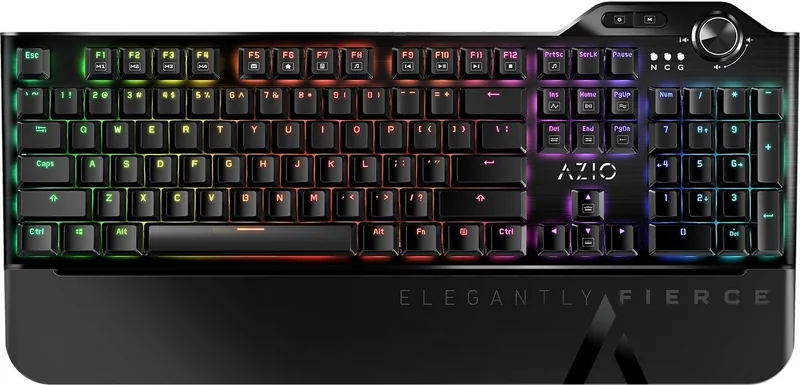
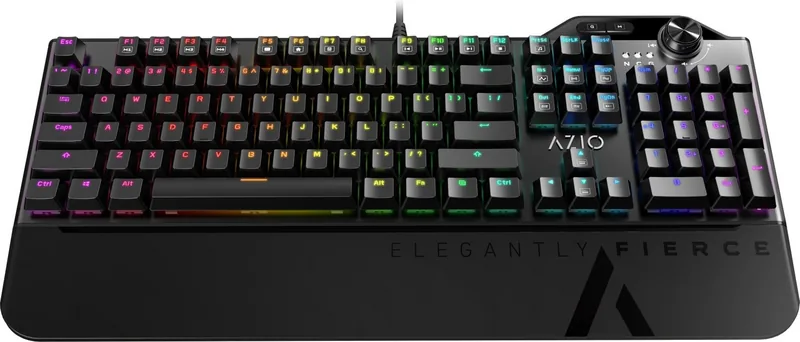
The Azio MGK L80 RGB Gaming Keyboard, black, Kailh Brown, USB, US Manual is built for players who want a mechanical keyboard that feels solid, looks refined, and stays easy to use. It combines RGB lighting, hardware-based controls, and a durable aluminum faceplate into a package that feels ready for both gaming and everyday typing.
This keyboard focuses on simplicity. Instead of relying on extra software, it offers plug-and-play setup over USB, so you can connect it and start using it right away. That makes it appealing for users who want a clean setup without driver headaches. The full-size layout includes handy media and productivity shortcuts, plus four macro keys that can be recorded on the fly in Gaming Mode.
The Kailh Brown switches give the MGK L80 a tactile feel without the loud click of traditional clicky switches. That makes it a good fit for mixed use: responsive enough for fast-paced games, yet comfortable enough for long typing sessions. Full N-Key Rollover through USB also helps ensure that multiple key presses register accurately, even during intense gameplay.
Lighting and Customization
One of the most attractive features is the RGB backlighting. The keyboard includes six lighting modes, such as spectrum cycling, wave, splash, reactive, marquee, and custom mode. Brightness and animation speed can be adjusted directly from the keyboard, which keeps customization quick and practical.
The custom mode adds extra personality by letting users assign colors to individual keys. For gamers, that can be useful for highlighting key bindings or creating a more personal setup. The magnetic detachable palm rest adds comfort and gives the keyboard a more complete, premium feel.
Everyday Use and Gaming Comfort
Beyond the visuals, the MGK L80 is designed to be useful day to day. Dedicated hotkeys provide fast access to media playback, web browsing, email, calculator, and search functions. The aluminum top plate adds stability, while the braided USB cable and full-size frame reinforce the sense of durability.
Notes
- Gaming Mode disables the Windows key to help prevent accidental interruptions.
- Macro keys are designed for quick recording and use without installing extra software.
- The included US manual supports straightforward setup and function reference.
Search for 67,732 Manuals online


Type-in Brand or Model