
Axis T8705 Manual
PDF manual · 11 Pages
English



Quick check
Incorrect answer, please try again.
Chat with your Axis T8705 manual using AI
Get instant AI answers from your Axis T8705 manual
Ask anything about the Axis T8705. Answers come from this manual, with the pages they are based on.
Ask a Question
Do you recommend T8705?
Yes NoFrequently Asked Questions
It receives network video streams and sends them to a connected display through HDMI. This makes it useful for security monitoring, public viewing, and control-room setups where camera feeds need to be shown clearly and reliably.
Is this answer helpful?
Yes. Axis cameras are easiest to add with the camera wizard, but other brands can be added manually by entering a name, stream URL, and codec. That makes the decoder suitable for mixed camera environments.
Is this answer helpful?
In the display settings, you can choose multiview and select a layout. If you prefer, you can also use sequencer mode to show cameras one at a time in a rotating cycle.
Is this answer helpful?
The first password protects access to the device and its services. The guidance recommends changing the default password immediately, using a strong password, and enabling HTTPS to improve protection over the network.
Is this answer helpful?
Download the latest firmware from Axis support, log in to the decoder, open the maintenance section, and follow the firmware update steps. Keep the device powered during the process so the update can complete safely.
Is this answer helpful?
A factory reset restores all settings to their original values, including the IP address. It is useful for recovery, but it should be used carefully because you will need to set the device up again afterward.
Is this answer helpful?
Advantages and Disadvantages
Advantages

- Easy browser-based setup and management for everyday use.
- Supports both sequencer and multiview display modes.
- Works well with Axis cameras and can also add third-party sources.
- Includes clear maintenance steps for firmware and troubleshooting.
Disadvantages

- Best setup experience is limited to Axis cameras.
- Initial security depends on the user changing the default password.
- Factory reset removes all settings, including network configuration.
- Some advanced tasks may require careful manual configuration.
Product Specification
Channels
16
Compression
MPEG4, H.264
Interfaces
1x Gb LAN, 1x HDMI
Special features
Multistreaming
Manufacturer's warranty
three years
Product Description
Axis T8705 Video Decoder Manual: A Practical Look at a Flexible Video Display Hub
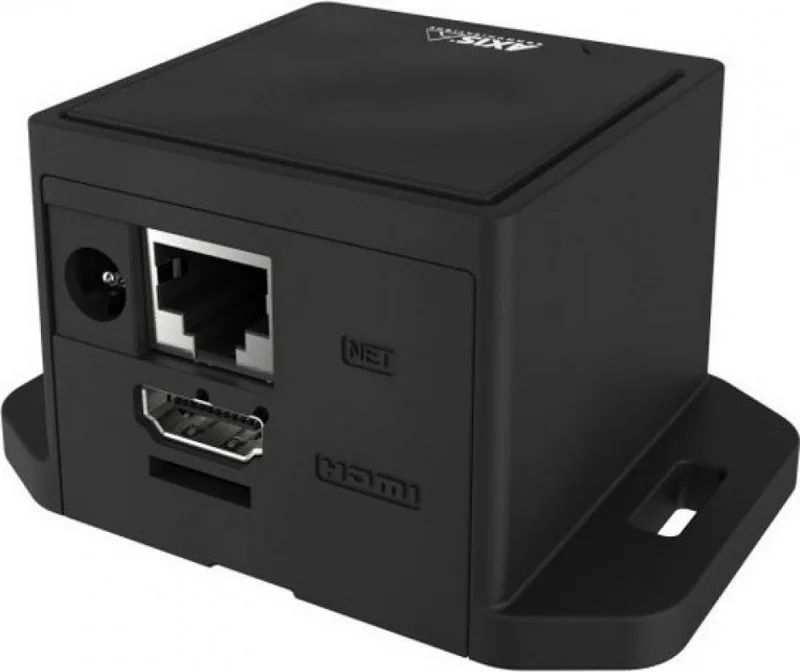
The Axis T8705 Video Decoder is designed for one clear purpose: turning network video streams into a smooth, easy-to-manage viewing experience on a connected monitor. For users building a security display setup, it offers a straightforward way to bring camera feeds together and present them in a format that works for daily monitoring, public viewing, or control-room use. The Axis T8705 Video Decoder Manual highlights how the unit balances simplicity with useful configuration options, making it approachable for both basic installations and more tailored deployments.
At the core of the product is its ability to connect to IP cameras over the network and output video through HDMI. Users can configure a monitor for either sequenced viewing, where sources rotate one at a time, or multiview layouts that place several feeds on screen together. That flexibility is helpful when the same decoder needs to support different use cases, from single-camera focus to broader situational awareness.
Setup is centered around browser-based access, and the interface is built to guide users through key tasks such as adding cameras, entering credentials, and adjusting advanced source settings. The decoder works especially well with Axis cameras, including a camera wizard that simplifies discovery and connection. Support for other brands is also available through manual camera entry, which expands its usefulness in mixed environments.
Security is another important theme. The guidance emphasizes setting a strong root password right away, using HTTPS after the first login, and managing credentials carefully. Firmware checking and upgrading are also part of regular maintenance, helping keep the decoder current and stable. If problems arise, the troubleshooting guidance covers topics like IP conflicts, browser access issues, and recovery steps such as resetting to factory defaults.
The result is a compact, network-ready video decoder that focuses on dependable display output and practical administration. For teams that need an efficient way to present surveillance video without unnecessary complexity, the Axis T8705 stands out as a capable and well-structured solution.
Notes
- Best suited for monitoring workflows that need HDMI video output from IP sources.
- Axis cameras get the smoothest setup experience, especially with the camera wizard.
- Secure password practices and firmware updates are strongly recommended.
- Factory reset restores all settings, including the IP address.
Search for 67,732 Manuals online


Type-in Brand or Model