
Axis Q6124-E Manual
PDF manual · 21 Pages
English



Quick check
Incorrect answer, please try again.
Chat with your Axis Q6124-E manual using AI
Get instant AI answers from your Axis Q6124-E manual
Ask anything about the Axis Q6124-E. Answers come from this manual, with the pages they are based on.
Ask a Question
Do you recommend Q6124-E?
Yes NoFrequently Asked Questions
It is used for professional surveillance where wide area coverage, zoom control, and automatic tracking are important. Common uses include entrances, parking areas, gates, and other outdoor security points.
Is this answer helpful?
Yes. It supports night mode and can use visible and near-infrared light to produce clearer black-and-white video in darker scenes. Proper exposure settings can also help reduce noise and blur.
Is this answer helpful?
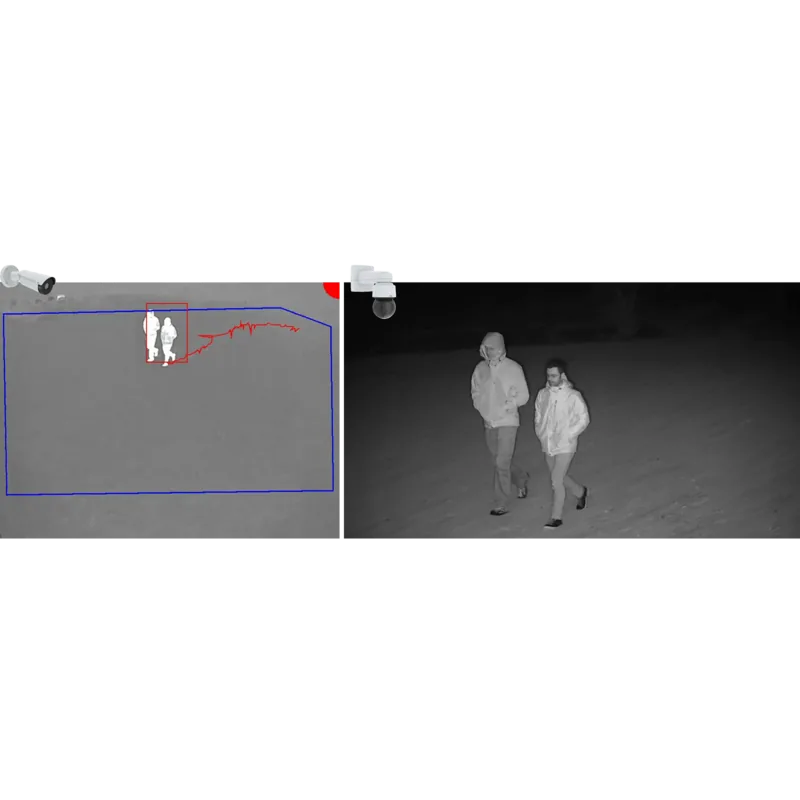
Yes. Its autotracking feature can detect motion and follow people or vehicles across the scene. It is best in areas with limited overall movement so the tracking stays accurate.
Is this answer helpful?
You can create privacy masks to hide selected areas of the image. These masks appear as solid blocks and are applied to live video, recordings, and streams.
Is this answer helpful?
The camera supports recording to an SD card and to network storage. You can also use event rules to trigger recording before and after motion is detected.
Is this answer helpful?
The 50Hz variant is suited for regions and installations that use 50Hz power environments. This helps align the camera setup with local infrastructure and lighting conditions.
Is this answer helpful?
Advantages and Disadvantages
Advantages

- Strong PTZ control with presets, guard tours, and autotracking for active monitoring.
- Helpful image tools like WDR, night mode, EIS, and speed dry improve real-world video quality.
- Flexible recording options with SD card and network storage support.
- Supports event-based actions such as motion detection, shock detection, and automated zooming.
Disadvantages

- Advanced image settings can reduce frame rate or increase bitrate if pushed too far.
- Multiple privacy masks and heavy event usage may affect performance.
- Factory reset is required if the root password is lost, which can disrupt access.
- Some features depend on proper setup and may need careful tuning for best results.
Product Specification
Type
Dome
Image Sensor
1/3" CMOS
Resolution
1280x720 Pixels (25fps)
Lens
0.17-5.08 in (F1.6-F4.7)
Light Sensitivity
0.15 Lux (Color), 0.008 Lux (B/W)
Viewing Angle
2.1-58.3 deg (horizontal), 1.3-34.9 deg (vertical)
Pan
360 deg (motorized)
Tilt
-90 deg to 20 deg (motorized)
Zoom Function
30x optical, 12x digital
Compression/Codecs
MJPEG, H.264
Multistreaming
supported
Connections
1x RJ-45 100Mb LAN
Data Storage
1x SD Card-Slot
Power Supply
PoE (Type 1)
Protection Class
IP66, IK08, NEMA 4X
Housing
suitable for outdoor use
System Compatibility
ONVIF (Profile G, S), IPv6
Zone & Analysis Functions
Motion Detection, Privacy Zones, IR Filter
Manufacturer's Warranty
3 Years
Product Description
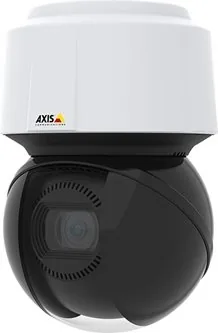
Axis Q6124-E PTZ 50Hz: Flexible Surveillance with Smart Control
The Axis Q6124-E PTZ 50Hz is built for situations where coverage, precision, and reliability matter. As a PTZ network camera, it combines pan, tilt, and zoom control with advanced image tuning tools that help it adapt to changing light, weather, and activity. For security teams, that means fewer blind spots and more useful footage when events unfold quickly.
One of the most appealing aspects of this camera is how well it balances image quality with practical deployment. Features like WDR, night mode, electronic image stabilization, and speed dry help it perform in demanding environments, from rainy outdoor scenes to low-light areas and locations exposed to vibration. The camera can also use privacy masks to protect sensitive areas while still monitoring the rest of the scene.
The PTZ side is just as strong. Users can define preset positions, create guard tours, and even enable autotracking so the camera follows movement when activity appears in view. This makes it a solid choice for entrances, parking lots, gates, and other places where attention needs to shift automatically. When paired with motion detection or shock detection, it becomes a responsive tool that can trigger recording, notifications, or zoom actions.
Streaming and storage options add to its flexibility. The camera supports H.264 for efficient bandwidth use and Motion JPEG for image-by-image access when detail is the priority. Recordings can be saved to an SD card or network storage, giving installers room to design systems around local backup, remote archiving, or both. That versatility is especially useful in professional surveillance setups.
Setup and maintenance are straightforward for users who follow the web interface and recommended browser guidance. The Axis Q6124-E PTZ 50Hz Manual also emphasizes secure password practices, firmware updates, and recovery steps such as factory reset. These details matter because they help protect the device, keep it current, and simplify long-term management.
In short, this camera is less about basic monitoring and more about adaptable surveillance. It is designed for users who want better control over what the camera sees, how it reacts, and how video is stored and delivered.
Notes
- Best suited for outdoor or high-importance monitoring points.
- Image tools can improve visibility, but each adjustment may affect performance.
- Advanced PTZ features work best when carefully planned around the site layout.
- Secure setup and regular firmware updates are strongly recommended.
Search for 67,732 Manuals online


Type-in Brand or Model