
Axis Q1645-LE Manual
PDF manual · 33 Pages
English



Quick check
Incorrect answer, please try again.
Chat with your Axis Q1645-LE manual using AI
Get instant AI answers from your Axis Q1645-LE manual
Ask anything about the Axis Q1645-LE. Answers come from this manual, with the pages they are based on.
Ask a Question
Do you recommend Q1645-LE?
Yes NoFrequently Asked Questions
Use AXIS IP Utility or AXIS Device Manager to discover devices and assign IP addresses. Alternatively, enter the device IP address or hostname in a browser, or use Safari Bonjour on macOS. On first login you must set the root password.
Is this answer helpful?
The camera supports multiple capture modes and resolutions, H.264 (recommended for efficient storage), MotionJPEG, and features like Zipstream, dynamic GOP/FPS, and configurable bitrate modes (VBR, ABR, MBR) to balance quality, bandwidth, and storage retention.
Is this answer helpful?
Use the pixel-counter tool in System > Orientation to set the area of interest and required pixel resolution. Combine this with appropriate shutter speed, gain, zoom, and scene profiles (e.g., Traffic Wizard) to ensure sufficient pixels for recognition at target distances.
Is this answer helpful?
You can create rules that trigger recordings or actions based on motion detection, audio detection, shock/tamper, scheduled events, or detector alarms. Pre/post buffers, storage targets (SD card or network share), and audio inclusion are configurable per stream profile.
Is this answer helpful?
Set a strong root password (minimum 8 characters recommended), enable HTTPS, and change passwords regularly. Check current firmware via the web UI Help > About and upgrade from Settings > System > Maintenance; ensure power remains connected during upgrades.
Is this answer helpful?
Factors include high resolution or low compression settings, many simultaneous viewers or mixed stream types, heavy ACAP usage, HTTPS, limited network bandwidth, client performance, or CPU overload. Adjust capture modes, stream profiles, or reduce concurrent streams to improve performance.
Is this answer helpful?
Yes — the product supports fiber-optic installations via media converters for long runs, offering benefits like long-distance reach, high speed, large capacity, and EMI immunity. Follow the Installation Guide for media converter setup.
Is this answer helpful?
Advantages and Disadvantages
Advantages

- High-quality imaging with large sensor, day/night mode and IR for low-light performance.
- Flexible lens options and remote focus/zoom for tailored surveillance scenarios.
- Robust connectivity: PoE, fiber support via media converters, audio and I/O for integrations.
- Advanced image corrections: EIS, barrel distortion correction, WDR and pixel counter tools.
- Comprehensive streaming/storage controls with H.264, MJPEG, Zipstream and microSD support.
Disadvantages

- High-resolution and low-compression settings increase CPU load, bandwidth, and storage needs.
- Running multiple ACAP applications or heavy event rules can degrade frame rate and performance.
- Complex feature set requires careful configuration to balance image quality versus bitrate.
- Firmware upgrades and resets require caution; wrong firmware or resets may disrupt settings.
- Multicast and external access may need network configuration (TTL, firewall, router support).
Product Specification
Type
Bullet
Image Sensor
1/2" CMOS
Resolution
1920x1080 Pixels (60fps)
Lens
0.15-0.39in (F1.5)
Light Sensitivity
0.1 Lux (Color), 0.02 Lux (B/W)
Viewing Angle
42-92° (horizontal), 23-50° (vertical)
Pan
N/A
Tilt
N/A
Compression/Codecs
MJPEG, H.264, G.711, G.726, PCM, OPUS, AAC
Multistreaming
supported
Alarm
2x Alarm Input/Alarm Output
Connections
1x Audio Input, 1x Audio Output, 1x RJ-45 100Mb LAN, 1x serial (RS-485), 1x serial (RS-422)
Data Storage
1x microSD-Slot
Illumination
IR Illumination (98.43ft)
Power Supply
PoE (Type 1)
Protection Class
IP66, IK10, NEMA 4X
Housing
suitable for outdoor use
System Compatibility
ONVIF (Profile G, S, T), IPv6
Zone & Analysis Functions
Motion Detection, Tamper Detection, Sound Detection, Shock Detection, Privacy Zones, IR Filter
Manufacturer's Warranty
3 Years
Product Description
Axis Q1645-LE — Powerful, flexible surveillance with Axis Q1645-LE Manual
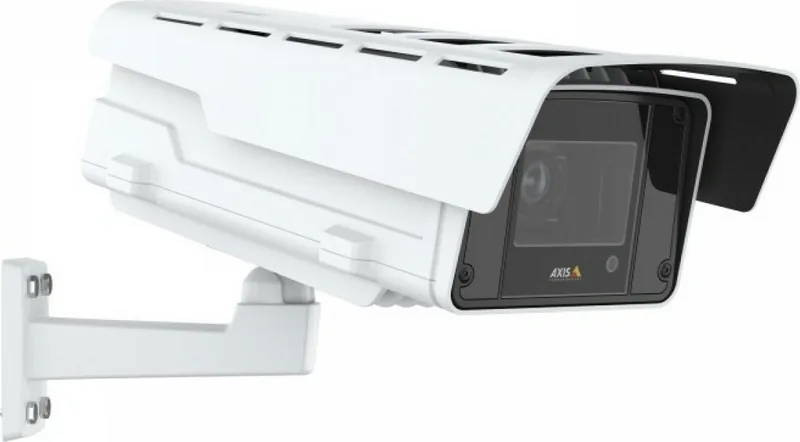
The Axis Q1645-LE is a high-performance network camera designed for professional surveillance installations that demand exceptional image quality, robust build, and advanced image management. Built for challenging outdoor environments, the Q1645-LE combines long-range optics options, day/night capability with IR support, and comprehensive image correction tools to ensure reliable monitoring across varied lighting and weather conditions.
This camera supports multiple lens options to match field-of-view and sensitivity needs — from wide-area coverage to long-distance identification. Its large sensor and adjustable aperture deliver excellent low-light performance, while automatic day/night switching and supplemental IR illumination ensure clear black-and-white images when visible light is insufficient. Electronic Image Stabilization (EIS) and barrel distortion correction help produce steady, geometrically accurate footage when the mounting or optics introduce vibration or wide-angle distortion. For license-plate or face capture scenarios, the camera offers pixel-counting tools and scene profiles to tune shutter, gain, and framing for optimal recognition.
The Q1645-LE is network-ready with PoE, fiber support via media converters for long-distance runs, and flexible audio and I/O connectivity for alarms, external sensors, and PA systems. On-device features include comprehensive streaming and storage controls (H.264, MJPEG, VBR/ABR/MBR), Zipstream and dynamic GOP/FPS options to balance quality and bandwidth, and local storage via microSD cards. The camera supports rule-based events — motion, audio, shock/tamper, and tampering-triggered alerts — enabling automatic recording, notifications, and overlays such as timestamps, street names, or motion-detected text.
Administration and maintenance are straightforward: discover and assign IP addresses with Axis utilities, secure the root account with strong passwords, upgrade firmware safely, and reset to factory defaults when needed. Built-in web-based configuration offers image, stream, and profile tabs to control capture modes, exposure, WDR, and advanced corrections. The platform also supports Axis Camera Application Platform (ACAP) apps for analytics, though it’s recommended to run one analytics app at a time to preserve performance.
Durable mechanical features include heater and fan options for harsh climates, IK10-rated housing choices, leveling and focus assistants with LED and buzzer feedback, and configurable LEDs for status and activity. Performance guidance highlights factors that affect CPU load, bitrate, and frame rate — such as resolution, simultaneous streams, HTTPS use, and installed applications — helping integrators design systems that meet throughput and retention requirements.
Notes
- Use Axis IP Utility or Device Manager to find and configure devices on the network.
- Always set a secure root password and enable HTTPS for access protection.
- For best recognition results, combine pixel-counting with appropriate shutter/gain and zoom settings.
Search for 67,732 Manuals online


Type-in Brand or Model