
Axis P1367 Manual
PDF manual · 20 Pages
English



Quick check
Incorrect answer, please try again.
Chat with your Axis P1367 manual using AI
Get instant AI answers from your Axis P1367 manual
Ask anything about the Axis P1367. Answers come from this manual, with the pages they are based on.
Ask a Question
Do you recommend P1367?
Yes NoFrequently Asked Questions
It is suited for indoor surveillance where image detail, flexible streaming, and event-driven recording are important. It works especially well in hallways, entrances, corridors, and other narrow or high-value monitoring areas.
Is this answer helpful?
Use a web browser and enter the camera’s IP address or hostname. If you do not know the address, use Axis discovery tools to locate it on the network. Then log in with the root account and set a secure password.
Is this answer helpful?
Because the initial password setup can be exposed over the network if HTTPS is not used. A strong password and encrypted connection help protect the device, recordings, and connected services from unauthorized access.
Is this answer helpful?
Choose H.264, enable Zipstream, increase compression, and use a longer GOP if appropriate. Lowering image detail can reduce network load, but it may also reduce visible fine detail in the video.
Is this answer helpful?
Yes. You can create an event rule that uses motion detection as a trigger and starts recording automatically. The camera can also record pre-trigger and post-trigger video to capture activity around the event.
Is this answer helpful?
The camera can record to network storage or a microSD card. Network storage is useful for centralized management, while an SD card is convenient for local backup or standalone recording setups.
Is this answer helpful?
Advantages and Disadvantages
Advantages

- Flexible image tuning for low light, backlight, and corridor monitoring.
- Supports H.264, Motion JPEG, Zipstream, and event-based recording.
- Built-in audio, I/O, and RS485/422 expand integration options.
- Browser access and straightforward setup make daily use practical.
Disadvantages

- Too many privacy masks or applications can affect performance.
- Higher detail settings may increase bandwidth and storage use.
- Firmware reset or lost root password can require factory restore.
- Some advanced features need careful setup to work as intended.
Product Specification
Image Sensor
1/2.9\" CMOS
Resolution
3072x1728 Pixel (30fps)
Lens
0.11-0.33in (F1.2)
Light Sensitivity
0.15 Lux (Color), 0.03 Lux (B&W)
Viewing Angle
36-104° (horizontal), 20-55° (vertical)
Compression/Codecs
MJPEG, H.264
Multistreaming
supported
Alarm
2x Alarm Input/Alarm Output
Connections
1x Audio Input, 1x Audio Output, 1x RJ-45 100Mb LAN, 1x serial (RS-485), 1x serial (RS-422)
Data Storage
1x microSD-Slot
Microphone
integrated
Power Supply
PoE (Type 1)
Protection Class
N/A
Housing
suitable for outdoor use
System Compatibility
ONVIF (Profile G, S), IPv6
Zone & Analysis Functions
Motion Detection, Privacy Zones, IR Filter
Product Description
Axis P1367 Manual: A Practical Look at a Versatile Network Camera
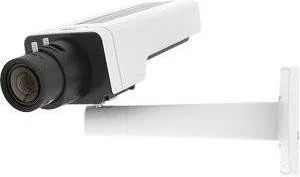
The Axis P1367 Manual points to a camera built for dependable video monitoring in demanding environments. The AXIS P1367 is a network camera designed to balance image clarity, flexible setup, and efficient storage use. It fits well in places where detail matters, such as hallways, entrances, corridors, loading zones, and other indoor surveillance areas.
One of the strongest aspects of the camera is its adaptability. It supports browser-based access, secure password setup, and a straightforward web interface for everyday configuration. Users can fine-tune exposure, compression, privacy masks, overlays, and event rules without needing a complicated workflow. That makes it useful for both first-time installers and experienced security teams.
Image optimization is a major theme throughout the Axis P1367 Manual. The camera includes tools for wide dynamic range, low-light noise reduction, corridor format, and facial-detail enhancement through pixel counting. These features help the camera stay useful in mixed lighting, narrow spaces, and scenes with strong contrast. If the goal is clearer identification rather than just general observation, the camera offers settings that help sharpen results.
The camera also supports practical system design choices. You can use H.264 or Motion JPEG depending on bandwidth and storage priorities, enable Zipstream to reduce data use, and send recordings to network storage or an SD card. Event-based recording is another highlight: motion detection can trigger alarms, overlays, email actions, or automatic video capture before and after an event.
For installers, the hardware layout is equally important. The device includes PoE network connectivity, audio in/out, I/O connectors, RS485/422 support, and a microSD card slot. These options make it easier to integrate the camera into larger security systems or connect it with external devices such as alarms and sensors.
Notes
- Best results come from matching exposure, compression, and resolution to the scene.
- Use privacy masks where sensitive areas must remain hidden.
- Keep firmware updated for improvements, fixes, and better stability.
- If performance drops, review stream settings, event load, and network capacity.
Search for 67,732 Manuals online


Type-in Brand or Model