
Axis P1254 Manual
PDF manual · 58 Pages
English



Quick check
Incorrect answer, please try again.
Chat with your Axis P1254 manual using AI
Get instant AI answers from your Axis P1254 manual
Ask anything about the Axis P1254. Answers come from this manual, with the pages they are based on.
Ask a Question
Do you recommend P1254?
Yes NoFrequently Asked Questions
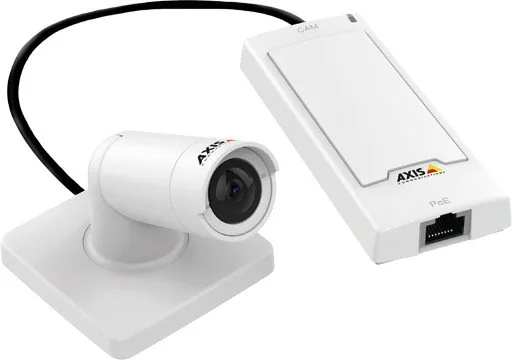
It uses a split design with a main unit and a separate sensor unit, making it easier to install discreetly in small or awkward spaces. That setup is useful when you want the camera hardware hidden while keeping the sensor in the best position.
Is this answer helpful?
It supports H.264 and Motion JPEG. H.264 is the more efficient option for reducing bandwidth and storage use, while Motion JPEG can be useful when you want simple frame-by-frame streaming and very broad compatibility.
Is this answer helpful?
Yes. It can be accessed through a web browser, and the setup includes options for NAT traversal, dynamic DNS, and secure HTTPS access. These features help make remote viewing and administration easier.
Is this answer helpful?
Yes. It supports action rules tied to motion detection, tampering, schedules, storage events, and other triggers. You can use those rules to start recording, send notifications, or trigger other responses.
Is this answer helpful?
The camera supports microSD cards and network shares. It can also be configured for continuous recording or event-based recording. For better protection, storage encryption is also available for SD cards.
Is this answer helpful?
Yes, it includes a wide range of security controls such as user roles, HTTPS, certificates, IEEE 802.1X, IP filtering, and encrypted communication options. These features make it suitable for managed professional environments.
Is this answer helpful?
Advantages and Disadvantages
Advantages

- Compact split-camera design is ideal for discreet mounting in tight or hidden locations.
- Supports H.264, Motion JPEG, and Zipstream for efficient video delivery and storage savings.
- Strong security options include HTTPS, 802.1X, certificates, IP filtering, and SNMP.
- Flexible event rules can trigger recording, alerts, overlays, or status actions automatically.
Disadvantages

- Setup can be technical and is better suited to users comfortable with network configuration.
- Some features depend on specific browsers, plugins, or client tools for full functionality.
- Storage and SD card handling require caution to avoid corruption or data loss.
- Advanced use may involve extra licenses, application management, or ongoing tuning.
Product Specification
Image Sensor
1/4" CMOS
Resolution
1280x720 Pixel (25fps)
Lens
0.08 in (F2.2)
Light Sensitivity
1.2 Lux (Color)
Viewing Angle
102° (horizontal), 56° (vertical)
Pan
180° (manual)
Tilt
0° to 90° (manual)
Compression/Codecs
H.264, MJPEG
Connections
1x RJ-45 100Mb LAN
Data Storage
1x microSD-Slot
Power Supply
PoE (Type 1)
Protection Class
N/A
Zone & Analysis Functions
Motion Detection
Manufacturer's Warranty
3 Years
Product Description
Axis P1254 Manual: Compact Network Camera, Big Flexibility
The Axis P1254 is built for installations that need a small-footprint network camera with serious configuration depth. In practice, it suits retail counters, entrances, corridors, and other tight spaces where a discreet sensor unit can be placed separately from the main unit. That split design makes the camera easier to hide, position, and adapt to real-world layouts without sacrificing image capture quality or network control.
What stands out most is how much the Axis P1254 can do once it is connected to a network. It supports H.264 and Motion JPEG streaming, stream profiles, overlays, privacy masks, and remote access through a browser or supported client tools. For users who want efficient video delivery, H.264 and Zipstream help reduce bandwidth and storage use while keeping important details readable. That makes the camera a practical choice for continuous recording as well as event-based surveillance.
The setup experience is aimed at administrators, but it remains approachable if you are familiar with IP devices, PoE, and basic networking. The camera includes guidance for password setup, power-line frequency selection, time synchronization, and browser access. It also supports HTTPS, IEEE 802.1X, IP filtering, SNMP, and certificate management, which gives it a strong security baseline for professional environments. If you need controlled access and reliable remote administration, the platform offers plenty of options.
Another strength is automation. The Axis P1254 can react to motion detection, tampering, storage events, live stream access, schedules, recurrences, and manual triggers. That means it can record, send alerts, flash status LEDs, or push media to recipients when conditions change. Combined with SD card storage or a network share, it becomes a flexible edge-recording solution that can scale from simple monitoring to more advanced workflows.
Notes
- Best suited for users who want compact hardware with deep configuration.
- Works well when efficient streaming and flexible event handling matter.
- Advanced security and storage controls make it suitable for managed deployments.
- The camera is powerful, but it rewards careful setup and planning.
Search for 67,732 Manuals online


Type-in Brand or Model