

Axis P1245 Manual
PDF manual · 22 Pages
English



Quick check
Incorrect answer, please try again.
Chat with your Axis P1245 manual using AI
Get instant AI answers from your Axis P1245 manual
Ask anything about the Axis P1245. Answers come from this manual, with the pages they are based on.
Ask a Question
Do you recommend P1245?
Yes NoVideo Manual
Axis Camera IP configuration [STEP-by-STEP]
Frequently Asked Questions
Enter the camera’s IP address or hostname in a supported browser (Chrome recommended, Firefox, Edge, Safari on macOS). If you don’t know the IP, use AXIS IP Utility or AXIS Device Manager to find and assign an address, then log in with your credentials.
Is this answer helpful?
Recordings can be stored locally on supported microSD/microSDHC/microSDXC cards (unmount before removal) or on network storage via SMB/NAS by configuring the camera’s System > Storage settings and connecting to the shared location.
Is this answer helpful?
Use H.264 with Zipstream enabled, turn on dynamic GOP, increase GOP length, enable dynamic FPS and increase compression. Balance these settings carefully to avoid losing critical image detail.
Is this answer helpful?
Run the AXIS Video Motion Detection application, create an action rule under System > Events using VMD as the trigger, choose Record video, select a stream profile, set pre- and post-trigger times and select SD card or network storage.
Is this answer helpful?
If the root password is lost, perform a factory reset: power down, press and hold the control button while reconnecting power for 15–30 seconds until the status LED flashes amber, then release. Reconfigure the device after reset.
Is this answer helpful?
Use Automatic exposure, set a higher max shutter value for less motion blur (trade-off), reduce sharpness, and lower max gain. Increasing scene lighting or adjusting mounting to change motion direction can also help.
Is this answer helpful?
High resolution, low compression, many simultaneous viewers, heavy application usage, HTTPS with MotionJPEG, or limited client/network resources can reduce framerate. Optimize streams, limit concurrent viewers and verify network bandwidth and client capabilities.
Is this answer helpful?
Advantages and Disadvantages
Advantages

- Flexible exposure modes (Automatic, Flicker-free, Flicker-reduced, Hold current) for diverse lighting conditions.
- Bandwidth- and storage-saving features like H.264, Zipstream, dynamic GOP and dynamic FPS.
- Supports local microSD storage and network storage (SMB/NAS) with easy setup.
- Action rules and ACAP support enable automation and third-party analytics such as people counting.
- Compact PoE-enabled main unit with clear LED status indicators and simple reset/control button.
Disadvantages

- Running multiple ACAP applications or many concurrent streams can reduce CPU and framerate.
- Using multiple privacy masks may negatively affect device performance.
- H.264 multicast and advanced streaming may require network configuration and licensing considerations.
- HTTPS and MotionJPEG streaming can reduce framerate; careful tuning may be required.
- Firmware upgrades require care—wrong files or interruptions can cause upgrade failures.
Product Specification
Image Sensor
1/2.9" CMOS
Resolution
1920x1080 Pixels (25fps)
Lens
0.11 in (F2.0)
Light Sensitivity
1.2 Lux (Color)
Viewing Angle
111° (horizontal), 61° (vertical)
Compression/Codecs
H.264, MJPEG
Connections
1x RJ-45 100Mb LAN
Data Storage
1x microSD-Slot
Power Supply
PoE (Type 1)
Protection Class
N/A
System Compatibility
ONVIF (Profile G, S), IPv6
Zone & Analysis Functions
Motion Detection
Manufacturer's Warranty
3 Years
Product Description
Axis P1245 — Reliable Network Camera for Professional Surveillance
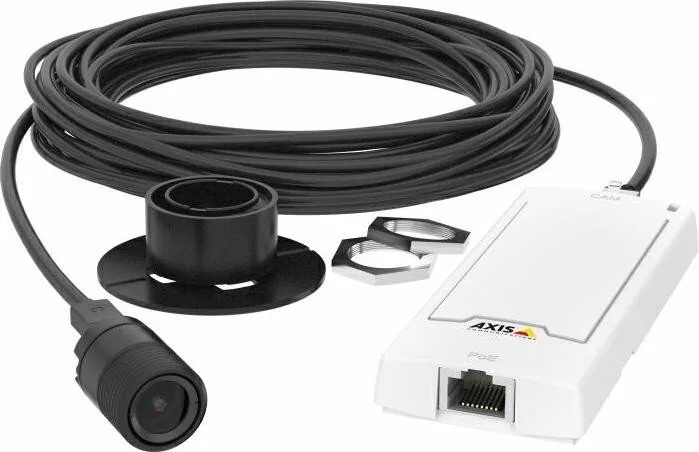
The Axis P1245 is a compact, feature-rich network camera designed for dependable surveillance in small to medium installations. Built on the AXIS P12 series platform, it combines versatile image controls, robust streaming options and event management to deliver clear, actionable video while keeping bandwidth and storage use efficient.
With a small main unit and attachable sensor units, the P1245 supports PoE for simplified installation and includes an SD card slot for local recording. The camera offers multiple capture modes and exposure settings to adapt to diverse lighting conditions — including automatic exposure, flicker-free and flicker-reduced modes for environments with artificial lighting. Wide Dynamic Range (WDR) and corridor format support help preserve detail in scenes with strong backlight or long, narrow areas such as hallways and tunnels.
Image quality can be tuned via noise reduction, shutter and gain adjustments to balance motion blur and low-light performance. Pixel counter and framing tools make it easier to position the view for tasks like facial recognition. Overlays and privacy masks provide on-stream annotations and selective concealment of sensitive areas; overlays can be triggered by analytics such as motion detection.
Streaming and storage are flexible: the P1245 supports Motion JPEG and H.264 (with Axis client licensing) to meet different quality, bandwidth and archival needs. Features like Zipstream, dynamic GOP and dynamic FPS help lower bandwidth and storage demands without losing crucial detail. Storage can be local (microSD/microSDHC/microSDXC) or network-based (SMB/NAS), and recordings can be triggered by events such as motion or tampering.
Events and action rules enable automation: combine triggers (motion, detectors, scheduled times or application events) with actions (recording, overlays, email notifications) to build tailored responses. The Axis Camera Application Platform (ACAP) supports third-party analytics like AXIS People Counter, expanding the camera’s capabilities without extra servers.
For maintenance and reliability, the P1245 includes an easy factory reset procedure, firmware upgrade workflow and diagnostic guidance for network, streaming and performance issues. LED status indicators and a control button simplify on-site operations. Security best practices are emphasized: change default passwords, enable HTTPS, and keep firmware updated.
Notes
- Use recommended browsers (Chrome, Firefox, Safari/Edge) for web access.
- Avoid removing the SD card while the device is running; unmount before removal.
- Multiple privacy masks and heavy application usage may impact performance.
Search for 67,732 Manuals online


Type-in Brand or Model