Manual.ly Logo

AXAGON ADSA-1S6 Manual

0.0 · 0 Ratings

PDF manual · 2 Pages

English

M: QW-35-FL
page

/ 2

Loading...
e89f7ee4db39010f80cf2ac840a441d2639e page 1
PL PT RO
GRFR HR
HU NLIT
CZ
FIN
ESP
DK
DE
EN
INSTRUCTIONS
FOR USE
(original)
revision 1.0
ADSA-1S6
Instructies voor gebruik (vertaling)
Instrukcja użycia (tłumaczenie)
Instruções de utilização (translação)
Instrucțiuni pentru utilizare (traducere)
Инструкция по эксплуатации (трансляция)
Návod na použitie (preklad)
Användarinstruktioner (translation)
Kullanım talimatları (tercüme)
Инструкции за Употреба (превод)
使用说明
(翻译)
( )
NL
PL
PT
RO
RU
SK
SWE
TR
BG
CN
ARA
Instructions for use (original)
Návod k použití (originál)
Gebrauchsanweisungen (Übersetzung)
Brugsanvisning (translation)
Instrucciones de uso (traducción)
Käyttöohjeet (käännös)
Instructions d'utilisation (traduction)
Oδηγίες χρήσης (μετάφραση)
Upute za korištenje (prijevod)
Felhasználói kézikönyv (fordítás)
Istruzioni per l'uso. (traduzione)
ENG
CZ
DE
DK
ESP
FIN
FR
GR
HR
HU
IT
TECHNICAL SPECIFICATIONS
INPUT INTERFACE
USB 3.2 Gen 1 (USB 3.0) • USB 2.0
5000 • 480 Mbit/s (SuperSpeed • HighSpeed)
USB Mass Storage Class
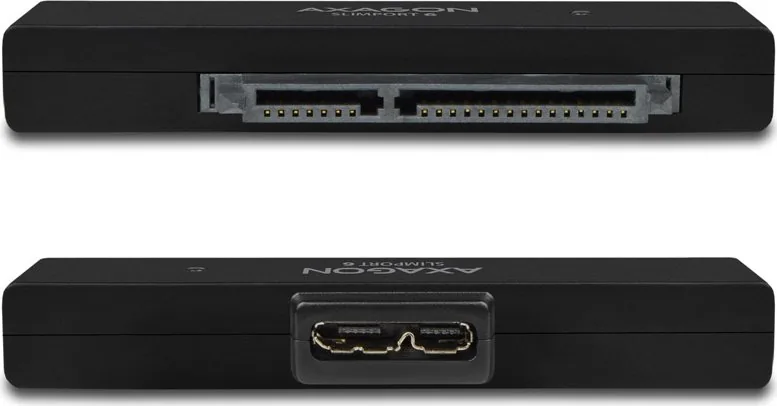
USB Type A male connector
OUTPUT INTERFACE
SERIAL ATA specification revision 3.1
6 • 3 • 1.5 Gbit/s (SATA/600 • SATA/300 • SATA/150)
2.5" SATA III / II / I HDD disks supported with all capacities
adapter and disk located in the case - max. disc thickness 9.5 mm
use without case - without limiting the thickness of the disk
22-pin SATA data and power female
5 Gbit/s theoretically (given by USB input)
POWER SUPPLY
Power through USB bus
OTHER FEATURES
UASP (USB Attached SCSI Protocol) and BOT (Bulk-Only Transport)
AUTOMATIC INSTALLATION
Plug & Play • Hot Plug • S.M.A.R.T. • TRIM
Auto Spindown • HDD Turn Off
LED INDICATION
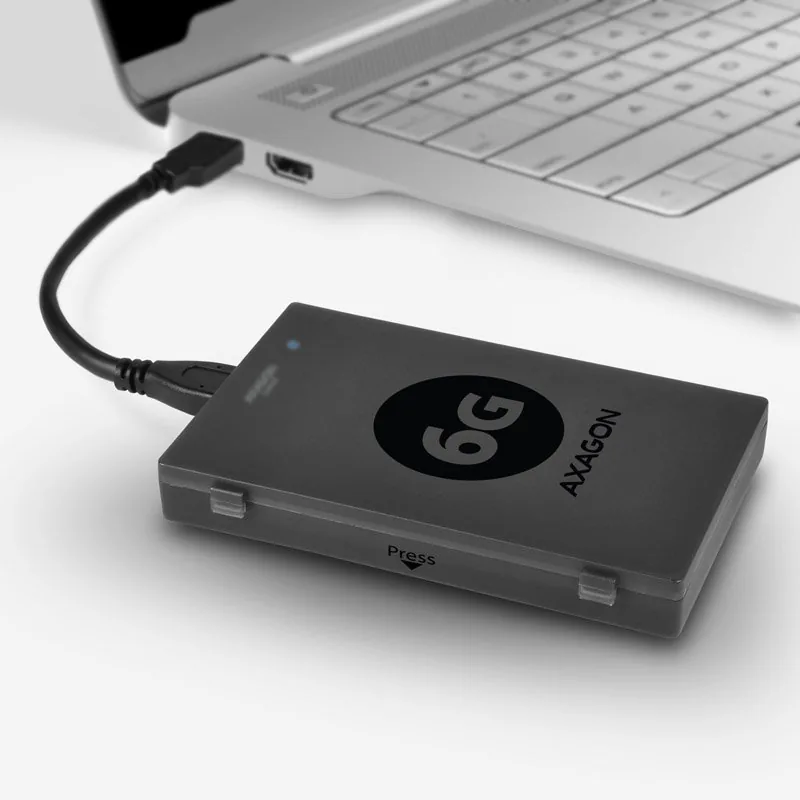
BLUE LED indicate connection to PC & HDD activity
OS SUPPORTED
WINDOWS XP • Vista • 7 • 8 • 8.1 • 10 & later
Server 2008 • 2012 • 2016 & later
32 & 64bit versions supported
OS X 10.x & later • Linux 2.6.x & later
© 2020 AXAGON
Výrobce / Manufacturer: RealQ s.r.o. - Železná 5, 619 00 Brno, Czech Republic
All rights reserved. All text and pictorial materials contained in this document
are protected by Copyright Act.
All marks indicated here are the registered trademarks of their appropriate owners.
Specifications are subject to change without prior notice.
Made in CHINA for Axagon.
SUPERSPEED USB ADAPTER
for 2.5" HDD/SSD
1. Turn on
computer.
2. Connect the
USB adapter to
the disk SATA
connector.
3. Connect the
adapter to the
USB port of the
computer.
4. The hard disk
will be detected
and installed
automatically.
INFO
If you want to
disconnect the
hard disk, make
sure that data
copying is
finished and the
data transfer
indicator is not
blinking.
1. Tænd for
computeren.
2. Forbind USB
adapteren til
diskens SATA
stikforbindelse.
3. Tilslut
adapteren til
computerens
USB-port.
4. Harddisken
registreres og
installeres
automatisk.
INFO
Hvis du vil
frakoble
harddisken, skal
du sørge for, at
datakopiering er
færdig, og
dataoverførselsin
dikatoren ikke
blinker.
1. Zapněte
počítač.
2. Připojte USB
adaptér k SATA
konektoru
disku.
3. Připojte
adaptér k USB
portu počítače.
4. Pevný disk
bude
detekován a
automaticky
nainstalován.
INFO
Pokud chcete
disk odpojit,
ujistěte se, že
je kopírování
dat ukončeno a
kontrolka
přenosu dat
nebliká.
1. Schalten Sie den
Rechner ein.
2. Schließen Sie den
USB-Adapter an den
SATA-Festplattenans
chluss an.
3. Schließen Sie den
Adapter an den
USB-Anschluss des
Computers an.
4. Die Festplatte wird
erkannt und
automatisch
installiert.
INFO
Wenn Sie die
Festplatte trennen
möchten, stellen Sie
sicher, dass der
Datenkopiervorgang
abgeschlossen ist
und die HDD
Datentransfer
Anzeige nicht blinkt.
1. Allumez
l'ordinateur.
2. Branchez
l'adaptateur USB
sur le port SATA
du disque.
3. Connectez
l'adaptateur au
port USB de
l'ordinateur.
4. Le disque dur
sera détecté et
automatiquement
installé.
INFO
Si vous souhaitez
déconnecter le
disque dur,
assurez-vous que
la copie des
données est
terminée et que
l'indicateur de
transfert de
données ne
clignote pas.
1. Kytke
tietokone päälle.
2. Yhdistä
USB-adapteri
levyn
SATA-liittimeen.
3. Liitä adapteri
tietokoneen
USB-väylään.
4. Kiintolevy
tunnistetaan ja
asennetaan
automaattisesti.
TIEDOT
Jos haluat
irrottaa
kiintolevyn,
varmista, että
tietojen kopiointi
on valmis ja että
tiedonsiirron
merkkivalo ei
vilku.
1. Encienda el
ordenador.
2. Conecte el
adaptador USB al
conector del disco
SATA.
3. Conecte el
adaptador al
puerto USB de la
computadora.
4. La detección e
instalación del
disco duro se
realizará
automáticamente.
INFORMACION
Si usted quiere
desconectar el
disco duro,
asegúrese de que
la copia de los
datos ha finalizado
y el indicador de
transferencia de
datos no está
parpadeando.
1. Ανοίξτε τον
υπολογιστή.
2. Συνδέστε τον
αντάπτορα USB στη
θύρα του δίσκου
SATA.
3. Συνδέστε τον
μετατροπέα στην
θύρα USB του
υπολογιστή.
4. Ο σκληρός δίσκος
θα εντοπιστεί και η
εγκατάσταση θα
γίνει αυτόματα.
ΠΛΗΡΟΦΟΡΙΕΣ
Αν θέλετε να
αποσυνδέσετε τον
σκληρό δίσκο,
βεβαιωθείτε ότι η
αντιγραφή
δεδομένων έχει
τελειώσει και η
ένδειξη μεταφοράς
δεδομένων δεν
αναβοσβήνει.
1. Kapcsolja be a
számítógépet.
2. Csatlakoztassa
az USB adaptert a
merevlemez SATA
csatlakozójához.
3. Csatlakoztassa
az adaptert a
számítógép USB
csatlakozófelületé
hez.
4. Megtörténik a
merevlemez
felismerésre és
automatikus
telepítése.
INFORMÁCIÓ
Ha szét akarod
kapcsolni a
merevlemezeket,
akkor győződj
meg arról, hogy az
adatmásolás
befejeződött, a
adatátvitel pedig
nem villog.
1. Upalite
računalo.
2. Priključite USB
adapter za
priključak SATA
diska.
3. Spojite adapter
na USB priključak
računala.
4. Tvrdi disk će
automatski biti
otkriven i
instaliran.
INFO
Ako želite ukloniti
tvrdi disk,
provjerite je li
kopiranje
podataka
završeno i da
indikator
prijenosa
podataka ne
treperi.
1. Accendete il
computer.
2. Collegare
l'adattatore USB al
connettore SATA
del disco.
3. Collegare
l'adattatore alla
porta USB del
computer.
4. Il disco rigido
verrà rilevato ed
installato
automaticamente.
INFO
Se si desidera
scollegare il disco
rigido, assicurarsi
che la copia dei
dati sia terminata e
che l'indicatore di
trasferimento dati
non lampeggi.
1. Schakel
de computer in.
2. Sluit de USB
adapter aan op de
SATA connector van
de schijf.
3. Sluit de adapter
aan op de
USB-poort van de
computer.
4. De harde schijf
wordt automatisch
gedetecteerd en
geïnstalleerd.
INFO
Als u de harde schijf
wilt loskoppelen,
zorg er dan voor dat
het kopiëren van
gegevens is
voltooid en dat de
indicator voor de
gegevensoverdrach
t van de niet
knippert.
1. Proszę włączyć
komputer.
2. Podłącz adapter
USB do złącza
SATA dysku.
3. Podłącz adapter
do portu USB
komputera.
4. Twardy dysk
zostanie
zidentyfikowany i
automatycznie
zainstalowany.
INFORMACJE
Jeśli chcesz
odłączyć dysk
twardy, upewnij
się, że kopiowanie
danych zostało
zakończone i
wskaźnik
transferu danych
dysku twardego
nie miga.
1. Porniţi PC-ul.
2. Conectați
adaptorul USB la
conectorul SATA al
discului.
3. Conectați
adaptorul la portul
USB al
computerului.
4. Discul fix va fi
detectat și instalat
în mod automat.
INFORMATII
Dacă doriți să
deconectați hard
disk-ul,
asigurați-vă că
copierea datelor
este terminată și
că indicatorul de
transfer de date nu
clipește.
1. Ligue o
computador.
2. Conecte o
adaptador USB ao
conector do disco
SATA.
3. Conecte o
adaptador à porta
USB do
computador.
4. O disco rígido
será detetado e
instalado
automaticamente.
INFO
Se pretender
desligar o disco
rígido,
certifique-se de
que a cópia de
dados está
concluída e o
indicador de
transferência de
dados não está a
piscar.
RU
SK SWE
TR BG
1. включить
компьютер.
2. Подключите
USB-адаптер к
переходнику
SATA диска.
3. Подключите
адаптер к
USB-порту
компьютера.
4. Жесткий диск
будет
обнаружен и
установлен
автоматически.
ИНФОРМАЦИЯ
Если жёсткий
диск
необходимо
отключить,
убедитесь, что
передача
данных
завершена, а
индикатор
передачи
данных не
мигаeт.
1. включете
компютъра.
2. Свържете USB
адаптера към SATA
конектора на диска.
3. Свържете
адаптера към USB
порта на
компютъра.
4. Хард дискът ще
бъде разпознат и
инсталиран
автоматично.
ИНФОРМАЦИЯ
Ако искате да
изключите хард
диска, се уверете, че
копираните на
данните е
завършило и
индикаторът за
трансфер на данни
не мига.
1. Bilgisayarı açın.
2. USB
adaptörünü disk
SATA konektörüne
bağlayın.
3. Adaptörü
bilgisayarın USB
portuna bağlayın.
4. Sabit disk
otomatik olarak
algılanacak ve
yüklenecektir.
BİLGİ
Sabit diski
çıkarmak
istiyorsanız, veri
kopyalama
işleminin bitmiş
olduğundan ve
veri aktarım
göstergesinin
yanıp
sönmediğinden
emin olun.
1. Zapnite
počítač.
2. Pripojte USB
adaptér k SATA
konektoru disku.
3. Pripojte
adaptér k USB
portu počítača.
4. Pevný disk
bude detekovaný
a automaticky
nainštalovaný.
INFO
Ak chcete disk
odpojiť, uistite sa,
že je kopírovanie
dát ukončené a
kontrolka
prenosu dát
nebliká.
1. Starta datorn.
2. Anslut
USB-adaptern till
diskens
SATA-anslutning.
3. Anslut adaptern
till datorns
USB-uttag.
4. Hårdisken
kommer upptäckas
och installeras
automatiskt.
INFO
Ifall du vill koppla
bort hårdisken, var
säker på att data
kopieringen är
fördig och att data
överförings
indikatorn inte
blinkar.
CN
1. 打开电脑。
2. 连接USB适配器到磁盘SATA连接器。
3. 将适配器连接到计算机的USB端口。
4.自动检测硬盘并安装。
信息
确保数据复制完成,并且数据传输指示灯不再闪烁时,
可断开硬盘连接。
ARA
.
. SATA USB
1.
2.
.
ً
.
.  USB     3.
4.
ENG SuperSpeed USB adapter for 2.5" disks
CZ SuperSpeed USB adaptér pro 2.5" disky
DE SuperSpeed USB-Adapter für 2.5" Festplatten
DK SuperSpeed USB-adapter til 2.5" diske
ESP Adaptador SuperSpeed USB para discos de 2.5"
FIN SuperSpeed USB -adapteri 2.5" -levyille
FR Adaptateur SuperSpeed USB pour disques 2.5"
GR Μετατροπέας SuperSpeed USB για δίσκους 2.5"
HR SuperSpeed USB adapter za 2.5" disk
HU SuperSpeed USB adapter 2.5" lemezekhez
IT Adattatore SuperSpeed USB per dischi da 2.5"
NL SuperSpeed USB-adapter voor 2.5" schijven
PL Adapter SuperSpeed USB dla dysków 2.5"
PT Adaptador SuperSpeed USB para discos de 2.5"
RO Adaptor SuperSpeed USB pentru discuri de 2.5"
RU Адаптер с SuperSpeed USB для 2.5" дисков
SK SuperSpeed USB adaptér pre 2.5" disky
SWE SuperSpeed USB-adapter för 2.5" diskar
TR 2.5" diskler için SuperSpeed USB adaptör
BG SuperSpeed USB адаптер за 2.5" дискове
CN 适用于 2.5 英寸磁盘的快速 USB 适配器
ARA ﺔﺻ ﻮﺑ 2.5 سﺎﻘﻣ صاﺮﻗﻸﻟ SuperSpeed USB لﻮﺤﻣ
http://axagon.eu/produkty/adsa-1s6#supportLinkGoal
PRODUCT SUPPORT LINK
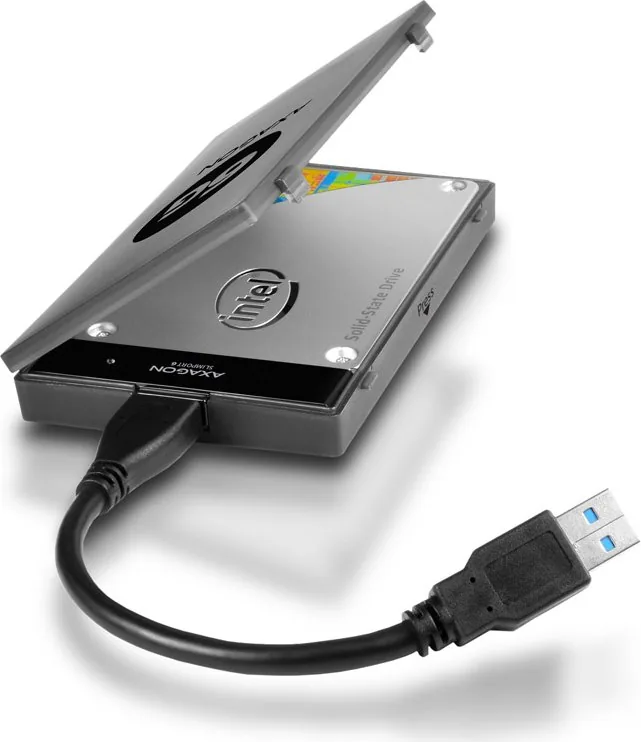
• USB adapter
• cable
• plastic case
• foam pads for 7mm disks
• multilanguage quick guide

Chat with your AXAGON ADSA-1S6 manual using AI

Get instant AI answers from your AXAGON ADSA-1S6 manual

Ask anything about the AXAGON ADSA-1S6. Answers come from this manual, with the pages they are based on.

Ask a Question

0/1000

Do you recommend ADSA-1S6?

Yes No

Frequently Asked Questions

A

Yes, the AXAGON adapter supports both 2.5-inch SATA HDDs and SSDs. It handles all capacities and speeds supported by the SATA specification.

Is this answer helpful?

A

No, the device supports Plug-and-Play functionality. It is automatically detected and installed by Windows, macOS, and Linux without manual driver installation.

Is this answer helpful?

A

No, this adapter is specifically designed for 2.5-inch drives. 3.5-inch drives require a different adapter that includes an external power source.

Is this answer helpful?

A

When using the included plastic case, the maximum disk thickness is 9.5 mm. Without the case, there is no limiting thickness restriction.

Is this answer helpful?

A

Watch the blue LED indicator. If the light is not blinking, the data transfer is likely complete. Always wait until the indicator stops blinking before disconnecting.

Is this answer helpful?

A

Yes, it is backward compatible with USB 2.0 ports, though data transfer speeds will be reduced to the USB 2.0 limit of 480 Mbit/s.

Is this answer helpful?

M: QW-35-FL

Advantages and Disadvantages

Advantages

  • Supports high-speed USB 3.2 Gen 1 transfer rates up to 5 Gbit/s
  • Compatible with Windows, macOS, and Linux operating systems
  • No external power supply needed as it draws power from USB
  • Includes protective case and foam pads for 7mm drives
  • Plug-and-play operation with S.M.A.R.T. and TRIM support
VS

Disadvantages

  • Maximum disk thickness limited to 9.5 mm when using the case
  • Requires careful disconnection to avoid data transfer errors
  • Not suitable for 3.5-inch desktop hard drives without additional power
  • LED indicator may be bright in very dark environments
  • Case adds slight bulk compared to bare adapter usage
M: QW-35-FL

Product Specification

Conversion

USB -> SATA

Host

1x USB 3.0 Micro-B (female), 1x USB-A 3.0 (male)

Target

1x SATA 6Gb/s + SATA Power (female)

Additional Power Supply

N/A

Form Factor

2.5-inch enclosure (9.5mm)

Dimensions

2.76x0.4x0.83 inches (adapter), 4.8x0.75x3.07 inches (enclosure)

M: QW-35-FL

Product Description

Unlock Your Data with the AXAGON USB 3.0 Micro-B to 2.5 inch SATA Adapter

The AXAGON USB 3.0 Micro-B to 2.5 inch SATA Adapter is a robust solution for connecting legacy and modern hard drives to your computer. Designed for users who need reliable data transfer without internal installation, this adapter transforms any standard 2.5-inch SATA drive into an external storage device instantly. Whether you are recovering data from an old laptop or expanding your storage capacity, this tool offers seamless compatibility.

High-Speed Performance and Versatility

Equipped with a USB 3.2 Gen 1 interface, this adapter delivers SuperSpeed data transfer rates up to 5 Gbit/s. It supports SATA III, II, and I specifications, ensuring backward compatibility with various drive generations. The device draws power directly from the USB bus, eliminating the need for an external power supply. This makes it ideal for portable SSDs and HDDs. The blue LED indicator provides visual feedback on connection status and disk activity, giving you peace of mind during transfers.

Universal Operating System Support

One of the standout features of the AXAGON adapter is its broad OS support. It works flawlessly with Windows XP through 11, including Server versions, as well as macOS and Linux distributions. The plug-and-play functionality means no driver installation is required on most systems. Advanced features like S.M.A.R.T. monitoring, TRIM support, and automatic spindown further enhance its utility for both casual users and IT professionals.

Practical Design Considerations

The adapter comes with a protective plastic case and foam pads specifically designed for 7mm drives, though it can also accommodate thicker disks up to 9.5 mm when used without the case. The 22-pin SATA connector ensures a secure fit. Users should always ensure data copying is complete before disconnecting the drive to prevent corruption. For extended use, the device adheres to EU safety standards regarding electromagnetic compatibility and hazardous substances.

M: QW-35-FL

© Copyright 2026 Manual.ly