Manual.ly Logo

AXAGON 4-Port USB 3.0 Hub Manual

0.0 · 0 Ratings

PDF manual · 2 Pages

English

M: QW-35-FL
page

/ 2

Loading...
3c5d180c835359a5fcc7c35bc498324b2a59 page 1
PL PT RO
GRFR HR
HU NLIT
CZ
FIN
ESP
DK
DE
EN
TECHNICAL SPECIFICATIONS
INPUT INTERFACE
USB 3.2 Gen 1 (USB 3.0) • USB 2.0
5000 • 480 • 12 • 1.5 Mbit/s (Super • High • Full • Low Speed)
USB Type C male connector
14 cm FIXED USB CABLE
OUTPUT INTERFACE
4 USB 3.2 Gen 1 ports with USB Type A female connectors
POWER SUPPLY
up to 0.5 Amp CHARGING on USB ports
power through USB bus
OTHER FEATURES
Over Current Protection
2 HDD + 1 SSD can be connected at the same time
AUTOMATIC INSTALLATION
Plug & Play • Hot Plug
OS SUPPORTED
WINDOWS XP • Vista • 7 • 8 • 8.1 • 10 & later
Server 2008 • 2012 • 2016 & later
32 & 64bit versions supported
OS X 10.x & later
Linux 2.6.x & later
RU
SK SWE
TR BG
CN
© 2021 AXAGON
Výrobce / Manufacturer: RealQ s.r.o. - Železná 5, 619 00 Brno, Czech Republic
All rights reserved. All text and pictorial materials contained in this document
are protected by Copyright Act.
All marks indicated here are the registered trademarks of their appropriate owners.
Specifications are subject to change without prior notice.
Made in CHINA for Axagon.
ARA
http://axagon.eu/produkty/hue-g1c#supportLinkGoal
PRODUCT SUPPORT LINK
INSTRUCTIONS
FOR USE
(original)
revision 1.0
HUE-G1C
Instructies voor gebruik (vertaling)
Instrukcja użycia (tłumaczenie)
Instruções de utilização (translação)
Instrucțiuni pentru utilizare (traducere)
Инструкция по эксплуатации (трансляция)
Návod na použitie (preklad)
Användarinstruktioner (translation)
Kullanım talimatları (tercüme)
Инструкции за Употреба (превод)
使用说明
(翻译)
( )
NL
PL
PT
RO
RU
SK
SWE
TR
BG
CN
ARA
Instructions for use (original)
Návod k použití (originál)
Gebrauchsanweisungen (Übersetzung)
Brugsanvisning (translation)
Instrucciones de uso (traducción)
Käyttöohjeet (käännös)
Instructions d'utilisation (traduction)
Oδηγίες χρήσης (μετάφραση)
Upute za korištenje (prijevod)
Felhasználói kézikönyv (fordítás)
Istruzioni per l'uso. (traduzione)
ENG
CZ
DE
DK
ESP
FIN
FR
GR
HR
HU
IT
ENG Four-port SuperSpeed USB hub
CZ Čtyř-portový SuperSpeed USB rozbočovač
DE SuperSpeed USB-Hub mit vier Anschlüssen
DK Fire-port SuperSpeed USB-hub
ESP Cuatro puertos Hub SuperSpeed USB
FIN Neliväyläinen SuperSpeed USB-keskitin
FR Hub SuperSpeed USB à quatre ports
GR θύρα hub τεσσάρων θέσεων SuperSpeed USB
HR SuperSpeed USB hub s četiri priključka
HU Négy csatolófelületes SuperSpeed USB hub
IT Hub SuperSpeed USB a quattro porte
NL SuperSpeed USB-hub met vier poorten
PL Czteroportowy hub SuperSpeed USB
PT Hub SuperSpeed USB de quatro portas
RO Patru porturi hub SuperSpeed USB
RU SuperSpeed USB-концентратор с четырьмя портами
SK Štvorportový SuperSpeed USB rozbočovač
SWE Fyra-utgångars SuperSpeed USB hub
TR Dört bağlantı noktalı SuperSpeed USB hub
BG SuperSpeed USB хъб с четири порта
CN 具有四个端口的SuperSpeed USB集线器
ARA ﺬﻓﺎﻨﻣ ﺔﻌﺑرأ ﻊﻣ عزﻮﻣ
SuperSpeed USB
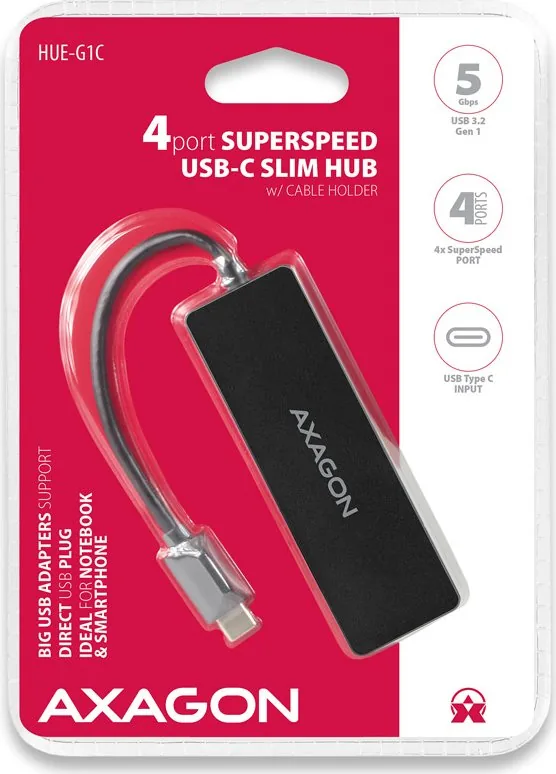
4 PORT SUPERSPEED USB-C
SLIM HUB w/ CABLE HOLDER
1. Zapněte
počítač.
2. Připojte hub k
USB portu PC.
3. Proběhne
automatická
instalace.
Nejsou
potřeba žádné
externí
ovladače.
4. Hub je
připraven.
1. Accendete il
computer.
2. Collegare l'hub
alla porta USB
del PC.
3. Ha luogo
l'installazione
automatica.
Non è
necessario
nessun driver
esterno.
4. L'hub è pronto.
1. Schakel de
computer in.
2. Sluit de hub
aan op de USB
poort van de
PC.
3. Er wordt een
automatische
installatie
uitgevoerd. U
hoeft geen
externe
stuurprogram
ma's te
installeren.
4. De hub is klaar.
1. Ligue o
computador.
2. Conecte o hub à
porta USB do PC.
3. Será executada
uma instalação
utomática. Não
há necessidade
de instalar
drivers externos.
4. O hub está
pronto.
1. Porniţi PC-ul.
2. Conectați
hub-ul la portul
USB al PC-ului.
3. Rulează
instalarea
automată. Nu
sunt necesare
niciun fel de
drivere externe.
4. Hub-ul este
gata.
1. Bilgisayarı açın.
2. Çoklayıcıyı PC
USB bağlantı
noktasına
bağlayın.
3. Kurulum
otomatik olarak
başlayacaktır.
Herhangi bir
harici sürücü
kurmanıza gerek
yok.
4. Çoklayıcı hazır.
1. Starta datorn.
2. Anslut hubben
till datorns
USB-port.
3. Automatisk
installation sker.
Inga drivrutiner
behöver
installeras.
4. Hubben är klar.
1. Zapnite počítač.
2. Pripojte hub k
USB portu PC.
3. Prebehne
automatická
inštalácia. Nie sú
potrebné žiadne
externé
ovládače.
4. Hub je
pripravený.
1. Proszę włączyć
komputer.
2. Podłącz hub do
portu USB
komputera PC.
3. Urządzenie
zostanie
zainstalowane
automatycznie.
Nie są
potrzebne
żadne
sterowniki
zewnętrzne.
4. Hub jest
gotowy.
1. Kapcsolja be a
számítógépet.
2. Csatlakoztassa
az hub-ot a PC
USB portjához.
3. Végbemegy az
automatikus
telepítés. Nem
szükséges
semmilyen
külső vezérlő.
4. A hub készen
áll.
1. Upalite računalo.
2. Priključite hub
na USB
priključak
računala.
3. PIzvršit će se
automatska
instalacija. Nije
potrebno
instalirati
dodatne
upravljačke
programe.
4. Hub je spreman.
1. Ανοίξτε τον
υπολογιστή.
2. Συνδέστε το
καλώδιο USB
στη θύρα USB
του υπολογιστή.
3. Θα εκτελεστεί
μια αυτόματη
εγκατάσταση.
Δεν χρειάζεται
να
εγκαταστήσετε
εξωτερικούς.
4. Ο δίκος είναι
έτοιμος για
χρήση.
1. Allumez
l'ordinateur.
2. Connectez le
hub au port USB
du PC.
3. L'installation
aura
automatiqueme
nt lieu. Aucun
pilote externe
n'est nécessaire.
4. Le hub est prêt.
1. Kytke tietokone
päälle.
2. Kytke keskitin
tietokoneen
USB-väylään.
3. Automaattinen
asennus
suoritetaan.
Ulkoisia ajureita
ei tarvitse
asentaa.
4. Keskitin on
valmis
käytettäväksi.
1. Encienda el
ordenador.
2. Conecte el hub
al puerto USB de
la PC.
3. Se procede a la
instalación
automática. No
es necesario
instalar
controladores
externos
adicionales.
4. El hub está listo.
1. Tænd for
computeren.
2. Forbind hubben
til Pc’ens USB
port.
3. En automatisk
installation vil
blive udført. Du
behøver ikke
installere
eksterne
drivere.
4. Hubben er klar.
1. Turn on
computer.
2. Connect the
hub to the PC
USB port.
3. An automatic
installation
will be
performed. No
need to install
any external
drivers.
4. The hub is
ready.
1. 打开电脑。
2. 将集线器链接到个人计算机(PC) USB端口。
3. 此时将执行自动安装。
这一过程中无需安装任何外部驱动程序。
4. 集线器(hub)已经准备好了。
1.
2.
3.
4.
1. Bключете
компютъра.
2. Свържете хъба
към USB порта
на компютъра.
3. Протича
автоматична
инсталиране.
Няма нужда от
никакви външни
драйвери.
4. USB хъба е
готов.
1. Bключить
компьютер.
2. Подключите
концентратор к
USB-разъёму
вашего
компьютера.
3. Происходит
автоматическая
установка.
Не требуется
никаких
внешних
драйверов.
4. Концентратор
готов к работе.
1. Schalten Sie
den Rechner ein.
2. Schließen Sie
den Hub an den
USB-Anschluss
des PCs an.
3. Es erfolgt eine
automatische
Installation. Es
sind keine
externen Treiber
notwendig.
4. Der Hub ist
bereit.

Chat with your AXAGON 4-Port USB 3.0 Hub manual using AI

Get instant AI answers from your AXAGON 4-Port USB 3.0 Hub manual

Ask anything about the AXAGON 4-Port USB 3.0 Hub. Answers come from this manual, with the pages they are based on.

Ask a Question

0/1000

Do you recommend 4-Port USB 3.0 Hub?

Yes No

Frequently Asked Questions

A

This hub supports Windows XP, Vista, 7, 8, 8.1, 10, and later versions including Server editions. It also works with OS X 10.x and later, as well as Linux 2.6.x and later, covering both 32-bit and 64-bit architectures.

Is this answer helpful?

A

Yes, the hub allows you to connect up to two Hard Disk Drives (HDD) and one Solid State Drive (SSD) simultaneously without needing an external power source, provided they do not exceed the power budget.

Is this answer helpful?

A

No, the hub is bus-powered, meaning it draws all necessary electricity directly from your computer's USB port. You do not need to plug in an extra power adapter.

Is this answer helpful?

A

No, the AXAGON USB Hub features automatic installation. Once plugged into a USB port, the operating system will detect it instantly without requiring any manual driver downloads or installations.

Is this answer helpful?

A

The hub comes with a fixed USB Type-C cable that is exactly 14 cm long, providing a compact connection that keeps your workspace organized.

Is this answer helpful?

M: QW-35-FL

Advantages and Disadvantages

Advantages

  • Supports simultaneous connection of two HDDs and one SSD
  • Fast USB 3.0 speeds up to 5 Gbps for quick data transfers
  • Plug and Play installation requires no driver setup
  • Bus-powered design eliminates the need for extra adapters
VS

Disadvantages

  • Fixed 14 cm cable limits placement flexibility
  • No dedicated power button on the hub unit itself
  • Not suitable for high-power devices like charging laptops
M: QW-35-FL

Product Specification

Type

USB-Hub

Form factor

1x external wired (cable not detachable)

Connection

1x USB-C 3.0 (connector via cable, 5Gb/s, 14cm cable length)

Ports

4x USB-A 3.0 (socket)

Transfer

4x USB-A 3.0 (socket, 5Gb/s)

Power supply

Power supply only via connection

Dimensions

3.78x0.39x1.18 in (WxDxH)

Weight

1.09 oz

Case color

black

Compatibility

universal

Manufacturer warranty

two years

USB spelling

Link

M: QW-35-FL

Product Description

AXAGON USB Hub: The Ultimate Connectivity Solution

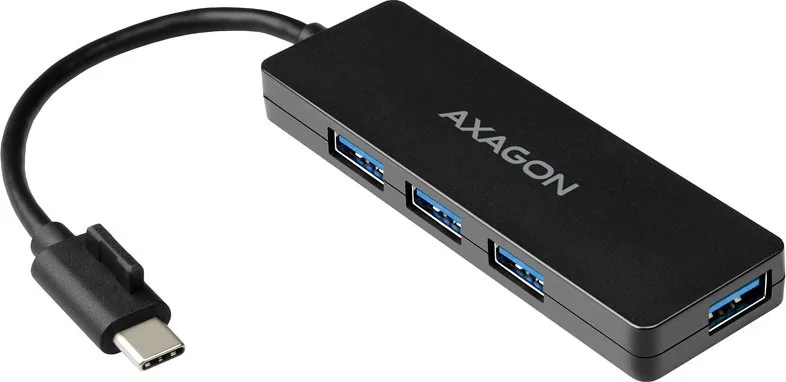
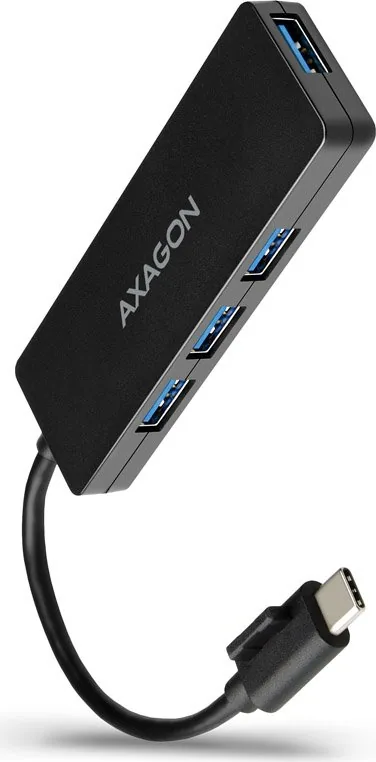
Expanding your computer's capabilities has never been easier with the AXAGON USB Hub. This sleek, four-port SuperSpeed USB hub is designed for users who demand reliability and speed in their daily digital workflow. Featuring a robust USB-C male connector with a fixed 14 cm cable, this device plugs directly into your laptop or desktop to instantly unlock additional connectivity options.

The hub boasts four USB-A 3.2 Gen 1 ports, delivering transfer speeds of up to 5 Gbps. Whether you are transferring large video files, connecting external hard drives, or plugging in multiple peripherals simultaneously, this hub handles it all with ease. It supports up to two HDDs and one SSD running at the same time, making it an ideal companion for content creators and data enthusiasts who need extensive storage access without cluttering their desk with tangled wires.

Installation is effortless thanks to its Plug & Play design. There is no need to hunt for drivers or install complex software; simply connect the hub, and your operating system will recognize it immediately. It is fully compatible with Windows XP through 10 and later versions, macOS 10.x and newer, as well as Linux systems. The built-in overcurrent protection ensures that your connected devices remain safe from power surges, while the bus-powered design means no external power adapter is required.

Designed with portability in mind, the slim form factor fits perfectly into any workspace. The included cable holder helps keep your setup tidy when not in use. Compliant with EU regulations including EMC and RoHS, this product represents a commitment to quality and environmental responsibility. Upgrade your connectivity today with the AXAGON USB Hub and experience seamless performance across all your devices.

M: QW-35-FL

© Copyright 2026 Manual.ly
