
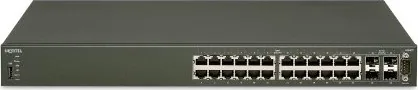
Avaya ERS 4500 4524GT Manual
PDF manual · 66 Pages
English



Quick check
Incorrect answer, please try again.
Chat with your Avaya ERS 4500 4524GT manual using AI
Get instant AI answers from your Avaya ERS 4500 4524GT manual
Ask anything about the Avaya ERS 4500 4524GT. Answers come from this manual, with the pages they are based on.
Ask a Question
Do you recommend ERS 4500 4524GT?
Yes NoFrequently Asked Questions
It is a rackmount managed switch designed for business networks that need Gigabit access, flexible uplinks, and dependable day-to-day switching performance.
Is this answer helpful?
The 4524GT offers 24 10/100/1000 RJ-45 ports and shared SFP support for fiber expansion, making it suitable for access and uplink use.
Is this answer helpful?
Yes. The ERS 4500 family supports stacking, allowing multiple units to operate as a single logical switch for easier management and higher resiliency.
Is this answer helpful?
Initial setup can be done through the console and CLI, BOOTP, a USB ip.cfg file, or the web-based management interface, depending on the deployment needs.
Is this answer helpful?
The 4524GT itself is a non-PoE model, but the 4500 series includes PoE variants. That makes the family useful when PoE is needed in other deployments.
Is this answer helpful?
Use antistatic protection, ensure proper grounding, keep ventilation clear, and avoid touching connector pins. These steps help prevent damage and safety risks.
Is this answer helpful?
Advantages and Disadvantages
Advantages

- 24 Gigabit copper ports provide solid access-layer density for business networks.
- Shared SFP support adds flexible fiber uplink options for longer runs or backbone links.
- Stacking support helps multiple switches operate as one manageable system.
- USB and console options simplify initial setup, recovery, and configuration transfer.
Disadvantages

- Installation requires careful grounding, ESD handling, and attention to ventilation.
- Some models are Class A devices, so they are better suited to business than home use.
- There is no AC power switch; unplugging the cord is the only way to shut the unit down.
- Power, cabling, and SFP compatibility must be checked closely to avoid setup issues.
Product Specification
Function
Switch
Type
Standalone, Rackmount (via mounting brackets)
Network ports
20x RJ-45, 4x RJ-45/SFP
Speeds
24x RJ-45 (10/100/1000Base-T), 4x SFP (1Gb/s)
PoE
N/A
Backplane
9kB Jumboframes, 8k MAC addresses, 2x Stacking (rear)
Officially supported standards
802.1AX, 802.1D, 802.1Q, 802.1X, 802.1AB, 802.1p, 802.1s, 802.1w, 802.1X, 802.3, 802.3ab, 802.3u, 802.3x, 802.3z, IGMPv3
Configuration
Console, serial (DB9, USB-A 2.0)
Color
black
Special features
Metal housing, removable mounting brackets, optional external redundant power supply (redundant power feed), firmware updates possible
Note
Version without power cable: AL4500A05-E6. EU power cable version: AL4500B05-E6. UK power cable version: AL4500C05-E6.
Note #2
For this device, "link aggregation" was officially specified with the obsolete standard IEEE802.3ad. Since 2008, this function is no longer managed by IEEE "Working Group 3" (IEEE 802.3, CSMA/CD - Ethernet), but by "Working Group 1" (IEEE 802.1, High Level Interface - Internetworking) and is technically defined unchanged via IEEE 802.1AX.
Product Description
Avaya ERS 4500 4524GT Rackmount Gigabit Managed Switch Overview
The Avaya ERS 4500 4524GT is built for business networks that need reliable switching, flexible uplinks, and straightforward rack deployment. As part of the ERS 4500 family, it combines Gigabit Ethernet access with shared SFP support, giving administrators room to mix copper and fiber connections as the network grows. The design is aimed at stable day-to-day operation in wiring closets, branch offices, and other professional environments where uptime matters.
What makes this model especially practical is its balance of density and manageability. The 4524GT provides 24 10/100/1000 RJ-45 ports, while the wider 4500 series also includes versions with PoE, Fast Ethernet, combo ports, and stacking support. That means the platform can be adapted for desktop connectivity, uplinks, wireless access points, or voice devices without forcing a complete redesign later. The manual also highlights support for SFP transceivers, redundant power options on selected models, and stack configurations that can simplify administration across multiple units.
Installation guidance in the Avaya ERS 4500 4524GT Rackmount Gigabit Managed Switch, 20x RJ-45, 4x RJ-45/SFP Manual emphasizes good cabling, grounding, airflow, and ESD protection. These details matter because the switch is designed for Class A business use and must be installed carefully to avoid interference, overheating, or static damage. The manual also explains how to connect AC power, interpret LED status, and set initial IP parameters through the console, BOOTP, USB, or the web interface.
For teams that need a compact yet capable managed switch, the 4524GT stands out for its practical feature set. Shared SFP ports make fiber expansion easier, while stacking support helps multiple switches operate like a single system. The result is a platform that feels well suited to organized, scalable network layouts where predictable performance is more valuable than flashy extras.
Notes
- Use proper grounding and antistatic precautions during installation.
- Check airflow clearance before placing the switch in a rack or on a shelf.
- Verify port type, cable category, and SFP compatibility before deployment.
- Review the Avaya ERS 4500 4524GT Rackmount Gigabit Managed Switch, 20x RJ-45, 4x RJ-45/SFP Manual before first power-up.
Search for 67,706 Manuals online


Type-in Brand or Model