
Avantree TWS120 Manual
PDF manual · 8 Pages
English



Quick check
Incorrect answer, please try again.
Chat with your Avantree TWS120 manual using AI
Get instant AI answers from your Avantree TWS120 manual
Ask anything about the Avantree TWS120. Answers come from this manual, with the pages they are based on.
Ask a Question
Do you recommend TWS120?
Yes NoFrequently Asked Questions
The earbuds offer 8 hours, and the case provides 36 hours total playtime.
Is this answer helpful?
Open the case, wait for pairing lights, and select Avantree TWS120 in Bluetooth settings.
Is this answer helpful?
Yes, both left and right earbuds support independent mono mode usage.
Is this answer helpful?
Red means charging, white means fully charged, green means case is full.
Is this answer helpful?
Long press the earphone for 10 seconds until white and red lights flash together.
Is this answer helpful?
The optimal range is between 0 degrees Celsius and 40 degrees Celsius.
Is this answer helpful?
Store them in the case and clean gently with a soft cloth according to instructions.
Is this answer helpful?
Advantages and Disadvantages
Advantages

- Over 36 hours total battery life with charging case.
- Flexible mono mode allows single earbud usage.
- Intuitive touch controls for easy music and call management.
- Clear LED indicators for battery and charging status.
- Stable Bluetooth connection with auto-reconnect feature.
Disadvantages

- Requires Micro-USB cable instead of modern USB-C.
- Reset process requires manual steps for each earbud.
- Temperature performance may drop outside 0 to 40 C range.
- Pairing history must be cleared on phone before reset.
- Only one unit charges if the other is removed.
Product Specification
Type
Headphones (In-Ear)
Form Factor
True Wireless, Hookless
Design
Closed
Microphone
Built-in
Wireless
Bluetooth 5.0, aptX
Controls
Touch Control
Battery Life
8 h, 36 h (with charging case)
Battery
USB Micro-B charging port, charging case, fast charging (10 min for 1 h battery life)
Color
Black
Product Description
Avantree TWS120 Wireless Audio Overview
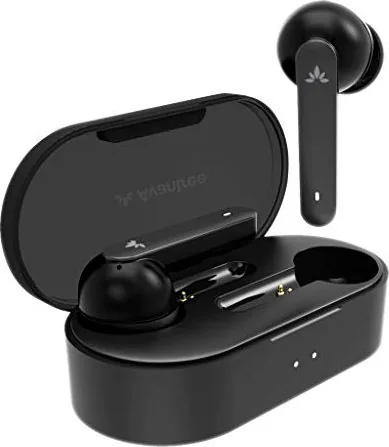
The Avantree TWS120 represents a significant step forward in true wireless technology. Designed for clear phone calls and immersive music, these earbuds deliver exceptional battery life. Users enjoy up to thirty-six hours of total playtime when utilizing the charging case. The earphones alone provide eight hours of continuous playback. This ensures you stay connected throughout long work days or commutes. The charging case fits easily into your pocket for added portability.
Enhancing Comfort During Use
Fit determines the success of any wireless earbud experience. The user guide recommends trying different sized ear tips to find the best match. Medium-sized tips come pre-mounted on the unit. Ensure all tips are firmly attached to prevent audio leakage. Flip the tips over and mount them properly. Aim the adjustment to point directly at the microphone hole. A secure fit provides better noise isolation. This maximizes clarity during voice calls.
Power Management and LED Indicators
Battery status is displayed through distinct LED lights. Earphone LEDs turn red while charging. They shine white for ten seconds upon completion. This automatic shut off helps conserve energy. The charging case uses dual LED indicators. The left light flashes red when the case is low. A solid green right light confirms the case is fully powered. Use a standard DC five volt USB port for charging. Include the provided Micro-USB cable for best results. Allow one and a half hours for a full recharge.
Operational Controls and Connection
Touch controls facilitate music and call management. Double tap either earbud for play pause or call answers. Volume increases by sliding up on the left bud. Volume decreases by sliding down. Navigating tracks involves sliding up or down on the right bud. Pairing happens automatically after opening the case. The right earbud flashes white and red alternately in pairing mode. Select the device name in your Bluetooth menu. It connects instantly for future use. You can also use mono mode by picking out one earbud.
Maintenance and Troubleshooting Steps
Resetting is essential for clearing memory issues. Long press the earbud for ten seconds until lights show white and red together. This clears pairing history with your device. Remove the earbud from the case if resetting the left unit first. Mono mode allows single earbud use for calls. Store the device in the case when not in use. Keep temperatures between zero and forty degrees Celsius. Check for support videos online for further help. Always forget the device before re-pairing to ensure a clean connection.
Final Maintenance Notes
Note: Clear Bluetooth history on your phone before pairing again. Note: Recharge every three months if not used for long periods. Note: Clean the microphone holes gently with a soft cloth.
Search for 67,706 Manuals online


Type-in Brand or Model