
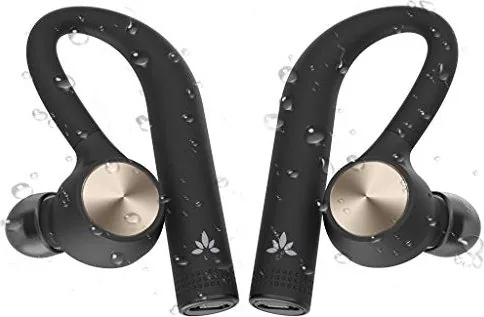


Avantree TWS109 Manual
PDF manual · 9 Pages
English



Quick check
Incorrect answer, please try again.
Chat with your Avantree TWS109 manual using AI
Get instant AI answers from your Avantree TWS109 manual
Ask anything about the Avantree TWS109. Answers come from this manual, with the pages they are based on.
TWS109 Maintenance Schedule
Avoid storing the earphones for extended periods without recharging; do not exceed three months.
Follow recommended cleaning instructions to keep the earphones safe and functional.
Free maintenance reminders
Timed to your purchase date. Always free, unsubscribe anytime.
Ask a Question
Do you recommend TWS109?
Yes NoFrequently Asked Questions
You can get up to ten hours of playtime on a single charge before needing to power down for recharging.
Is this answer helpful?
Hold the right earphone for four seconds to enter pairing mode, then select Avantree TWS109 on your device.
Is this answer helpful?
Yes, the right earbud can be used alone for mono playback or taking calls independently of the left one.
Is this answer helpful?
A solid blue light or flashing blue indicates a connection to a mobile device or active pairing mode.
Is this answer helpful?
It takes approximately ninety minutes to fully charge using the included Micro USB cable.
Is this answer helpful?
Power them off, then hold the right and left earphones for fifteen seconds each until LED flashes red and blue simultaneously.
Is this answer helpful?
Optimal function occurs between zero and forty degrees Celsius, though it functions beyond this range.
Is this answer helpful?
Advantages and Disadvantages
Advantages

- Up to ten hours of continuous playtime on a single charge for extended listening sessions.
- Allows mono earbud use on the right side for calls when the other is unavailable.
- Simple touch buttons manage playback, calls, and power functions without complex menus.
- Clear LED indicators show battery and connection status visually at a glance.
- Pairs quickly with devices and supports automatic reconnection after initial setup.
Disadvantages

- Charging requires a specific Micro-USB cable which is less universal than USB-C.
- Reset process involves holding the button for fifteen seconds on both earbuds individually.
- Performance may be impaired if stored outside the zero to forty degree Celsius range.
- Pairing history must be cleared manually from mobile devices before reconnecting.
- Only the right earbud supports mono playback, limiting single-unit flexibility.
Product Specification
Type
In-Ear Headphones
Form Factor
True Wireless, Ear Hook
Design
Closed
Microphone
Built-in
Wireless
Bluetooth
Controls
Touch Control
Battery
USB Micro-B Charging Port
Color
Black
Product Description
Discovering the Avantree TWS109 Experience
The Avantree TWS109 True Wireless Earphones represent a significant step forward in affordable audio technology. Designed with a focus on user comfort and extended battery life, these earbuds cater to active lifestyles who demand reliability in their daily gear. The fitting adjustment process is crucial for stability. It involves selecting the right eartips from the included accessories kit. While medium-sized eartips come pre-mounted, users should physically try different sizes for an optimal seal and sound isolation that prevents external noise from leaking in during noisy environments.
Battery performance is a key highlight for this specific model. Users can expect up to ten hours of continuous playtime on a single charge. This duration is ideal for long flights, intensive work sessions, or all-day listening without interruption. When the battery gets critically low, a voice prompt notifies the user to recharge immediately. Charging is facilitated via a standard Micro USB cable. It requires approximately ninety minutes to fully charge from zero. During charging, the LED indicator remains solid red on the earbud. When the process concludes, the light turns off, providing visual confirmation of power status without needing to check apps.
Operation relies on simple touch controls located on each earbud surface. Pressing and holding allows for power management, while double-tapping handles music and call functions. Powering off one earbud automatically shuts down the other, ensuring no power is wasted. Pairing with a Bluetooth device is straightforward for most users. The right earbud initiates pairing mode automatically upon first use. Later, you can manually enter pairing mode by holding the right earbud for four seconds until the LED flashes blue and red alternately to signal discoverability.
A unique feature of the TWS109 is the mono earbud mode functionality. Only the right earphone can function independently for calls or audio playback. This flexibility allows users to leave one earbud in the case for charging while staying connected to their mobile phone via the other unit. Resetting the pairing history is necessary if the devices fail to connect correctly to a new source. This process involves holding the power buttons for fifteen seconds on both units while they are completely off.
Proper care ensures longevity and consistent performance over time. The device functions optimally between zero and forty degrees Celsius. Extreme temperatures can impair the chemical battery performance significantly. It is recommended not to store the earphones for more than three months without recharging to protect the internal battery health from deep discharge. Regular cleaning removes debris from the charge port and speaker mesh to maintain sound quality.
Usage Tips
Always charge with a standard USB 5V source to prevent damage.
Final Thoughts
These earphones balance functionality with ease of use effectively for the consumer.
Search for 67,706 Manuals online


Type-in Brand or Model