
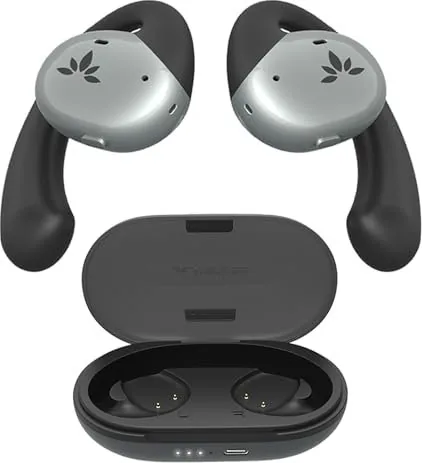


Avantree Pebble Manual
PDF manual · 1 Pages
English


Quick check
Incorrect answer, please try again.
Chat with your Avantree Pebble manual using AI
Get instant AI answers from your Avantree Pebble manual
Ask anything about the Avantree Pebble. Answers come from this manual, with the pages they are based on.
Ask a Question
Do you recommend Pebble?
Yes NoFrequently Asked Questions
Remove the earbuds from the charging case; they enter pairing mode (LED flashes blue and red). Open your phone’s Bluetooth menu and select "Avantree Pebble" to pair. If prompted, confirm pairing on your phone.
Is this answer helpful?
To increase volume: double-click the main button on the right earbud. To decrease volume: double-click the main button on the left earbud. Single taps and presses handle playback and call controls.
Is this answer helpful?
If they don’t reconnect automatically, open your device’s Bluetooth menu and manually select "Avantree Pebble." If issues persist, visit avantree.com/pebble/reconnection or contact Avantree support for troubleshooting steps.
Is this answer helpful?
Connect the charging case to a 5V/500mA–2A USB charger using the included Type-C cable. Place the earbuds into the case to charge. LED indicators on the case show charging status from low to full.
Is this answer helpful?
Perform a factory reset to clear pairing history—refer to the Avantree Pebble support guide for the exact reset sequence. If unsure, visit avantree.com/support/pebble for step-by-step instructions and assistance.
Is this answer helpful?
Yes. Optional accessories include individual right/left earbuds, replacement charging cases, and Type-C cables. Visit avantree.com/pebble/accessories for compatibility and ordering details.
Is this answer helpful?
Visit avantree.com/support/pebble for online guides, reconnection instructions, and product registration. You can also submit a support ticket or email [email protected]; regional phone numbers are listed on the Avantree website.
Is this answer helpful?
Advantages and Disadvantages
Advantages

- Compact, pocketable design with a slim Type-C charging case for easy portability.
- Simple pairing flow: auto-pair on first removal and reliable auto-reconnect.
- On-ear controls allow playback, call handling, and direct volume adjustment.
- Noise-canceling mic and main microphone improve call clarity in everyday settings.
- Support resources, accessories and replacement parts available from Avantree.
Disadvantages

- Limited advanced features compared with higher-end true wireless models (e.g., no active noise cancellation advertised).
- Volume control limited to double-tap on earbuds; no dedicated app-based EQ described.
- Battery runtime specifics not stated in text; users may need to check product page for exact figures.
- Troubleshooting may require visiting support pages or contacting regional help lines.
- Replacement accessories and parts may be sold separately, adding extra cost.
Product Specification
Design
Earbuds (Open-Ear)
Form Factor
True Wireless, Ear hook
Acoustic Principle
open
Microphone
integrated
Wireless
Bluetooth 5.2
Controls
Touch Control
Battery life
10h, 35h (with charging case)
Battery
USB-C charging port, charging case, 2h charging time
Frequency range
20Hz-20kHz
Impedance
22 Ohm
Sensitivity
118dB
Driver
0.65 in
Color
black
Weight
0.92 oz (per earbud), 3.71 oz (charging case)
Product Description
Avantree Pebble — Compact True Wireless Earbuds
The Avantree Pebble delivers a comfortable, pocketable true wireless experience designed for everyday use. Lightweight earbuds and a slim charging case offer reliable Bluetooth connectivity, intuitive touch controls, and clear voice pickup for calls. With simple pairing and automatic reconnection, these earbuds are aimed at users who want fuss-free audio for commuting, workouts, and daily hands-free calls.
Design and Comfort
Pebble’s low-profile shape fits snugly in the ear and comes with a compact Type-C charging case for easy carry. The earbuds are labeled L and R with tactile controls on each bud that support taps and holds, enabling playback, calls, and volume adjustments without reaching for your phone.
Connectivity and Controls
Pairing is straightforward: remove the buds from the case and they enter pairing mode (LED flashes blue and red). Select “Avantree Pebble” from your device’s Bluetooth menu. The earbuds support auto-reconnect when returned to the case or taken back out. Volume is adjusted on the buds themselves—double-tap the right earbud to increase and the left to decrease volume.
Charging and Battery
Charge the case via the included Type-C cable using a 5V/500mA–2A USB charger. Place earbuds in the case to initiate charging; LED indicators show charge status. The case provides additional charges on the go, keeping the earbuds ready for extended daily use.
Call Quality and Features
Pebble includes built-in microphones and a noise-canceling mic configuration to improve voice clarity during calls. Indicators show power and connection status so you can quickly troubleshoot pairing or battery issues.
Support and Troubleshooting
If earbuds fail to auto-reconnect, selecting “Avantree Pebble” from the Bluetooth menu usually resolves it. For reconnection steps, firmware, accessories like single-ear replacement buds, or further support, Avantree’s product pages and support channels provide guides and ticketed assistance.
Notes
- LED behavior: blue/red blinking for pairing; charge LEDs indicate low to full.
- Factory reset clears pairing history if you need to re-pair with a new device.
- Optional accessories include individual left/right earbuds and replacement charging cases.
Search for 67,706 Manuals online


Type-in Brand or Model