
Avantree HF027 Manual
PDF manual · 5 Pages
English



Quick check
Incorrect answer, please try again.
Chat with your Avantree HF027 manual using AI
Get instant AI answers from your Avantree HF027 manual
Ask anything about the Avantree HF027. Answers come from this manual, with the pages they are based on.
Ask a Question
Do you recommend HF027?
Yes NoFrequently Asked Questions
Check TV audio settings and select Headset or External Speakers. Ensure output is to VARIABLE mode if volume control is required.
Is this answer helpful?
Volume adjustment on wired headphones generally works on mobile devices only. Use TV remote or buy an inline controller.
Is this answer helpful?
Use the included clip on clothing to provide slack and prevent cable tension from pulling earbuds out of your ears.
Is this answer helpful?
Yes, remove the 4 to 3 pole converter adapter to use the microphone on single jack smartphone devices safely.
Is this answer helpful?
The effective working length is about 3 meters or 12 feet due to coil tension beyond that point.
Is this answer helpful?
Yes, you need an RCA to 3.5mm cable for TVs with RCA outputs labeled AUDIO OUT.
Is this answer helpful?
Clip to clothing or shirt. Do not clip onto zippers or thick clothes to avoid damage or tugging.
Is this answer helpful?
Advantages and Disadvantages
Advantages

- Extended coiled cable design offers flexibility up to 15 feet total length for user comfort.
- Compatible with a wide range of devices including TVs, PCs, and mobile phones effectively.
- Includes a clothing clip to secure the earphone cable and prevent accidental pulling or damage.
Disadvantages

- Volume control does not function on TVs or older PCs with manual adapters included.
- Microphone requires removal of 4 to 3 pole converter on single jack devices like phones.
- Some TV adapters and converters must be purchased separately for specific RCA or 6.35mm outputs.
Product Specification
Type
Headphones (In-Ear)
Form Factor
Headband-Free
Principle
Closed-Back
Microphone
Inline Microphone
Connector
3.5mm Jack
Wireless
No
Cable
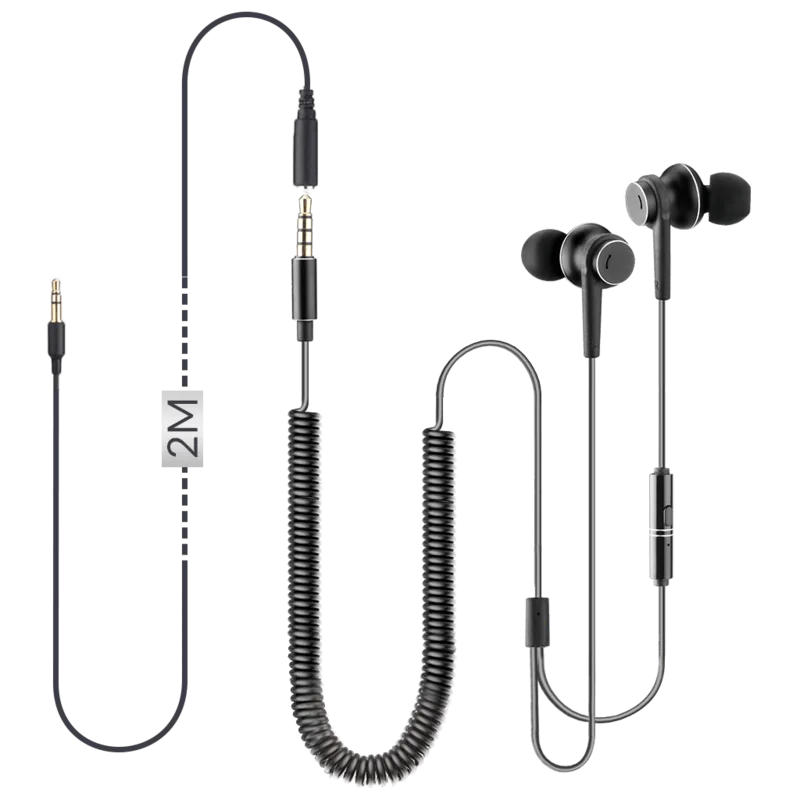
9.84 ft, Coiled Cable, Extension Cable (6.56 ft)
Control
1-Button Remote
Sensitivity
104 dB
Color
Gray
Product Description
Avantree HF027 Product Overview
Essential Setup Guide
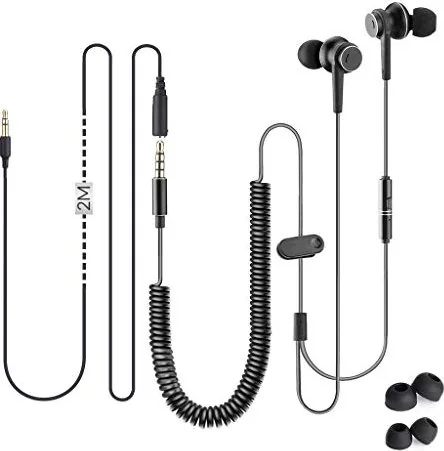
The Avantree HF027 is a versatile wired audio accessory designed for multiple platforms to enhance listening experiences significantly. It supports mobile devices, newer computers, televisions, and music keyboards effectively with minimal setup required. Users often check the Avantree HF027 Manual to understand detailed wiring requirements before installation begins. This headset excels with its long coiled cable that allows freedom of movement while maintaining a stable connection to your audio source. Whether you are gaming or watching movies, the design ensures comfort and reliability for extended sessions.
Mobile and PC Connections
For smartphones, tablets, and modern PCs with one audio jack, simply plug the 3.5mm connector directly into the port provided. However, you must remove the 4 to 3 pole converter adapter to enable microphone functionality on single jack setups effectively. Keeping this adapter safe is highly recommended for future use with other devices that require different jack standards. Plug the device in for TV use to experience high fidelity sound output. Clip the wire accessory securely to clothing to prevent tugging on the earbuds during active use.
TV and Older Equipment
When connecting to older PCs, televisions, or keyboards with dual 3.5mm outputs, the 4 to 3 pole converter must connect to the earphone first. Failure to do so results in muffled sound or critically low volume levels for the user to hear. Check for RCA jacks labeled AUDIO OUT specifically, not COMPONENT INPUT which is strictly for video signals. If using a Big Phone Jack output like 6.35mm, you must purchase a converter separately to bridge the gap successfully. Ensure the audio output setting on your TV is set to VARIABLE to allow volume control via remote control interface.
Troubleshooting Audio
If no sound plays through the headphones, verify the TV audio settings menu carefully to locate the correct option. Many brands differ in their naming conventions, so set output to Headset or External Speakers to route signal correctly. Volume control is limited on these wired headphones for TV use, working fully on mobile devices instead without issues. If volume does not change during playback, purchase an inline volume controller for adjustment purposes easily. Earbuds may not stay in if the cable pulls them out of place constantly. Use the included clip on shirt fabric, avoiding zippers or thick materials that might damage the wire.
Cable Specifications
The coiled cord extends roughly fifteen feet in total relaxed length for user convenience. Effective working length is twelve feet due to coil tension and structural integrity limits. Beyond this range, buy an extension cable to maintain signal integrity without excessive strain on the internal wiring components. These steps ensure optimal performance across your home entertainment system without compromise or signal loss.
Final Recommendation
This product delivers solid performance when configured according to the specific audio output type found in your environment.
Search for 67,706 Manuals online


Type-in Brand or Model