
Avantree C171 Manual
PDF manual · 1 Pages
English


Quick check
Incorrect answer, please try again.
Chat with your Avantree C171 manual using AI
Get instant AI answers from your Avantree C171 manual
Ask anything about the Avantree C171. Answers come from this manual, with the pages they are based on.
Ask a Question
Do you recommend C171?
Yes NoFrequently Asked Questions
Connect the audio jack to your PC. Refer to the setup guide for driver configuration if needed to initialize the connection properly for your specific hardware model.
Is this answer helpful?
Recheck the connection and ensure the headset is not physically damaged. Contact support if the issue persists to troubleshoot button mapping failures.
Is this answer helpful?
Visit avantree.com/support/c171 to access troubleshooting guides and submit tickets for further assistance regarding your product inquiries.
Is this answer helpful?
Gizmex GmbH is the company responsible for manufacturing this product, based in Dusseldorf, Germany, ensuring quality standards.
Is this answer helpful?
Register your device at avantree.com/product-registration to maintain warranty status and track your purchase information effectively.
Is this answer helpful?
Call the region-specific number listed on the support page, such as +1 800 232 2078 for the US/CA, or check the contact details for your location.
Is this answer helpful?
Dispose of the packaging and this product in accordance with the latest provisions regarding environmental compliance and recycling standards.
Is this answer helpful?
Advantages and Disadvantages
Advantages

- Reliable wired connection ensures consistent audio without signal dropouts.
- Direct Windows PC integration simplifies setup for users globally.
- Multi-region support offers assistance through various contact channels.
- Robust build quality suits long calls and intensive workdays effectively.
- Responsive control interface allows precise management of calls and volume.
Disadvantages

- Wired design limits mobility compared to wireless headset options.
- Some users report unresponsive buttons that require support resolution.
- Setup instructions depend heavily on external manuals for clarity.
- Windows PC focus may not be ideal for Mac or Linux users.
- Packaging disposal instructions required for compliance with environmental standards.
Product Specification
Product Type
Headphones (In-Ear)
Design
Headband
Design Principle
Closed-back
Microphone
Wired Microphone
Connection
USB-C
Wireless
No
Cable Length
47.24 in
Controls
3-Button Remote
Frequency Response
20Hz-20kHz
Impedance
32 Ohm
Sensitivity
107dB
Driver
0.64 in
Color
Black
Weight
0.03 lbs
Product Description
Unlocking Audio Potential with Avantree C171
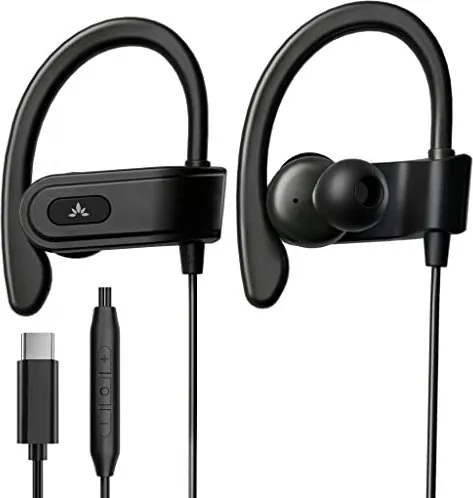
Finding the perfect wired headset can transform your daily communication experience significantly in the modern world. The Avantree C171 stands out as a reliable companion for professionals and students alike who demand consistency. With its robust build and clear audio transmission, this device ensures you stay connected without the frustration of intermittent signals often found in wireless alternatives. Comfort is paramount during long calls or study sessions, and the industrial design reflects a deep understanding of ergonomic needs for extended wear during intensive workdays.
Setting up your new gear should be seamless to save your valuable time. Many users appreciate the straightforward integration with Windows PC operating systems globally for various tasks. Navigating audio settings becomes intuitive once you understand the basics of the physical connection process required. For those seeking detailed guidance on configuration, referring to the Avantree C171 Manual provides step-by-step instructions that eliminate guesswork for new users entirely. This resource helps you optimize your setup for minimal latency and maximum clarity across voice assistants and traditional calls efficiently.
The control interface is another highlight of this device for superior usability. Button functionality allows you to manage calls and adjust volume with ease and precision during critical moments. Whether you need a quick tap to answer or a press hold for voice activation, the responsive touch points ensure you remain in control during urgent situations. Specific commands include single taps for functions or holding for longer actions which streamlines workflow. Even if issues arise, such as unresponsive buttons or setup difficulties, support channels are readily available to restore functionality quickly through dedicated teams.
Long-term reliability depends on accessible support networks and clear global guidance. Assistance is available through various contact points across multiple regions including the US, UK, and Europe. From technical troubleshooting to product registration, the support team ensures you get value from your purchase without significant delay. Contact points like [email protected] ensure help is always within reach for any inquiries you might have regarding your audio setup. Disposing of packaging responsibly shows a commitment to environmental standards alongside performance capabilities. Ultimately, this headset offers durability and performance that justifies its place in your personal tech ecosystem.
Company information like Gizmex GmbH confirms the manufacturing backing behind the product globally. Understanding the specifications helps in making informed decisions about audio peripherals for specific needs. The focus on wired technology ensures consistent power and signal stability for demanding professional tasks. Whether for work or leisure, this equipment delivers consistent results that meet modern communication standards effectively. The multi-language support included aids international users in understanding the features immediately without language barriers.
Notes:
- Ensure Windows PC compatibility before purchase for best results.
- Register your device for best support experience and warranty.
- Contact regional offices for specific help in your area.
- Check button mapping for optimal control during usage.
Search for 67,706 Manuals online


Type-in Brand or Model