
Autel MaxiDiag Elite MD802 Manual
PDF manual · 87 Pages
English



Quick check
Incorrect answer, please try again.
Chat with your Autel MaxiDiag Elite MD802 manual using AI
Get instant AI answers from your Autel MaxiDiag Elite MD802 manual
Ask anything about the Autel MaxiDiag Elite MD802. Answers come from this manual, with the pages they are based on.
Ask a Question
Do you recommend MaxiDiag Elite MD802?
Yes NoFrequently Asked Questions
You must register the tool on the Autel website first. Then install the Maxi PC Suite on a Windows or Mac computer. Connect the SD card to your PC and run the Maxi PC Suite software to download and install available updates for the scanner.
Is this answer helpful?
Yes, the tool supports both manual and automatic oil reset operations. It can reset service lights for engine oil, spark plugs, and other maintenance intervals depending on the specific vehicle manufacturer and configuration.
Is this answer helpful?
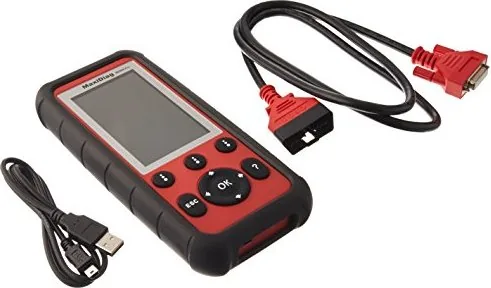
The package includes the user manual, a CD with software, an OBD II cable, a USB cable, an SD card containing the operation software, and a nylon carry case for storage when not in use.
Is this answer helpful?
Yes, the tool covers non-OBDII vehicles when set up with optional OBDI adaptors. This extends the diagnostic power to older model years that do not meet the universal OBD II protocol standards.
Is this answer helpful?
Printing is available via USB connection to a Windows-based PC. You need to connect the tool to a computer running the Autel PC Suite and select the print option after recording data files.
Is this answer helpful?
Ensure the vehicle battery has at least 8.0 volts before starting diagnostics. If the tool will not power up, check the DLC pins and ensure the vehicle battery voltage is sufficient with a multimeter.
Is this answer helpful?
Advantages and Disadvantages
Advantages

- Comprehensive OBD II and manufacturer specific diagnostics support
- Advanced EPB and ABS maintenance functions included in software
- User friendly interface with intuitive keyboard navigation
- Online software updates keep vehicle coverage current
- Graphing capabilities for live data analysis and comparison
Disadvantages

- Windows PC required for initial software configuration and printing
- Some vehicle functions require specific OBD I adaptors for older models
- Mac support for printing functions is currently limited
- Update process requires internet connection and registration
- Physical size may require careful handling in tight engine bays
Product Specification
Interface
OBD II
Functions
Freeze-Frame Data, MIL Off, Live Monitor, Clear Function, Reset Function
Display
LCD
Power Supply
OBD-powered
Dimensions
4.33 x 1.46 x 8.35 in
Weight
0.62 lbs
Product Description
Autel MaxiDiag Elite MD802 Diagnostic Scanner Overview
The Autel MaxiDiag Elite MD802 represents a significant advancement in automotive diagnostic technology. Designed for professional mechanics and enthusiasts, this scanner offers comprehensive coverage of vehicle systems. The device features a high-resolution TFT color display that clearly presents test results and data streams. Technicians can easily navigate menus using the intuitive keyboard buttons located on the unit. Power is supplied via the vehicle Data Link Connector or an external adapter, ensuring flexibility during testing sessions.
Diagnostic capabilities extend far beyond basic code reading. The unit supports OBD II functionalities including live data streaming, freeze frame retrieval, and emission readiness monitoring. This allows users to verify if a vehicle passes inspection requirements before submission. Advanced service functions include Oil Reset operations and Electronic Parking Brake maintenance. The EPB function enables cable replacement, tensioning, and calibration directly through the scanner interface. Similarly, ABS diagnostics are supported to ensure braking systems are functioning correctly.
System setup allows customization of language, units of measure, and audio output. Built-in diagnostic tests check keyboard functionality and LCD display integrity. Auto Scan performs an overall assessment of engine, transmission, airbag, and ABS systems. Live Data functions enable real-time viewing of sensor values and system status. Users can record data for playback later, aiding in intermittent fault diagnosis. Merging graphs allows comparison of related parameters to identify relationships between engine metrics.
Software maintenance is seamless with the Maxi PC Suite. Users register the tool online to access updates and warranty services. The software update procedure involves connecting the SD card to a computer and following the on-screen prompts. This ensures the diagnostic tool remains compatible with the latest vehicle models released annually. Vehicle coverage expands through software updates, including support for non-OBD II vehicles using specific adaptors.
Safety remains a priority during operation. Users are reminded to work in well-ventilated areas and wear protective eyewear. The tool operates within specific temperature ranges to maintain accuracy during testing sessions. Playback data storage allows for later review of recorded diagnostics on the SD card. Printing capabilities are available via USB connection to a Windows-based PC for creating detailed service reports.
For detailed operational procedures, consulting the Autel MaxiDiag Elite MD802 Manual is recommended to understand model-specific variations and safety warnings. Proper initialization and vehicle selection prevent communication errors during the diagnostic process. Whether troubleshooting engine performance or verifying emission controls, this tool provides the necessary data. It streamlines the repair workflow effectively while maintaining high standards of accuracy required in modern automotive repair environments. Always ensure the vehicle ignition state is correct before connecting any test equipment to avoid damage. The extensive list of OBD II monitors includes Misfire, Fuel System, and EGR checks that ensure compliance with regulations.
Important Notes
Ensure the tool is kept dry and clean. Do not expose to excessive temperatures. Always reset engine oil life to 100% after changes. Use proper safety precautions when working around ignition coils or moving parts.
Search for 67,706 Manuals online


Type-in Brand or Model