
Autel AutoLink ML529 Manual
PDF manual · 63 Pages
English



Quick check
Incorrect answer, please try again.
Chat with your Autel AutoLink ML529 manual using AI
Get instant AI answers from your Autel AutoLink ML529 manual
Ask anything about the Autel AutoLink ML529. Answers come from this manual, with the pages they are based on.
AutoLink ML529 Maintenance Schedule
Keep the scan tool dry, clean, and free from oil, water, or grease. Use a mild detergent on a clean cloth to clean the outside of the scan tool.
Use a mild nonabrasive detergent and a soft cotton cloth. Do not use solvents like alcohol and do not soak the keypad as it is not waterproof.
Ask a Question
Do you recommend AutoLink ML529?
Yes NoFrequently Asked Questions
It works with all OBDII compliant vehicles sold in the US since 1996, including light trucks and cars from domestic, Asian, and European manufacturers that have a standard 16-pin DLC.
Is this answer helpful?
Yes, you can connect the tool to a Windows PC using the provided USB cable and use the Autel Printer software to print DTC data and test results. Note that printing is not supported on Mac systems at this time.
Is this answer helpful?
Use the One-Click I/M Readiness Key or navigate to the Ready Test menu. The device will illuminate a green LED and beep twice if all monitors are complete, or red if they are not ready.
Is this answer helpful?
No, the Autel Autolink ML529 draws power directly from the vehicle's Data Link Connector (DLC) when connected, so no internal batteries are needed for operation.
Is this answer helpful?
Clearing codes resets the I/M readiness monitors to Not Ready status. You must drive the vehicle through a complete drive cycle for the monitors to run again and pass inspection.
Is this answer helpful?
Yes, it fully supports CAN protocol vehicles. However, the specific O2 Monitor Test function is not available for CAN-equipped vehicles; use On-Board Monitor Test instead.
Is this answer helpful?
Register your device on the Autel website, download the Maxi PC Suite on a Windows computer, connect the tool via USB, and follow the on-screen instructions to install updates.
Is this answer helpful?
Advantages and Disadvantages
Advantages

- Supports all OBDII compliant vehicles from 1996 and newer
- Features clear LED indicators for instant status checks
- Includes I/M readiness testing for emissions compliance
- Allows printing of diagnostic data to a PC
- Compact and lightweight design for easy handling
Disadvantages

- Does not support O2 Monitor Test on CAN-equipped vehicles
- Print function is unavailable on Mac computers currently
- Cannot erase permanent codes stored in non-volatile memory
- Requires vehicle ignition on for most operations
- Limited to one year warranty period
Product Specification
Interface
OBD II
Functions
Freeze-frame data, indicator light reset function (ABS, MIL, SRS), live monitor, clear function
Display
LCD
Connectors
USB
Power supply
OBD-powered
Dimensions
7.2x3.6x1.3 inches
Weight
8.4 ounces
Product Description
Autel Autolink ML529 - Read, Download & Print Free
The Autel Autolink ML529 stands as a robust and user-friendly OBDII/EOBD scanner designed for both professional technicians and automotive enthusiasts. This handheld device simplifies the complex world of vehicle diagnostics by offering comprehensive tools to read, clear, and monitor diagnostic trouble codes across all OBDII compliant vehicles from 1996 onwards. Whether you are dealing with domestic, Asian, or European cars, this tool ensures seamless communication through various protocols including CAN.
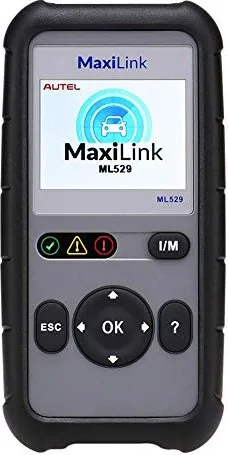
One of the standout features of the Autolink ML529 is its intuitive interface powered by a 2.8-inch LCD display and a straightforward navigation system using scroll buttons and an OK key. The device provides immediate visual feedback through color-coded LEDs: green indicates normal operation, yellow signals pending issues or incomplete monitors, and red warns of active faults requiring attention. Beyond basic code reading, it excels in I/M readiness testing, allowing users to quickly verify if a vehicle is prepared for emissions inspections without endless driving cycles.
The scanner also supports advanced functions like live data recording with manual or DTC triggers, freeze frame analysis, and component tests for EVAP systems. Users can review recorded data later via the playback feature or print reports directly to a computer using the included USB cable and Maxi PC Suite software. With built-in DTC lookup capabilities and AutoVIN technology, identifying manufacturer-specific codes becomes effortless. The device is compact, weighing only 237 grams, and operates on power drawn directly from the vehicle, eliminating the need for internal batteries during use.
For those looking to maintain their tool, the Autolink ML529 offers easy software updates through a PC connection, ensuring access to the latest vehicle coverage and diagnostic algorithms. Safety is prioritized with clear warnings against connecting equipment while the engine runs and guidelines for proper handling in well-ventilated areas. By combining portability, depth of function, and ease of use, the Autel Autolink ML529 remains a top choice for efficient vehicle maintenance and repair.
Search for 67,706 Manuals online


Type-in Brand or Model