
Autel AutoLink ML329 Manual
PDF manual · 39 Pages
English



Quick check
Incorrect answer, please try again.
Chat with your Autel AutoLink ML329 manual using AI
Get instant AI answers from your Autel AutoLink ML329 manual
Ask anything about the Autel AutoLink ML329. Answers come from this manual, with the pages they are based on.
AutoLink ML329 Maintenance Schedule
Use a mild detergent on a clean cloth to clean the outside of the scan tool. Keep it dry, clean, and free from oil, water, or grease.
If the scan tool does not power up, check if DLC pins are bent or broken and clean them if necessary.
Ask a Question
Do you recommend AutoLink ML329?
Yes NoFrequently Asked Questions
The ML329 supports all OBD-II–compliant vehicles, typically domestic, Asian, and European gasoline and light-truck models from 1996 onward. Some 1994–1995 vehicles may be OBD-II compliant if labeled accordingly; verify via the Vehicle Emission Control Information label or the 16-pin DLC under the dash.
Is this answer helpful?
Connect the ML329 to a Windows or Mac computer using the supplied USB cable, install and run Autel’s Maxi PC Suite from autel.com, register and sign in with your Autel ID, enter the tool serial and password (found in About), then select and apply available updates via the Update Mode.
Is this answer helpful?
Green indicates monitors are within allowed limits and no DTCs are present (likely ready for emissions testing). Yellow signals possible issues or incomplete monitors (pending or stored codes). Red means DTCs are present or monitors failed—repairs are required before emissions testing.
Is this answer helpful?
Yes. Erasing codes clears DTCs, freeze frame data, and resets I/M readiness monitors to Not Ready. To return monitors to Ready status requires completing the vehicle-specific drive cycle with no active codes.
Is this answer helpful?
Verify ignition is ON, ensure the OBD-II connector is securely attached, confirm the vehicle is OBD-II compliant with a 16-pin DLC, wait 10 seconds and retry, and check control module health. If problems persist, contact Autel support or your local distributor.
Is this answer helpful?
Yes. The tool displays live PID data (complete data set pages) and freeze frame parameters recorded when a DTC was set, helping replicate conditions for diagnostics and repair verification.
Is this answer helpful?
Keep the tool dry, clean, and free from oil or grease. Use a mild nonabrasive detergent on a soft cloth for the exterior. Do not use solvents like alcohol on the keypad and avoid soaking the keypad, as it is not waterproof.
Is this answer helpful?
Advantages and Disadvantages
Advantages

- Simple, intuitive interface with dedicated one-click I/M readiness key for quick emissions checks.
- Works with all OBD-II–compliant vehicles and supports live data, freeze frame, VIN, CVN and readiness tests.
- Compact, durable design with color TFT display, three-color LED indicators, and self-test utilities.
- USB connectivity for easy firmware updates via Autel Maxi PC Suite on Windows or Mac.
- Configurable settings (language, units, beeps, monitor allowances) to match regional requirements.
Disadvantages

- Limited to essential OBD-II functions; lacks advanced bi-directional tests and extensive manufacturer-specific features.
- No built-in battery—requires vehicle OBD-II port power and minimum vehicle battery voltage to operate.
- Small display size may limit readability of large data sets compared with tablet-based tools.
- Clearing codes also erases freeze frame and readiness status, requiring drive cycles to reset monitors.
- LED or connector faults require contacting support or distributor for repair; some fixes need technical assistance.
Product Specification
Features
Freeze-Frame Data, Warning Light Deactivation Function (ABS, MIL, SRS), Erase Function
Display
LCD
Connections
USB
Power Supply
OBD-powered
Dimensions
2.68x0.71x4.72in
Weight
0.34lb
Product Description
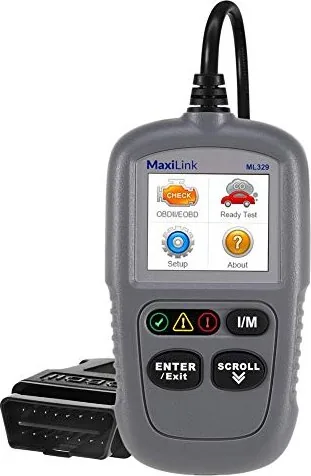
Autel Autolink ML329 Manual: Compact, Reliable OBD-II Scanner
The Autel Autolink ML329 is a compact, user-friendly OBD-II/EOBD scanner designed for both DIY mechanics and professional technicians. Built to communicate with all OBD-II–compliant vehicles (1996 and newer in many markets), the ML329 provides essential diagnostic functions including reading and erasing Diagnostic Trouble Codes (DTCs), viewing live data, freeze frame data, I/M readiness status, and vehicle information like VIN and calibration numbers. Its small footprint, clear TFT display, and intuitive single-button and scroll navigation make it an efficient tool for quickly diagnosing emissions-related issues and verifying repairs.
Ergonomically designed, the ML329 features a bright color display, three-color LED readiness indicators (green/yellow/red), a one-click I/M readiness button, and a USB port for PC updates. It runs from the vehicle’s OBD-II port (8–18V) and supports USB connectivity to a Windows or Mac computer for software updates via Autel’s Maxi PC Suite. The tool includes a quick guide and a USB cable and supports multiple languages and configurable monitor settings to match regional emissions requirements.
In operation, the ML329 guides users through scanning procedures: plug into the 16-pin DLC, power the tool with ignition on, select OBD II/EOBD, and follow on-screen prompts. It distinguishes stored, pending, and permanent codes, displays real-time PID data, and shows freeze frame parameters captured when a DTC was set. The I/M Readiness functions include a quick one-click check (with audible tones and LED cues) and a full readiness menu showing individual monitor statuses. The Ready Test mode is helpful post-repair to confirm monitors complete their drive-cycle tests and for pre-inspection readiness checks.
The ML329 also includes self-test utilities for display, keyboard, and LEDs, plus configurable options like units (metric/English), key and status beeps, and vehicle info display. If issues arise, the manual provides troubleshooting steps for linking errors, power problems, and LED faults. Autel supports registration and firmware updates through autel.com, and the device is backed by a limited one-year warranty and global support contacts.
Whether you need a straightforward code reader to check emissions readiness, verify repairs after clearing codes, or pull live engine data for diagnosis, the Autel Autolink ML329 offers a balanced mix of simplicity, essential diagnostic features, and reliable build quality for everyday automotive troubleshooting.
Notes
- Supports OBD-II protocols including CAN; some 1994–1995 vehicles may also be compliant if labeled.
- Clearing codes resets readiness monitors; complete drive cycles are required to restore "Ready" status.
- Keep the tool clean and avoid solvents on the keypad; do not connect/disconnect while ignition is on.
Search for 67,706 Manuals online


Type-in Brand or Model