
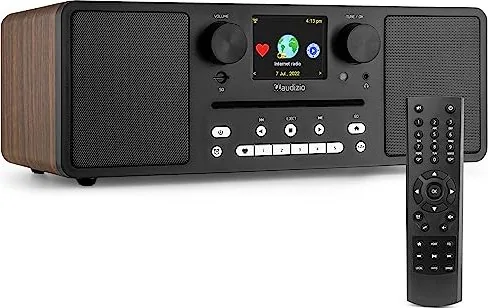
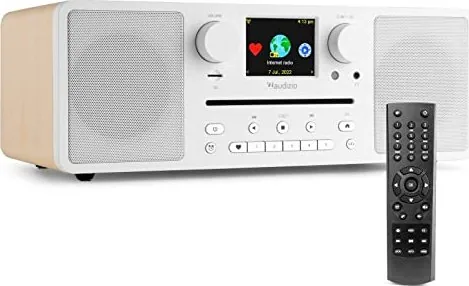
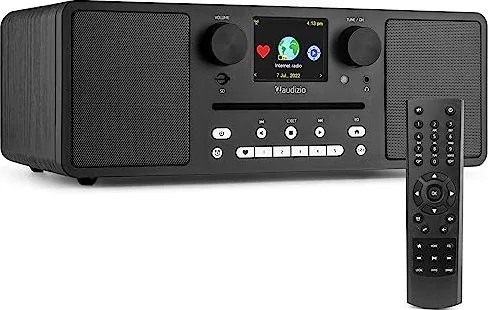
Audizio Naples Manual
PDF manual · 72 Pages
English



Quick check
Incorrect answer, please try again.
Chat with your Audizio Naples manual using AI
Get instant AI answers from your Audizio Naples manual
Ask anything about the Audizio Naples. Answers come from this manual, with the pages they are based on.
Naples Maintenance Schedule
If the product has a built-in lead-acid rechargeable battery and is not used for a long period, recharge it every 3 months to prevent permanent damage.
Check the mains lead before every use for damages and faults to avoid electrical shock and malfunction.
Free maintenance reminders
Timed to your purchase date. Always free, unsubscribe anytime.
Ask a Question
Do you recommend Naples?
Yes NoFrequently Asked Questions
Navigate to configuration settings and select Network. Enable the wireless function and scan for available networks. Select your router from the list and enter the password if required. The device supports WPA and WEP encryption standards for secure connection.
Is this answer helpful?
Yes, use the Media Centre feature. Ensure your computer and radio are on the same network. Select UPnP or DLNA sources to browse shared folders directly on the radio display.
Is this answer helpful?
Go to the Alarm menu and choose Active. Select time, sound source, and repeat days. You can set two separate alarms with different tones like FM or DAB radio.
Is this answer helpful?
The device supports MP3 audio files. File systems must be FAT12, FAT16, or FAT32. Ensure the drive is formatted correctly if files do not appear on the list.
Is this answer helpful?
Yes, enable Bluetooth mode on the radio. Pair your device by finding Audizio Naples in your Bluetooth list. Audio streams directly without cables once paired successfully.
Is this answer helpful?
Select FM mode then rotate the Tune knob to search frequencies. Use the arrow keys to scroll through stations. You can save them as presets for quick access later.
Is this answer helpful?
Press the Info button on the remote or go to Configuration Info Network. The IP address is listed there for browser access.
Is this answer helpful?
Advantages and Disadvantages
Advantages

- Extensive connectivity options including CD, USB, Bluetooth, and Internet Radio streaming services.
- Dual Alarm functionality with customizable ringtone sources and snooze features for wake-up convenience.
- Remote control over network via PC or smartphone web browsers for easy management.
- Support for DAB Plus and wide frequency FM reception for superior local radio quality.
- Adjustable Equalizer and Dimmer settings allow for personalized audio and display preferences.
Disadvantages

- CD tray requires manual ejection in some instances if the mechanism does not auto-release.
- Requires stable Wi-Fi connection for internet radio features and network streaming capabilities.
- External antenna must be extended manually for optimal FM and DAB signal reception.
- USB power consumption limits are strict so high power drives may not be recognized.
- Initial network setup wizard may be confusing for users unfamiliar with router setup.
Product Specification
Power
50W Peak
Audio Formats
CD Audio, CD-R/RW
Tuner
FM, DAB+, Internet Radio
Display
2.8" LCD, Time, Date
Audio Connections
AUX In (3.5mm Jack), Stereo Line Out (3.5mm Jack), Headphones (3.5mm Jack)
Additional Connections
USB-A, Card Reader (microSD)
Wireless
Bluetooth 5.0, Wi-Fi 4 (WLAN 802.11b/g/n)
Power Supply
AC Power
Features
Remote Control, Sleep Timer, Telescopic Antenna, Alarm
Dimensions
13.78 x 5.00 x 7.68 in (WxHxD)
Weight
7.05 lbs
Product Description
Experience Superior Sound with Audizio Naples
The Audizio Naples represents a significant upgrade for home audio systems. It delivers clear quality across multiple platforms effectively. Internet connectivity opens up a world of stations through Skytune. You can filter by genre or region easily on the display. Local digital broadcasts are captured using DAB Plus standards. FM bands remain supported for broad local coverage without internet. Wireless access allows UPnP media streaming from home servers. This allows access to stored music files effectively.
Physical connections offer diverse options for traditional audio users. A CD slot accommodates standard audio discs for playback at home. USB ports and Micro SD slots provide flexible storage access for MP3 files. The AUX input jack accepts signals from various external gadgets directly. Bluetooth technology facilitates wireless playback from mobile devices securely. Pairing is straightforward once the mode is activated on the unit display. Navigation is handled via a clear display and tactile buttons. Volume adjustments are precise and easy to make during listening sessions.
Daily convenience features include a double alarm system. Two separate alarms allow for complex scheduling needs with reminders. A sleep timer powers down the unit automatically after a set duration. This is ideal for listening to audio before sleep without shutoff. The equalizer setting allows for audio customization to match room acoustics. Network settings can be configured through a web interface on a computer. This remote management simplifies changes to favorites or settings physically.
Careful handling ensures product longevity over time. Placement near windows improves antenna reception significantly for signal strength. Temperature stability is crucial for electronic components to avoid condensation. Voltage requirements must match the local mains supply to prevent damage. Safety warnings regarding liquids and metal objects protect internal circuits effectively. The warranty remains valid if instructions are followed strictly. Detailed configuration steps help avoid common setup errors. Users should check their internet connectivity for streaming stability.
Network speed impacts streaming performance noticeably during heavy usage. For complete installation guidance, consult the Audizio Naples Manual for reference. It covers safety procedures and connection diagrams in detail. Troubleshooting sections address common connectivity issues for quick resolution. Technical support resources are available if problems persist. The device supports several languages for international use. Power saving modes help reduce energy consumption when idle. Ensure proper grounding to prevent electrical hazards during operation. Regular updates keep the software current for new features.
This all-in-one solution fits neatly on any desktop. It appeals to audiophiles and casual listeners alike. Integration with home networks creates a seamless experience. Whether using the internet or physical media, the sound remains crisp. Configuration options provide control over playback modes for needs. Memory presets save your favorite stations efficiently for selection.
Search for 67,732 Manuals online


Type-in Brand or Model