
Audizio AD200 Manual
PDF manual · 28 Pages
English



Quick check
Incorrect answer, please try again.
Chat with your Audizio AD200 manual using AI
Get instant AI answers from your Audizio AD200 manual
Ask anything about the Audizio AD200. Answers come from this manual, with the pages they are based on.
AD200 Maintenance Schedule
If the product has a built-in lead-acid rechargeable battery and is not used for a long period, recharge it every 3 months to prevent permanent damage.
Check the mains lead before every use for damages and faults to ensure safe operation and prevent electrical shock.
Free maintenance reminders
Timed to your purchase date. Always free, unsubscribe anytime.
Ask a Question
Do you recommend AD200?
Yes NoFrequently Asked Questions
Press the BT select button until BT appears on the display. Turn on Bluetooth streaming on your device and select Audizio AD Amplifier from the list. Playback starts automatically on the radio speakers.
Is this answer helpful?
No. Never connect the unit to a dimmer or adjustable power supply. This can damage the internal circuitry. Always connect directly to a protected mains outlet.
Is this answer helpful?
Only use a dry cloth to clean the unit. Do not use cleaning sprays as they leave residues that cause dust and grease buildup. Do not use chemicals on the switch or finish.
Is this answer helpful?
If the unit has been in a cold environment, let it reach room temperature before turning it on. Condensation can damage the device. Do not use the unit in humid rooms or outdoors.
Is this answer helpful?
No. Do not open the housing as internal parts carry voltage. Repairs must be carried out by a qualified technician. DIY repairs will invalidate the warranty.
Is this answer helpful?
Keep the unit at least 60cm away from computers or TVs. The internal speaker can cause a magnetic field that might interfere with other electronic equipment.
Is this answer helpful?
The unit requires 220-240Vac/50Hz power. Check your local mains voltage matches these specifications before connecting. Use a protected socket with an appropriate fuse.
Is this answer helpful?
Advantages and Disadvantages
Advantages

- Bluetooth 5.0 streaming for wireless connectivity
- Multiple input options including 3.5mm, RCA, and subwoofer output
- Ded rotary controls for Treble, Mid, and Bass adjustment
- Remote control simplifies playback and volume management
- Independent EQ options for sound customization
Disadvantages

- Warranty is invalidated by unauthorized DIY repairs
- Sensitive to moisture requiring stable indoor environments
- Specific voltage requirement limits usage in some regions
- Potential magnetic field interference with electronic devices
- Heavier weight requires consideration for transport
Product Specification
Channels
2
Power per channel
200W (8 Ohm)
Audio Connectors
2x Stereo Line In (RCA), AUX In (3.5mm Jack), Pre Out (RCA), Sub Out (RCA)
Wireless
Bluetooth 5.0
Dimensions
16.93x3.82x12.40in (WxHxD)
Weight
9.15 lbs
Product Description
Discovering the Audizio AD200 Audio Experience
Welcome to the world of sound with the Audizio AD200 amplifier system. This device brings your music collection to life with versatile connectivity options. Whether you are streaming wirelessly or connecting via cable, this unit offers robust performance. It serves as a central hub for audio playback, ensuring that your favorite tracks sound their best through dedicated speaker connections.
Connectivity and Playback Options
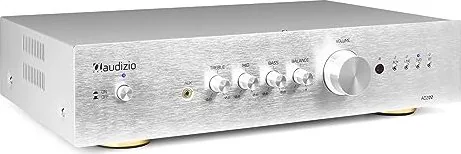
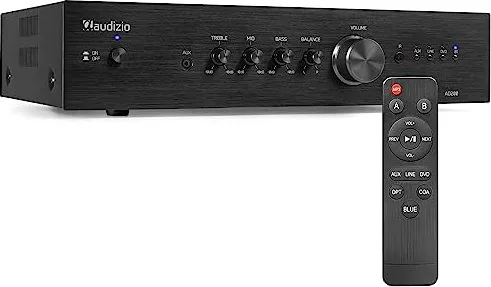
The core of this system lies in its diverse input capabilities. You can connect using Bluetooth 5.0 for seamless wireless streaming. For wired connections, a 3.5mm auxiliary input accommodates standard audio devices. Additionally, RCA inputs allow integration with traditional CD players or DVD machines. There is a dedicated subwoofer output for extra bass power. When you explore the features outlined in the Audizio AD200 Manual, you will find detailed instructions on pairing devices. The remote control simplifies input selection between AUX, LINE, and DVD modes instantly.
Control and Customization
Customizing your sound is intuitive with dedicated rotary controls located on the front panel. Adjust treble, mid-range, and bass frequencies to match your listening preferences. Volume control is also easily accessible alongside balance adjustments. A remote control provides further convenience for changing tracks and adjusting volume from across the room. The device features MP3 module support for direct playback if applicable to the connected source configuration.
Safety and Installation Guidelines
Proper installation is crucial for longevity and safety. The unit operates on standard voltage, but ensure your power supply matches the required specifications. Avoid placing the device near heat sources or in damp environments. If the unit has been exposed to drastic temperature changes, allow it to reach room temperature before powering on to avoid condensation issues. Always use the provided power cord and ensure the connection is stable. Do not use dimmers or adjustable power supplies as this can damage the internal circuitry.
Maintenance and Warranty Considerations
Regular maintenance ensures the system performs well over time. Avoid opening the housing as internal parts carry voltage. Keep the equipment away from electronic devices causing interference, maintaining a distance of at least 60cm from computers or TVs due to potential magnetic fields. Do not use cleaning sprays as residues can damage the finish. Keep the unit out of reach of children. By adhering to these practices, you ensure a reliable audio experience for years to come while protecting your investment. The physical dimensions allow for various placement options.
Additional Notes
Ensure all cables are routed safely to prevent damage from foot traffic. If the product falls, have it inspected by a professional before use. Never connect to a rheostat or dimmer. Dispose of electronic products at recycling centers.
Search for 67,732 Manuals online


Type-in Brand or Model