
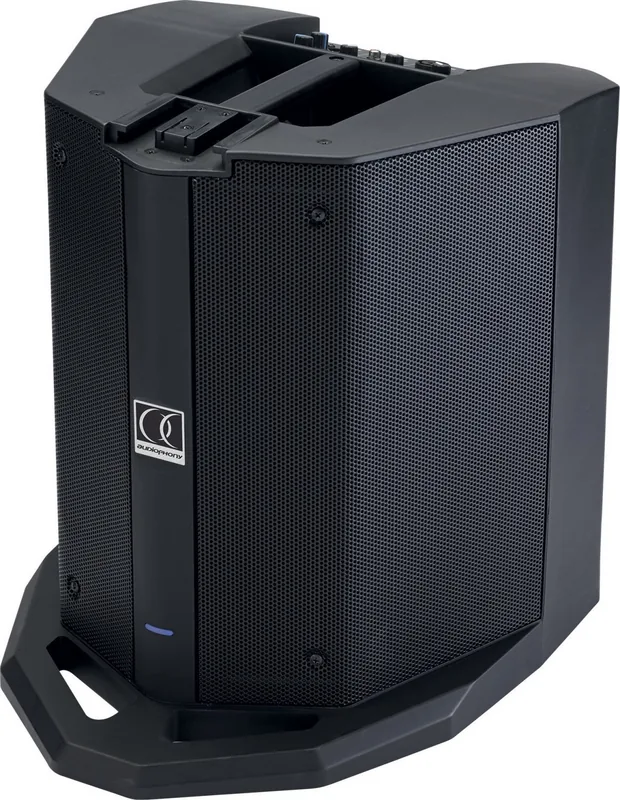


Audiophony Mojo 500 Line Manual
PDF manual · 14 Pages
English



Quick check
Incorrect answer, please try again.
Chat with your Audiophony Mojo 500 Line manual using AI
Get instant AI answers from your Audiophony Mojo 500 Line manual
Ask anything about the Audiophony Mojo 500 Line. Answers come from this manual, with the pages they are based on.
Mojo 500 Line Maintenance Schedule
Unplug the product before cleaning. Use a damp cloth only. Do not wash the product or use unauthorized accessories.
Contact qualified service personnel if the power cord or plug is damaged.
If replacing the fuse, ensure the new one has exactly the same characteristics as the original.
Ask a Question
Do you recommend Mojo 500 Line?
Yes NoFrequently Asked Questions
It provides three channels. CH1 uses a combo XLR/Jack for line level instruments or microphones. CH2 uses a Jack for guitar or microphone. CH3 accepts RCA L/R for line sources plus a 3.5mm stereo Aux input for an additional line device.
Is this answer helpful?
Press Pair so the green LED blinks, then select "MOJO500Line" on your smartphone or computer. When connected, the Pair LED stays green and a sound signal confirms the link. Use the Pair control for play/pause. Only one Bluetooth device can be connected at a time.
Is this answer helpful?
The ON/LIMIT LED indicates output level. Set each channel using its Level control so the indicator does not remain continuously red. If it stays red, the system will distort rather than get louder. Excess input level can also damage the system despite protections.
Is this answer helpful?
Yes. The rear panel includes Low/Sub adjustment and Treble/High adjustment, each with +/-15dB range. Use these equalizers after setting channel Levels, so you can shape the overall tonal balance without forcing the limiter.
Is this answer helpful?
Use the balanced XLR line output. The output level is line, and the signal corresponds to the master mix. This allows you to link an additional system for expanded coverage.
Is this answer helpful?
Use the system indoors only. Maintain ambient temperature from +5 to +35C with relative humidity below 85%, provided ventilation openings are not obstructed. Do not cover cooling vents or operate in closed non-ventilated setups like sealed cases or racks without designed airflow.
Is this answer helpful?
Advantages and Disadvantages
Advantages

- Active subwoofer paired with a purpose-built column for a coordinated sound system
- Flexible inputs: CH1 combo XLR/Jack (line or mic), CH2 Jack (guitar or mic), CH3 RCA L/R, Aux 3.5mm, and Bluetooth
- On-board DSP controls: channel Level plus High and Sub equalization (each +/-15dB)
- Balanced XLR line output for linking to an additional system
- Bluetooth pairing with play/pause via the Pair control
Disadvantages

- Proper gain staging is required; if the ON/LIMIT indicator stays red, sound distorts
- Bluetooth connection supports only one device at a time
- Designed for indoor use with ventilation; obstructed vents can cause overheating
- The column is intended to be used with this specific subwoofer to avoid damage
- Sound pressure levels can be harmful with prolonged exposure
Product Specification
Principle
2-Way
Mid-range drivers
6x 2.75"
Woofers
1x 8"
Frequency range
50Hz-20kHz
Power
250W RMS
Audio connections
Stereo Line In (RCA), AUX In (3.5mm Jack), 2x Mic/Line In (XLR/6.35mm Combo)
Wireless
Bluetooth
Power supply
Mains operation
Special features
Audio effects
Consists of
1x Compact speaker, 1x Subwoofer
Product Description
Audiophony Mojo 500 Line Manual - Active Subwoofer and Column with Bluetooth
The Audiophony Mojo 500 Line is an amplified sound system designed to deliver clear, powerful coverage for small to medium live setups. Built around an active subwoofer paired with an integrated column speaker, it combines low-end punch with practical, guided connections so you can get sound working quickly and consistently. This Audiophony Mojo 500 Line Manual highlights the recommended setup approach, input routing, and the key controls that help you shape the overall balance.
At its core, the system uses separate amplification paths for bass and for mid/high frequencies. The column delivers 100W RMS (200W max) with a frequency response from 180Hz to 20kHz, while the subwoofer provides 150W RMS (300W max) covering 50Hz to 200Hz. Together, they create a compact all-in-one solution intended for venues where convenience matters and sound needs to stay intelligible at usable volume levels.
For audio sources, the Mojo 500 Line supports multiple channels: a combo XLR/Jack input for CH1 (line or microphone), a Jack for CH2 (guitar/micro), and CH3 with RCA L/R plus a 3.5mm stereo Aux input and Bluetooth. Bluetooth pairing is straightforward: the unit searches for a device, you select "MOJO500Line" on your phone or computer, and you can use the Pair control for play/pause. The system also includes an adjustable equalization approach for highs and lows (each +/-15dB), plus channel level controls.
Pros
- Active subwoofer plus dedicated column for a cohesive, tuned sound
- Multiple inputs for microphones, line sources, and external devices (RCA and Aux)
- Bluetooth input for wireless playback
- High/low +/-15dB equalization and per-channel Level control
- Balanced XLR line output to link another system
Cons
- Meant for indoor, ventilated operation and specific environmental conditions
- Proper gain staging is required to prevent LIMIT/DSP distortion
- Bluetooth supports only one device at a time
- Column use is recommended only with this subwoofer model
Results you can expect (configured correctly)
- Cleaner output by setting each channel so the ON/LIMIT indicator does not stay red
- Better tonal control by adjusting High and Low before final volume
- More even coverage by adding systems rather than pushing one unit too hard
- Reduced risk of damage by matching power and avoiding overheating
Tradeoffs to keep in mind
- Higher volumes increase SPL risk; keep safe distance from speakers
- Ventilation is necessary; do not cover cooling openings or use in unventilated cases
- Audio can distort when the LIMIT threshold is exceeded
Notes at the end
- Use the correct mains voltage and the supplied IEC cord.
- Disconnect power before cleaning; do not open the housing.
- Operate within +5 to +35C and humidity below 85% (ventilation openings unblocked).
Search for 67,706 Manuals online


Type-in Brand or Model