

Astell&Kern AK UW100MKII Manual
PDF manual · 29 Pages
English



Quick check
Incorrect answer, please try again.
Chat with your Astell&Kern AK UW100MKII manual using AI
Get instant AI answers from your Astell&Kern AK UW100MKII manual
Ask anything about the Astell&Kern AK UW100MKII. Answers come from this manual, with the pages they are based on.
Ask a Question
Do you recommend AK UW100MKII?
Yes NoFrequently Asked Questions
Remove earbuds from case to wake them. Enable Bluetooth on your device. Select AK UW100MKII from the list of available devices to pair. They will connect automatically next time if removed from case within range.
Is this answer helpful?
Yes. Place the charging case on a wireless charging pad ensuring the center aligns correctly. LED indicators will blink to show charging status. Blue and green lights indicate progress.
Is this answer helpful?
Check that the contacts are clean using a dry cloth. Ensure the lid is closed. Verify the charger meets specifications DC 5V 1A. Remove debris from the charging case connector.
Is this answer helpful?
It uses Bluetooth 5.2 which is generally stable within ten meters. Obstacles like walls can reduce range. Keep the device close to the earbuds for best quality and least interference.
Is this answer helpful?
Touch both earbuds for six seconds while they are inside the case. This returns them to factory settings so they can pair with new devices if connection issues occur frequently.
Is this answer helpful?
Yes, using the AK Control App you can update firmware Over-The-Air. Ensure you have an internet connection and the app is installed to receive latest features and fixes.
Is this answer helpful?
Advantages and Disadvantages
Advantages

- Supports wireless charging for flexible power options in daily use.
- Features Bluetooth 5.2 for stable connections over distance.
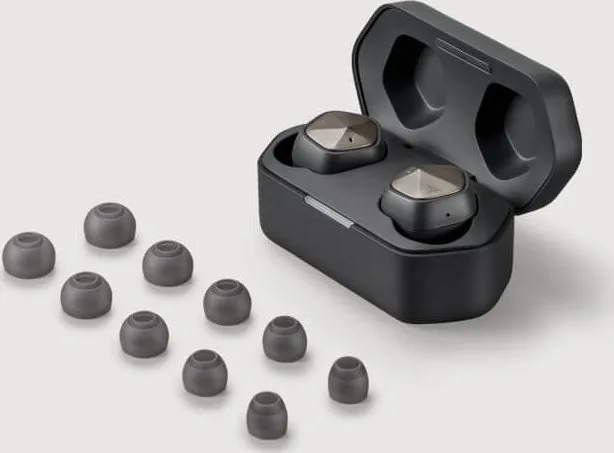
- Includes five sizes of ear tips for better fit and comfort.
- AK Control App enables deep customization of touch functions.
Disadvantages

- Not waterproof so water exposure voids warranty and damages device.
- Magnet inside can interfere with medical devices like pacemakers.
- Battery capacity may decrease over time due to age.
- Touch controls may malfunction if pressed too quickly.
Product Specification
Type
Earphones (In-Ear)
Form Factor
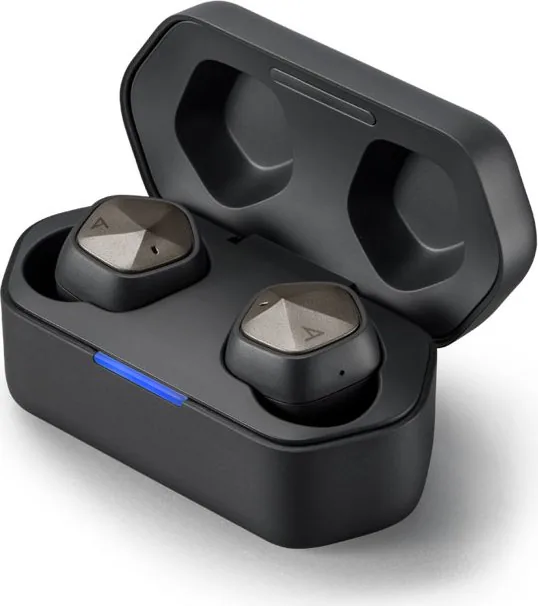
True Wireless, without ear hooks
Design
Closed
Microphone
Built-in
Wireless
Bluetooth 5.2, AAC, aptX, aptX Adaptive, Google Fast Pair, Multipoint
Controls
Touch Control, Auto-Pause/Play
Battery Life
9.5h, 29h (with charging case)
Battery
USB-C Charging Port, Wireless Charging (Qi), Fast Charging (10 min for 1 hr Battery Life)
Sensitivity
94 dB
Drivers
Balanced Armature
Device Features
Ambient Mode
Software Features
Voice Assistant, Equalizer Presets, Custom Equalizer, App Control
Color
gray, black
Weight
0.25 oz (per Earphone), 2.29 oz (Charging Case)
Product Description
Experience High Fidelity Sound with the Astell&Kern AK UW100MKII
The audio landscape is constantly evolving, seeking new ways to deliver premium sound quality in compact formats. The Astell&Kern AK UW100MKII earbuds stand out as a testament to this pursuit, combining advanced technology with ergonomic design. If you are looking for detailed guidance on setup and features, the Astell&Kern AK UW100MKII Manual provides the essential roadmap for maximizing your experience. This device brings studio-grade audio drivers to your hands via a TWS design that prioritizes both comfort and connectivity.
Setup and Features
Setting up the earbuds begins with selecting the right ear tips from the included set of five sizes. Proper fit is crucial for sound isolation and comfort during extended listening sessions. The charging case features a USB Type-C port and supports wireless charging, offering flexibility for users on the go. Visual indicators through LED lights help monitor battery levels for both the earbuds and the case, ensuring you are never caught off guard.
Connectivity relies on Bluetooth 5.2, which offers stable connections within a ten-meter range. Users can manage playback, calls, and ambient modes using the touch controls located on the exterior of the earbuds. The AK Control App allows for deeper customization, including firmware updates, equalizer settings, and touch function assignments. This integration transforms the hardware into a software-driven experience where your sound profile is adjustable to personal taste.
Safety and Usage
Safety and maintenance are also highlighted within the documentation. Avoid water exposure and extreme temperatures to prevent damage. The product contains magnets that can affect medical devices like pacemakers, so users should remain aware of their surroundings. Troubleshooting guides address common issues like connectivity drops or charging failures quickly. Overall, this device represents a strong contender in the wireless audio market for audiophiles seeking convenience without sacrificing quality. Keep in mind that the firmware updates are conducted Over-The-Air via the application for enhanced performance.
Notes
Remember that using non-compliant cables may damage the device. Regular cleaning prevents dirt buildup on charging contacts. Keep the firmware updated for bug fixes. Ensure headphones are charged before first use for optimal battery health.
Conclusion
In conclusion, the Astell&Kern AK UW100MKII delivers a robust package for daily use. The combination of aptX adaptive codecs and dedicated DACs ensures high-resolution audio playback. Whether you prioritize music streaming or phone calls, the touch sensor responses offer intuitive control. With the support of the comprehensive Astell&Kern AK UW100MKII Manual, owners can navigate all settings with confidence and avoid common pitfalls regarding battery health and wireless interference during usage sessions.
Search for 67,732 Manuals online


Type-in Brand or Model