
Arturia MiniLab MkII Manual
PDF manual · 42 Pages
English



Quick check
Incorrect answer, please try again.
Chat with your Arturia MiniLab MkII manual using AI
Get instant AI answers from your Arturia MiniLab MkII manual
Ask anything about the Arturia MiniLab MkII. Answers come from this manual, with the pages they are based on.
Ask a Question
Do you recommend MiniLab MkII?
Yes NoVideo Manual
Tutorials | MiniLab MKII - Introduction
Frequently Asked Questions
The controller includes Analog Lab Lite, which offers a wide range of sounds from the V Collection. It also provides licenses for Ableton Live Lite and UVI Grand Piano Model D.
Is this answer helpful?
No, the MiniLab MkII is class-compliant. It works plug-and-play with Windows and Mac computers without requiring additional driver installation.
Is this answer helpful?
Yes, the eight pads are velocity and pressure sensitive. You can assign them to trigger notes, program changes, or MIDI CC messages using the MIDI Control Center.
Is this answer helpful?
There are eight internal storage slots for Device Memories. Memory 1 is reserved for Analog Lab Lite and cannot be changed, leaving seven for custom setups.
Is this answer helpful?
Yes, the back panel features a standard jack for connecting an optional footswitch, which can be configured as a sustain pedal or toggle switch.
Is this answer helpful?
The touch strips allow for continuous control of pitch bend and modulation by sliding your finger, replacing traditional wheels for a more expressive experience.
Is this answer helpful?
Absolutely. You can export your templates and global settings as files via the MIDI Control Center to share or restore on other machines.
Is this answer helpful?
Advantages and Disadvantages
Advantages

- Includes powerful Analog Lab Lite software with hundreds of presets
- Compact and portable design with USB bus power
- 16 fully programmable encoders for deep parameter control
- Velocity and pressure-sensitive pads with aftertouch
- Dedicated touch strips for intuitive pitch and modulation
Disadvantages

- Limited 25-key keyboard range may restrict some players
- Device Memory 1 cannot be overwritten by user
- Requires internet connection for initial software activation
- Touch strips lack physical feedback compared to wheels
- No built-in speakers or audio outputs
Product Specification
Type
MIDI Keyboard
Keys
25
Pads
8
Knobs
16
Faders
No
Other Controllers
Modulation (Touch), Pitch-Bend (Touch)
Connectors
USB-B (USB to Host), Sustain Pedal
Dimensions
14.0x2.0x8.7 in (WxHxD)
Weight
3.31 lbs
Product Description
Unlock Your Creative Potential with the Arturia MiniLab MkII
The Arturia MiniLab MkII stands as a beacon of compact efficiency in the world of music production. Designed for producers who value portability without sacrificing control, this USB-MIDI controller seamlessly bridges the gap between hardware and software. Whether you are working in a cramped home studio or performing on stage, the MiniLab MkII offers a robust set of tools to bring your musical ideas to life.
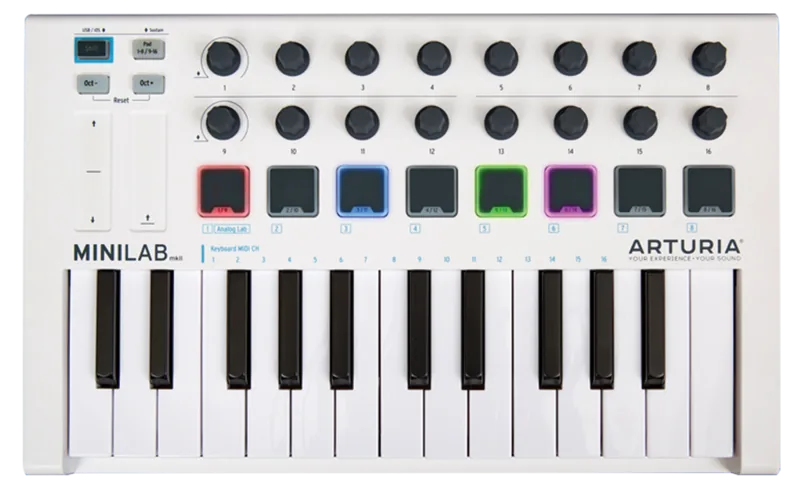
At its core lies a 25-key Slim-Key keyboard that delivers expressive playability while maintaining a small footprint. The controller is powered entirely via USB, eliminating the need for external power supplies. What truly sets this device apart is its deep integration with Arturia's Analog Lab Lite software. This included application provides instant access to a vast library of sounds derived from the acclaimed V Collection, allowing users to explore rich synthesizer tones and classic keyboards immediately upon setup.
Control is intuitive and versatile thanks to sixteen programmable encoders, eight velocity-sensitive pads with aftertouch, and innovative touch strips for pitch and modulation. These touch strips replace traditional wheels, offering a modern, fluid interface for real-time sound shaping. The device also features a dedicated footswitch input, making it perfect for live performances where hands-free sustain control is essential.
Customization is effortless through the MIDI Control Center software. Users can create up to eight distinct Device Memories, each storing unique mappings for different DAWs or specific plugins. You can drag and drop templates, export settings for backup, and fine-tune parameters like key velocity curves and knob acceleration to match your personal playing style. The MiniLab MkII is not just a controller; it is a comprehensive solution for the modern musician seeking flexibility and high-quality sound design capabilities in a portable package.
Search for 67,706 Manuals online


Type-in Brand or Model